What Is Scheduling Software and Why It Matters — Routelink
What Is Scheduling Software. Learn what scheduling software is, how it works, and why delivery teams rely on it. Covers features, types, and how

1 October 2026 · Routelink Team
What Is Scheduling Software and Why It Matters
What Is Scheduling Software. Learn what scheduling software is, how it works, and why delivery teams rely on it. Covers features, types, and how
Scheduling software is digital tooling that plans, assigns, and adjusts tasks, appointments, or deliveries by coordinating people, time, vehicles, and other resources. For a local delivery business, it turns incoming orders into workable routes, driver assignments, customer time windows, and live updates instead of leaving the dispatcher to juggle spreadsheets, calls, and a whiteboard.
A florist with three drivers might start each morning with names written beside delivery areas, special instructions buried in emails, and a phone that never stops ringing. One late wedding delivery can force the dispatcher to redraw the day, call two drivers, update customers, and hope no vehicle is overloaded. That isn’t a calendar problem. It’s an operations problem.
Scheduling software provides a shared digital layer for planning and execution. It can connect order intake, availability, vehicle capacity, route planning, dispatch, tracking, proof of delivery, and customer communication. The difference matters because scheduling has become a substantial software category. One 2026 scheduling apps market report values the global market at USD 663.1 million in 2025 and projects USD 1,813.1 million by 2033, while its web-based segment held 65.9% of market share in 2025. Those figures point to a shift from isolated calendars toward browser-based operational infrastructure.
Table of Contents
- A Practical Definition of Scheduling Software
- How the Scheduling Engine Actually Works
- Main Types of Scheduling Software Explained
- How Delivery-Heavy Businesses Use It Day to Day
- Scheduling Software vs Route Planning and Dispatch Tools
- Integrations, Security, and ROI Considerations
- Buyer Checklist for Operations Managers
- Common Questions and Where Scheduling Is Heading
A Practical Definition of Scheduling Software
Return to the florist’s morning. The dispatcher has three drivers, a whiteboard of customer names, delivery promises scattered across order notes, and no reliable way to see whether a van has enough room for the next batch. A customer calls to change an address, one driver reports a sick child, and the dispatcher starts crossing out names before the first vehicle leaves.
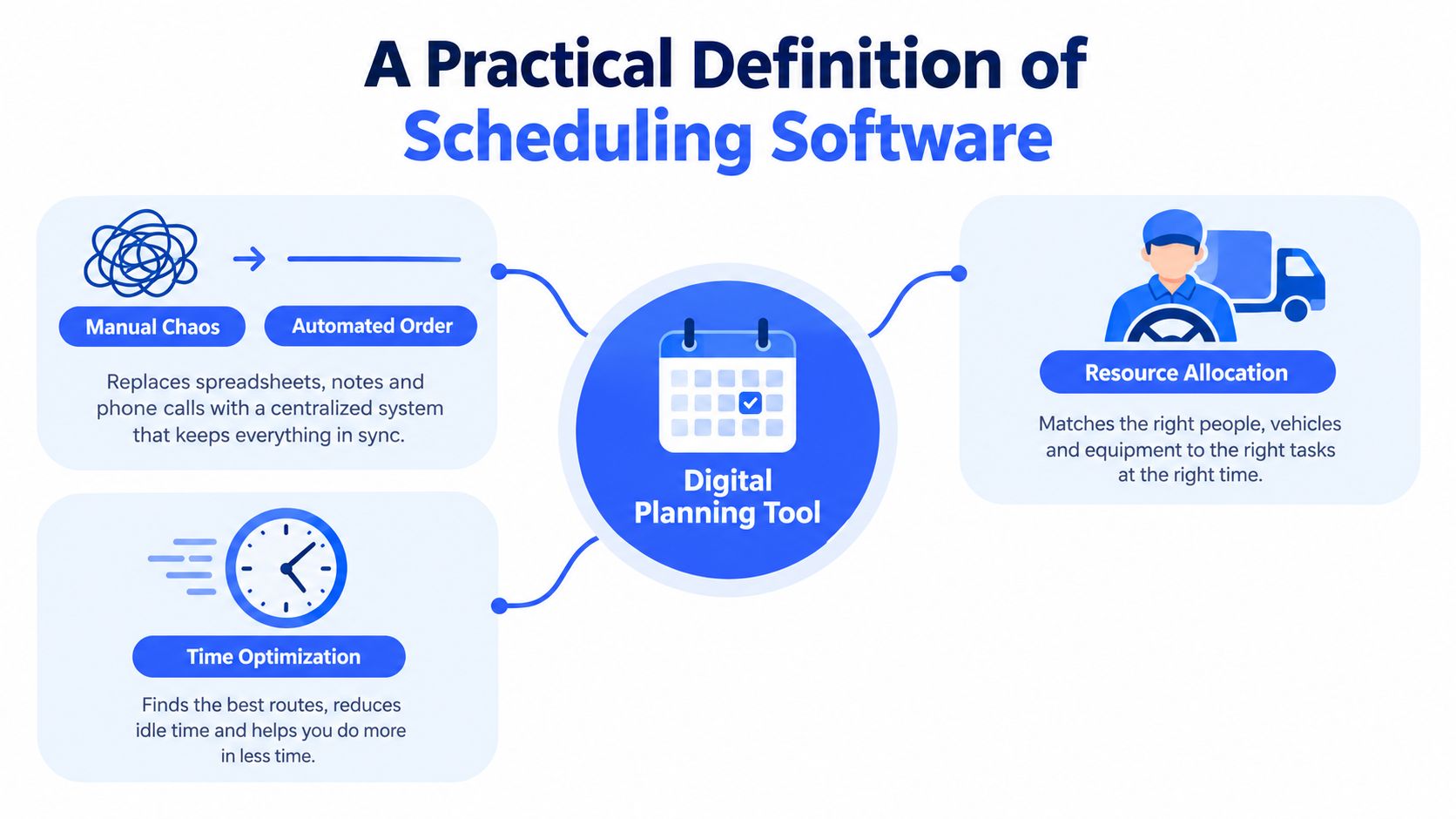
Scheduling software replaces that fragile chain with a shared planning system. It takes work that needs to happen, checks who and what can perform it, assigns a time and resource, and adjusts the plan when conditions change. For deliveries, the resources include drivers, vehicles, depot capacity, route space, service time, and customer availability.
A calendar is not an operating system
A shared calendar answers, “What is booked at this time?” A scheduling system also asks:
- Can the assigned vehicle carry the load?
- Is the driver qualified and available?
- Can the route reach the customer within the promised window?
- How long will unloading take?
- What changes if a stop is cancelled or delayed?
That distinction is central to understanding what is scheduling software. A simple booking tool may reserve a consultation. A delivery scheduling platform must coordinate dependencies and constraints across many jobs at once.
The market context reinforces this broader definition. A calendar and scheduling software market overview describes growing expectations for connections with video tools, CRM, project management, payments, and workforce systems, alongside priorities such as interoperability, privacy, accessibility, and automation. Scheduling works best when it connects the systems that create work with the people who execute it.
The rest of the decision becomes practical: how the scheduling engine evaluates jobs, which category fits your operation, how a delivery day runs, why route planning alone may fall short, and which questions to ask before buying.
How the Scheduling Engine Actually Works
A scheduling engine starts with structured inputs, not a blank calendar. For a delivery company, those inputs may include orders, customer addresses, promised time windows, estimated service times, vehicle capacity, driver shifts, depot locations, delivery type, and product volume. The logistics scheduling explanation from Locus describes this as a constrained optimization problem involving jobs, vehicles, drivers, time windows, capacity, skills, and service-time requirements.
From order data to an executable plan
The engine generally works through a sequence of decisions:
- Validate the work. It checks whether each address can be mapped and whether the order contains the information needed for planning.
- Group compatible jobs. Nearby stops may be grouped by territory, depot, delivery type, or vehicle suitability.
- Assign resources. The system considers driver availability, vehicle capacity, shift limits, and required skills.
- Respect customer promises. It places stops inside feasible delivery windows rather than treating every order as interchangeable.
- Sequence the route. It orders stops to create a practical run, limiting unnecessary travel and idle time.
- Test the result. It checks for overloads, missed windows, excessive route duration, or unassigned jobs.
A strong system doesn’t treat the morning plan as permanent. If traffic delays a stop, a driver calls in sick, or an urgent order arrives, the engine can recalculate the remaining work. The dispatcher then reviews the proposed change instead of rebuilding the entire schedule manually.
Practical rule: A schedule is useful only when it remains feasible after the first real-world disruption.
The difference between a good engine and a decorative calendar is its handling of constraints. A van may have room by item count but not by weight or volume. A driver may be available but lack the skill or authorization needed for a particular delivery. A customer may accept delivery only during a narrow window, while another stop has flexible timing.
For teams experimenting with more advanced automation, a personal workflow orchestration agent can help coordinate recurring workflow decisions, but it should complement, not replace, operational rules and human review.
Main Types of Scheduling Software Explained
The label “scheduling software” covers several different products. Choosing the wrong category creates predictable frustration. An appointment tool may handle bookings beautifully while offering no concept of van capacity, route geometry, or driver dispatch.
| Type | Core Purpose | Typical Users | Best Fit Scenario |
|---|---|---|---|
| Appointment scheduling software | Reserve customer appointments and service times | Clinics, consultants, salons, repair services | A clinic booking patient visits against practitioner availability |
| Workforce scheduling software | Plan employee shifts, coverage, leave, and labor rules | Warehouses, care teams, hospitality businesses | A warehouse assigning picker shifts while managing availability and compliance |
| Delivery scheduling software | Assign orders to vehicles and drivers within route and time constraints | Retailers, distributors, caterers, local fleets | A catering company building morning delivery runs around venue windows |
Appointment scheduling
Appointment software is built around a customer selecting or receiving a time. It usually manages availability, booking pages, reminders, rescheduling, and sometimes payments. A clinic, for example, needs to match patients with practitioners and rooms, not necessarily sequence dozens of stops across a city.
A workforce scheduling market report cites a survey in which 42% of businesses use appointment scheduling software to streamline booking processes. The same source reports that 67% of patients prefer online booking, compared with 22% who prefer phone scheduling, illustrating why self-service booking has become important in service operations.
Workforce scheduling
Workforce software answers a different question: who should work, when, and under which labor rules? It supports shifts, availability, leave, shift swaps, coverage, and sometimes compliance controls. A warehouse manager may use it to place trained staff on picking and loading shifts, but still need a separate delivery system to build routes.
Delivery scheduling
Delivery scheduling combines job assignment with physical execution. It must consider addresses, vehicles, drivers, capacity, service time, route order, customer windows, dispatch status, and delivery evidence. That makes it the natural fit for businesses whose work ends at a customer location.
If your fleet operates under regulated driving or safety requirements, you may also need a separate compliance layer. Resources that help teams find DOT compliance software can be useful during evaluation, especially when scheduling decisions interact with driver records and operating rules.
How Delivery-Heavy Businesses Use It Day to Day
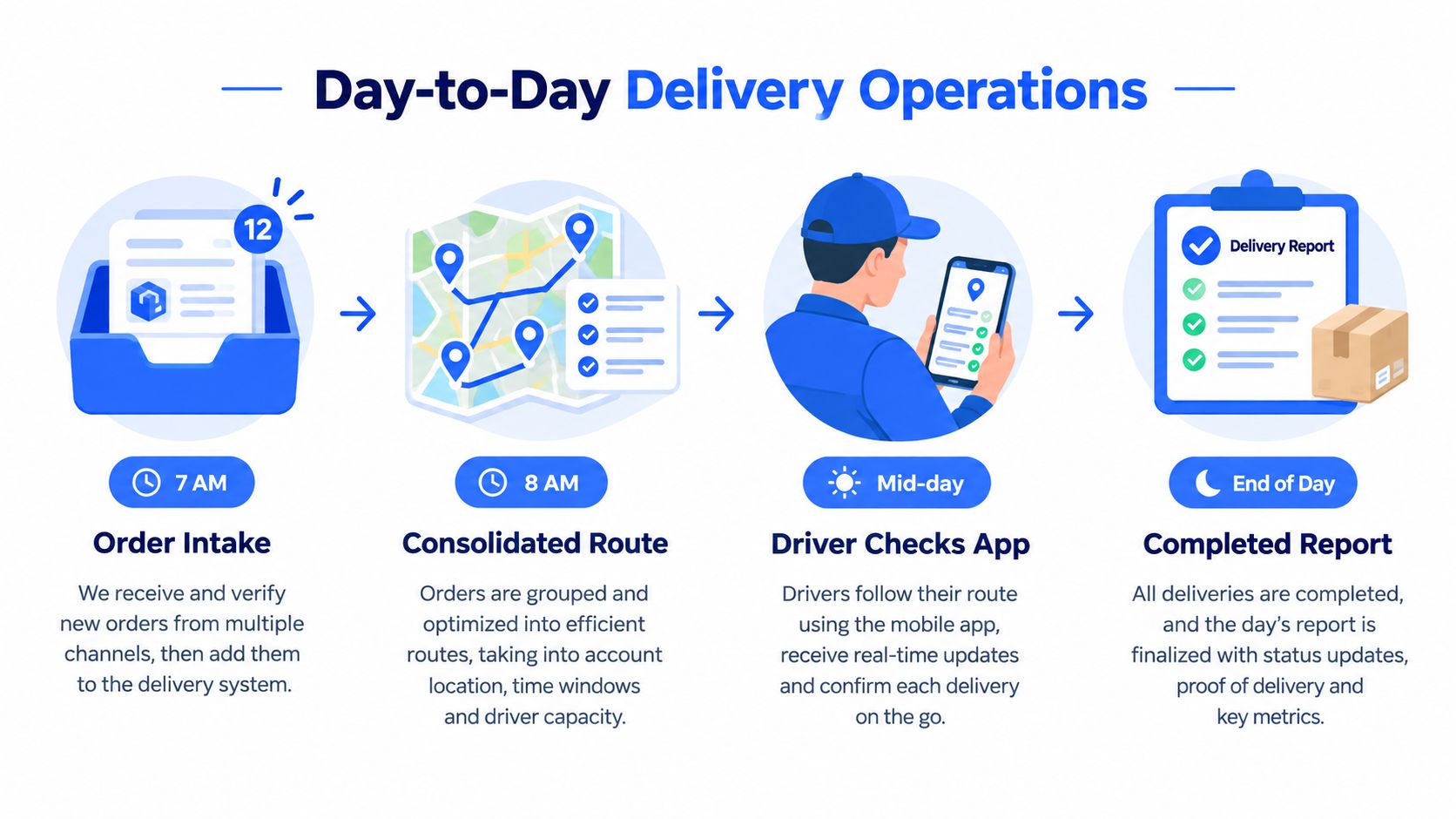
A local building-supply distributor begins the day with orders arriving from its online store, sales team, and recurring customer accounts. Instead of copying each order into a spreadsheet, the office team brings the work into one intake queue, checks exceptions, and lets the platform prepare a planning view.
The morning plan
At 7 AM, the dispatcher reviews new orders, addresses, product details, and customer windows. The system flags incomplete or unmappable addresses and groups compatible stops near one another. Rather than drawing routes from memory, the dispatcher sees which jobs are ready, which need attention, and which vehicles can carry them.
Around 8 AM, the dispatcher confirms the proposed routes. The platform assigns stops to vehicles and drivers, displays capacity warnings, and produces a driver-ready manifest. If the dispatcher needs to move a large order to a different truck, they can edit the plan directly instead of rewriting every route.
A driver receives the assigned work through a mobile browser or app, depending on the platform. The route includes stop instructions, navigation, delivery notes, and the actions required to record completion.
A practical delivery management system workflow should connect these office decisions to what drivers see in the field. Otherwise, the dispatcher may have a polished plan while drivers still rely on outdated paper instructions.
Live exceptions
At mid-morning, a customer may be closed, a road may be blocked, or a driver may need to swap vehicles. The dispatcher records the exception, contacts the customer if needed, and reassigns the affected work. A connected system can update the route, driver instructions, and customer-facing status from the same operational record.
Scheduling software earns its place here. The value isn’t only the first route. It’s the ability to preserve coordination after orders, people, and conditions change.
Here is a short visual explanation of how delivery workflows connect planning and field execution:
Closing the day
At the end of the run, the office reviews completed stops, failed attempts, customer signatures, photos, notes, and unresolved exceptions. That information supports invoicing, customer service, driver review, and future planning. The dispatcher no longer has to reconstruct the day from messages and handwritten marks.
The delivery operations cost reduction framework is most useful when it starts with this operational record. Before changing software, measure where time and effort disappear: manual planning, customer calls, failed deliveries, vehicle utilization, and reconciliation work.
Scheduling Software vs Route Planning and Dispatch Tools
A route planner is usually a specialist. It takes a set of stops and determines a sensible order on a map. A dispatch board tracks drivers, route status, and exceptions. Scheduling software is the broader layer that decides which work belongs on which resource before route execution begins.
Consider a florist preparing 60 deliveries across 4 vans on Valentine’s morning. A standalone route planner may produce an efficient stop sequence, but someone still has to decide which van has enough cooler space, which driver can cover the route, and which wedding venue requires a strict arrival window. If that preparation happens on a whiteboard, the route tool is optimizing only the final slice of the problem.
| Capability | Scheduling Software | Route Planner | Dispatch Board |
|---|---|---|---|
| Order intake | Connects or imports incoming work | Usually receives prepared stops | Usually receives prepared routes |
| Vehicle assignment | Considers capacity and suitability | May support basic vehicle rules | Shows assigned vehicles |
| Driver matching | Uses availability, shifts, or skills | Often limited | Tracks the chosen driver |
| Time windows | Builds them into feasibility | Sequences around them | Monitors them after planning |
| Route sequence | Optimizes within the full plan | Core function | Usually displays routes |
| Live changes | Recalculates assignments and routes | May reoptimize stops | Records or communicates changes |
| Customer communication | Can trigger notifications and ETAs | Often limited | May show status, depending on tool |
Why the wider layer matters
The delivery scheduling comparison from Software Advice highlights the practical value of combining route optimization, driver dispatch, real-time tracking, proof of delivery, and customer notifications. These capabilities belong to one workflow because the dispatcher needs to know not only where a driver should go, but whether the plan is being completed and what the customer has been told.
A route planner can be excellent at geometry and still leave operational gaps. It may not know that a truck is already full, that a driver lacks the required skill, or that a customer changed the delivery window after the route was built. A dispatch board can show a driver as “delayed” without knowing which remaining jobs can feasibly move to another vehicle.
The best planning system doesn’t stop at the map. It explains who does the work, with which resource, within which promise, and what happens when the plan changes.
That integrated approach is the difference between optimizing a route and managing delivery operations. Teams that want to understand the dispatch layer in more detail can review this guide to dispatch scheduling software.
Integrations, Security, and ROI Considerations
A scheduling platform creates value when information moves reliably between the systems your delivery operation already uses. Map the tools that create orders, store customer data, track vehicles, record payments, and communicate with recipients before assessing a platform.
Integration depth matters
Useful connections often include:
- Order intake: Ecommerce, order management, ERP, or CRM systems.
- Finance: Accounting, invoicing, and payment tools.
- Fleet data: GPS, telematics, vehicle records, and driver status.
- Customer messaging: SMS, email, WhatsApp, branded tracking pages, or support tools.
- Warehouse operations: Inventory, picking, loading, and depot systems.
A logo list proves little. A one-way CSV export may transfer orders once, while an API or webhook can pass changes as they happen. Ask whether each connection handles address changes, cancellations, status updates, capacity fields, proof of delivery, and failed transfers. For example, a customer changing a delivery window should update the schedule, notify the right people, and leave an error record if the change cannot pass through.
Security deserves operational attention
The platform may hold customer addresses, delivery instructions, driver information, and commercial data. Verify encryption in transit and at rest, role-based access, audit logs, data retention, and clear ownership terms. Drivers should see their assigned work without automatically accessing every customer or route in the business.
Request the vendor’s current information about security controls and certifications, including any relevant SOC 2 or ISO 27001 status. A certification label does not explain permissions, backups, incident response, or data export. Ask how access is removed when someone leaves, how backups are restored, and how your team retrieves its records if the contract ends.
Build a measurable business case
Use a before-and-after comparison rather than a general promise. Baseline the four weeks before rollout, then compare the same four-week window after go-live. Count dispatcher hours per 100 stops, failed-attempt rate, and status calls per route, using the same definitions and similar operating conditions.
The operational cost reduction guide can help structure that review. A drop in status calls alone may cover a meaningful share of the platform’s cost because each avoided call returns dispatcher time. Also examine vehicle capacity use, manual planning work, and reconciliation effort after implementation.
Buyer Checklist for Operations Managers
Vendor demonstrations often make every platform look capable. A better approach is to score each product against the work your team performs under pressure, then test the shortlist with real orders and real constraints.
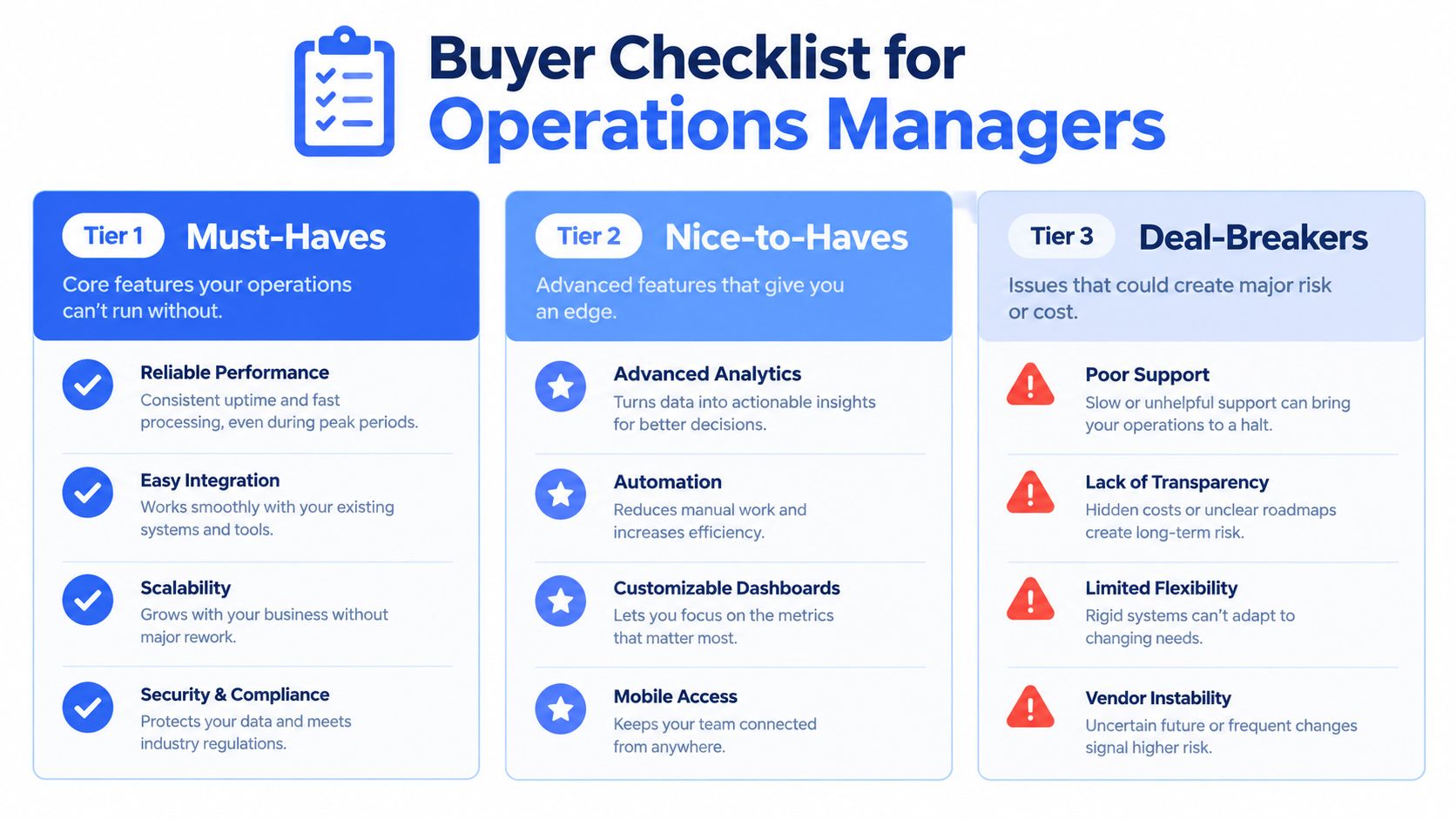
Must-haves
Weight these features heavily because they affect daily execution:
- Real-time driver visibility: See route progress, stop status, and exceptions without relying on phone calls.
- Time-window handling: Confirm that the engine can protect customer promises during assignment and reoptimization.
- Mobile driver experience: Give drivers navigation, instructions, status updates, and proof-of-delivery actions in a usable interface.
- Order integrations: Connect the platform to the systems that create delivery work, not just a spreadsheet after the fact.
- Customer notifications: Send useful status, ETA, delay, and completion messages without making the dispatcher repeat the same update manually.
Nice-to-haves
These features can improve control once the core workflow works:
- Driver ratings: Capture feedback for coaching and service review.
- Proof of delivery: Store signatures, photos, reasons, and notes beside the completed stop.
- Multi-stop optimization: Handle dense route days and changing stop priorities.
- Performance dashboards: Help managers compare planned work with actual execution.
Deal-breakers
Treat these as serious warnings, not minor inconveniences:
- No API access: You may be trapped in manual exports as the business grows.
- Vague pricing: Unclear limits for users, stops, depots, messages, or integrations make budgeting difficult.
- Long implementation contracts: A lengthy commitment is risky before the system proves itself on your routes.
- Weak dispatch support: A technically capable tool still fails if nobody helps the team handle exceptions and adoption.
Ask each vendor to load a representative route, including a difficult address, a narrow customer window, a large order, a driver absence, and a mid-route change. A short trial on real operational data will reveal more than a polished demonstration.
Common Questions and Where Scheduling Is Heading
How is it different from a shared calendar?
A shared calendar records appointments and availability. Scheduling software also evaluates capacity, dependencies, route feasibility, driver assignment, execution status, and changes during the day.
Does a small fleet need it?
A small fleet may benefit when one person spends substantial time coordinating orders, drivers, and customer updates. The decision depends less on fleet size than on operational complexity, delivery promises, geographic spread, and the cost of rebuilding plans manually.
How long does implementation take?
The answer depends on data quality, integrations, workflow changes, and staff readiness. A basic setup can be relatively quick, while a multi-depot operation with custom data flows requires more preparation and testing. Ask for a rollout plan that includes address validation, driver training, exception handling, and a trial with live-style work.
What does it cost?
Pricing varies by product, users, vehicles, stops, depots, messages, and included integrations. Ask for the total operating cost, including implementation, support, data migration, hardware assumptions, and any charges that apply when the operation expands.
The direction is clear even without treating every AI claim as a guarantee. Buyers increasingly want mobile-first tools, real-time adjustments, browser access, and automation that reduces repetitive coordination. The workforce management market report describes demand for mobile scheduling, live changes, and AI-enabled automation while also noting implementation friction and a gap between vendor promises and user pain.
Scheduling is moving from a back-office calendar to a customer-facing operational layer. The platform you choose can influence whether customers receive accurate updates, whether drivers receive workable instructions, and whether dispatchers spend the day planning or repairing plans.
Routelink helps local delivery teams bring order intake, route optimization, driver dispatch, live tracking, customer notifications, and post-run reporting into one browser-based workflow. Review your current spreadsheet process against those capabilities, then visit Routelink to see whether it fits your delivery operation.