Delivery Management System Explained for Growing Fleets
Learn what a delivery management system does, its core features, ROI, and how to choose and implement one for 1PL and SMB fleets.

At 7:30 in the morning, the dispatch desk is already behind. Orders sit in a spreadsheet, one driver is calling about a missing address, another is waiting for a route change, and customers are asking when their deliveries will arrive. Someone is manually rearranging stops while checking vehicle space from memory. By the time the first vans leave, the plan may already contain duplicate entries, unrealistic time windows, or a stop nobody can locate.
This is the point where a growing fleet needs more than a shared calendar and a route planner. Last-mile delivery can represent 41% of total supply-chain costs, while newer benchmarks place it at 53% of total shipping costs, and a failed delivery can average about $17.20 per order, according to industry guidance on last-mile route optimization. Those pressures make small planning errors expensive.
A delivery management system brings the work into one operating flow. It helps a team validate addresses before dispatch, see available vehicle capacity, build workable routes, send instructions to drivers, monitor progress, and review what happened afterward. The important shift isn’t just automation. It’s giving dispatchers reliable information before they make decisions.
Table of Contents
- Introduction Why Delivery Chaos Needs a System
- What a Delivery Management System Really Is
- Core Features That Make Deliveries Work
- Benefits and ROI You Can Measure
- How to Implement and Integrate Without Disruption
- How to Choose the Right System for 1PL and SMB Fleets
- Common Pitfalls and Real World Results
Introduction Why Delivery Chaos Needs a System
A local delivery run can fail long before a driver reaches the first stop. An order might contain an incomplete street name, a customer note that doesn’t match the delivery location, or a delivery window that conflicts with the vehicle’s other commitments. If the dispatcher only discovers the issue after routes are built, the team must repair the plan while drivers are already moving.
That morning scramble affects more than the dispatcher. Drivers receive changing instructions, warehouse staff load vehicles without a clear sequence, and customers get uncertain updates. A missed stop can create a second trip, consume additional labor, and disrupt the rest of the route. The operation may still complete its deliveries, but it spends the day reacting instead of controlling the run.
The cost pressure explains why delivery management has moved beyond basic dispatching. Industry benchmarks on last-mile operations identify on-time delivery rate, first-attempt success rate, route effectiveness, cost per delivery, vehicle-capacity utilization, and ETA accuracy as practical measures of performance. These metrics connect daily decisions to business outcomes. If a route carries too little, travels too far, or repeatedly returns to the same address, the dashboard should make that visible.
The hidden problems behind failed runs
Route sequencing gets attention because it appears on a map. Address quality and capacity visibility are less visible, but they often determine whether the sequence can work at all. A route optimizer can’t create a reliable plan from a stop that hasn’t been mapped correctly, and it can’t prevent overload if the system doesn’t know what each vehicle can carry.
This guide follows the operation from intake to review. You’ll see what a delivery management system does, which capabilities matter, how to introduce one without disrupting live deliveries, and how a small fleet can choose a suitable platform without buying unnecessary complexity.
The central idea is simple: good delivery decisions require trustworthy stop data and a realistic view of available capacity. Routing is where those inputs become a plan, not where the process begins.
What a Delivery Management System Really Is
A dispatcher starts the morning with incomplete addresses, several vehicle sizes, changing delivery windows, and drivers already assigned to different areas. A delivery management system brings those moving parts into one operating picture. It works like an air traffic control tower for local deliveries. The tower does not fly aircraft or load cargo. It coordinates movements, assigns resources, spots conflicts, and shares current information. A delivery system performs the same coordinating role for orders, depots, vehicles, drivers, and customers.
At a basic level, the system gathers delivery requests in one place. It checks whether each stop has usable location details, a workable service window, suitable vehicle capacity, and an available driver. Once those inputs support a plan, it sends route instructions, receives status updates, and stores completion evidence for later review.
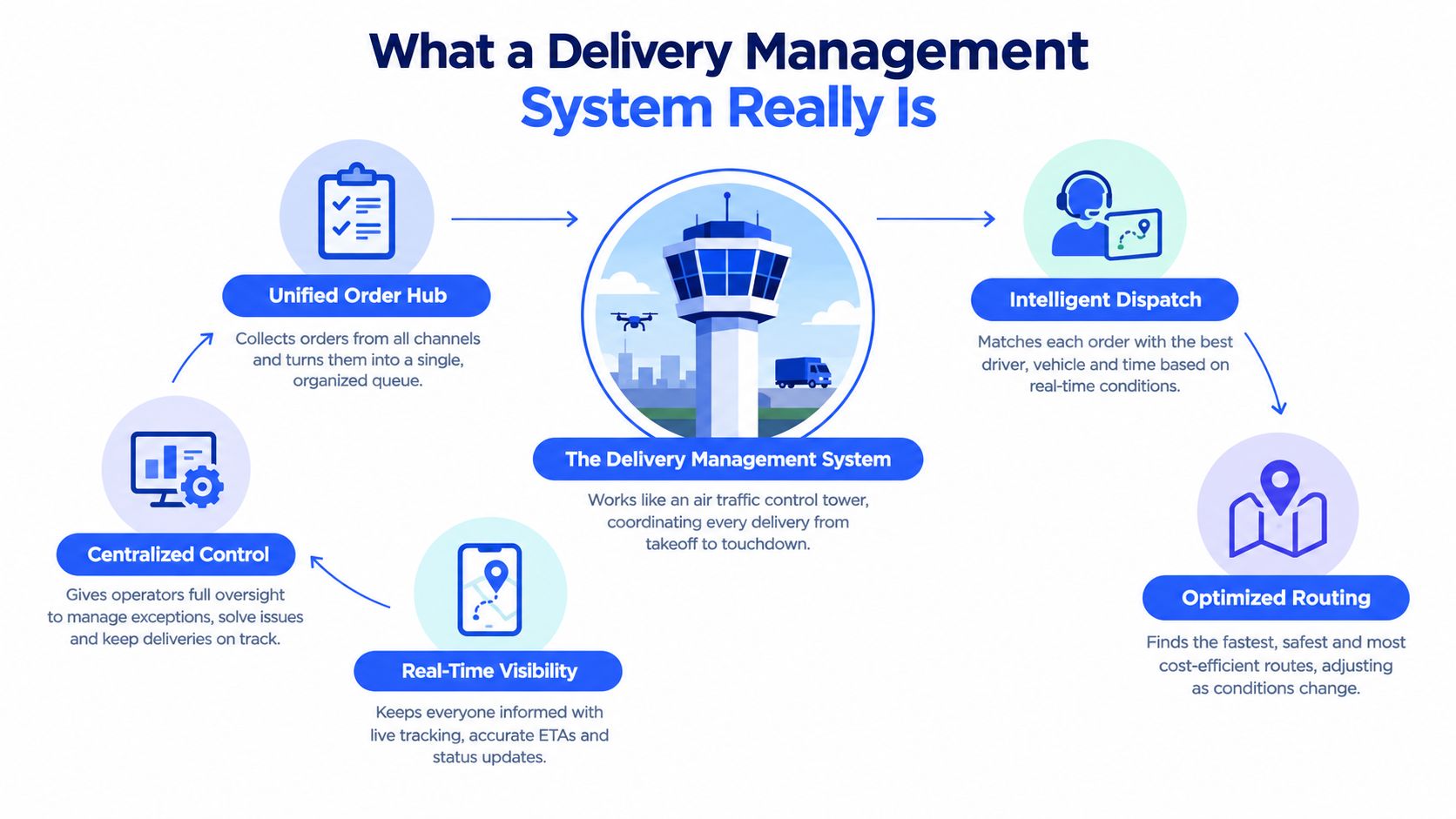
From separate tools to one operating picture
A route planner may arrange stops, a tracking app may show vehicle locations, and an order system may hold customer details. A delivery management system connects those jobs, allowing a dispatcher to move from intake to route creation, dispatch, live progress, and post-run analysis without entering the same information repeatedly.
The benefit becomes clear when a delivery changes. If a customer requests a different time window, the dispatcher needs to see the assigned vehicle, remaining capacity, driver location, and nearby routes that could absorb the stop. Separate tools may contain those details, but someone must assemble the answer manually. That delay can produce an avoidable return trip or an overloaded vehicle.
Modern planning combines algorithms with traffic conditions, vehicle capacity, driver hours, and delivery windows, as described in Logistics guidance on route optimization. The cited urban last-mile study found that planned routes used less than 20% of vehicle cargo capacity, while 60% to 65% of total route time went to driving between orders. Those figures do not describe every fleet. They show why a system must expose both unused capacity and wasted travel, rather than treating route order as the only problem.
What the system isn’t
A delivery management system cannot repair poor warehouse discipline, incorrect order entry, or an inaccurate address. It also cannot make an overloaded van safe. Its recommendations depend on trustworthy stop data and clear operating limits. Address quality determines whether a driver can reach the intended location, while capacity visibility determines whether the planned load can travel safely and efficiently.
For teams coordinating people on the road, resources such as Rally for delivery couriers provide context around courier workflows and the conditions drivers face. A capable system respects those realities by making instructions clear, changes controlled, and status updates easy to submit.
Core Features That Make Deliveries Work
A useful delivery management system follows the order of work. It starts with the stop, checks whether the stop is usable, builds a plan, sends that plan to a driver, records progress, captures completion evidence, and turns the results into decisions.
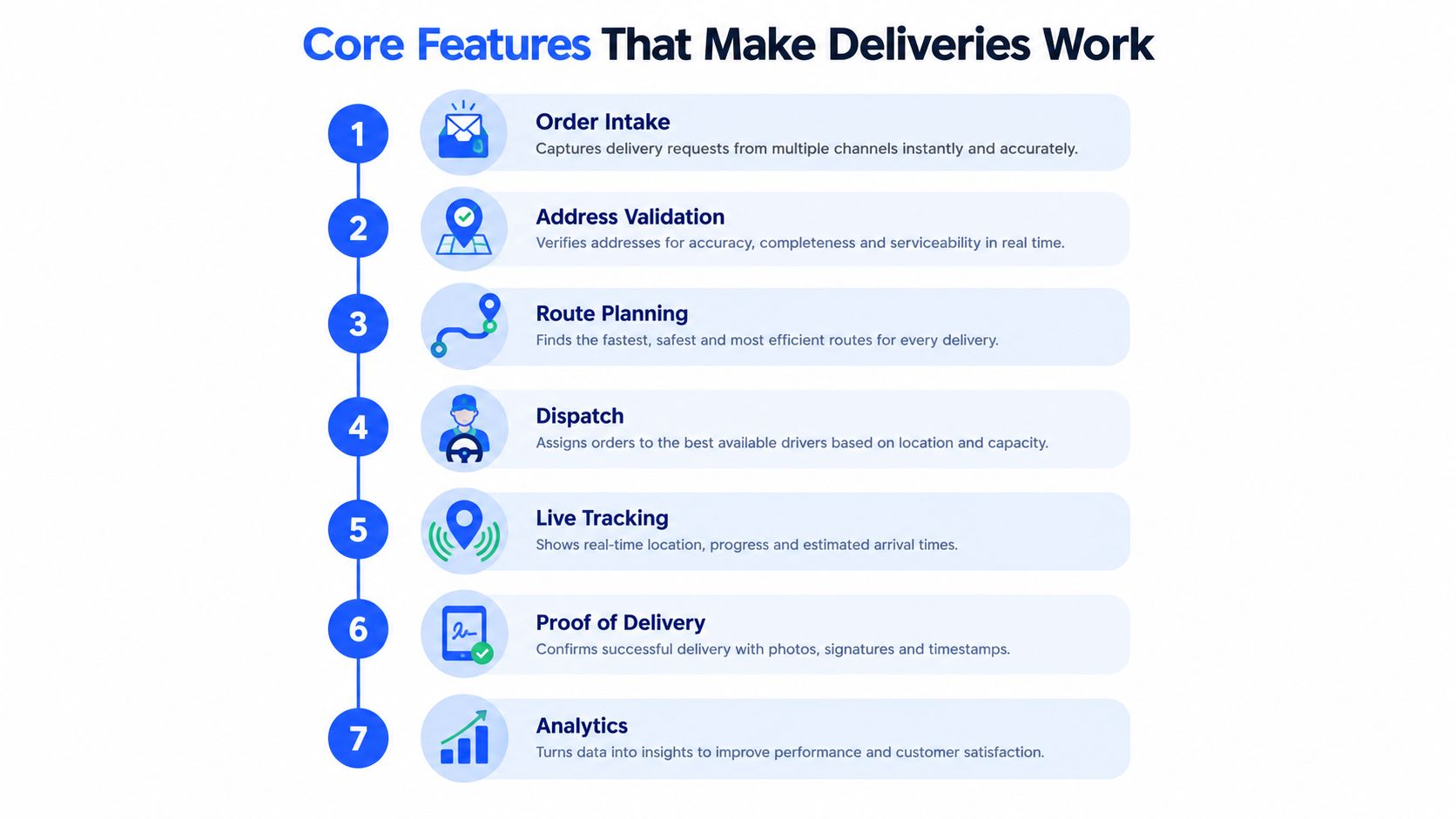
The operational chain
Order intake gathers orders from spreadsheets, ecommerce platforms, inboxes, or connected business systems. A CSV or XLSX import is useful when a team isn’t ready for an API, especially if the system offers a template, preview, and tolerance for extra columns. The purpose is to create one working queue instead of leaving orders scattered across email, paper, and separate files.
Address validation and geocoding come next. Google Maps Platform guidance distinguishes address validation, which improves the quality of user input, from geocoding, which converts a resolved address into coordinates for routing. A strong workflow flags weak matches, allows a dispatcher to correct or pin a location, and keeps uncertain stops out of automatic planning until someone confirms them.
Practical rule: Don’t let an unmapped stop enter an optimized route simply because the order exists.
Route planning uses the cleaned stops alongside delivery windows, vehicle capacity, driver hours, depots, territories, and other constraints. Multi-depot boards help teams plan from separate locations, while zones and route templates support recurring operating patterns. Drag-and-drop editing remains important because dispatchers often know facts that a model can’t fully represent, such as a driver’s familiarity with a difficult site.
Dispatch turns the plan into action. The driver needs a clear stop sequence, customer notes, navigation, and a way to report a blocked road, unavailable customer, or damaged package. Browser-based driver links can reduce installation friction when a fleet uses different smartphones or relies on subcontractors.
Live tracking gives the office a current view of route progress. Geofences can help trigger arrival or departure events, while customer notifications and branded tracking pages reduce the need for manual status calls. For a deeper look at the customer-facing side, see this guide to delivery tracking software.
Closing the loop
Proof of delivery records signatures, photos, notes, and failure reasons. The record should explain what happened at the stop, not merely show that a driver tapped a button.
Analytics then connects the completed run to operational measures. A team can compare planned and actual routes, inspect late stops, identify repeated address failures, and review capacity use. For teams studying location-based controls, optimizing fleet operations with geofencing offers useful context on how geofences fit into fleet workflows.
The strongest systems connect these features without forcing the dispatcher to re-enter information at every handoff. That continuity is what turns individual tools into an operating system for delivery work.
Benefits and ROI You Can Measure
A delivery management system earns its cost when it changes what happens on an actual run. Track cost per delivery, miles traveled, punctuality, first-attempt completion, and vehicle capacity, then connect each measure to a decision a dispatcher or operations manager can make.
Last-mile spending explains why these measures belong in the same review. Industry route-optimization data places last-mile delivery at 41% of total supply-chain costs in commonly cited industry figures, with more recent benchmarks reaching 53% of total shipping costs. The same source reports that a failed delivery can average about $17.20 per order. The figures do not forecast one fleet’s results. They show why preventing an avoidable return trip deserves separate attention from reducing route miles.
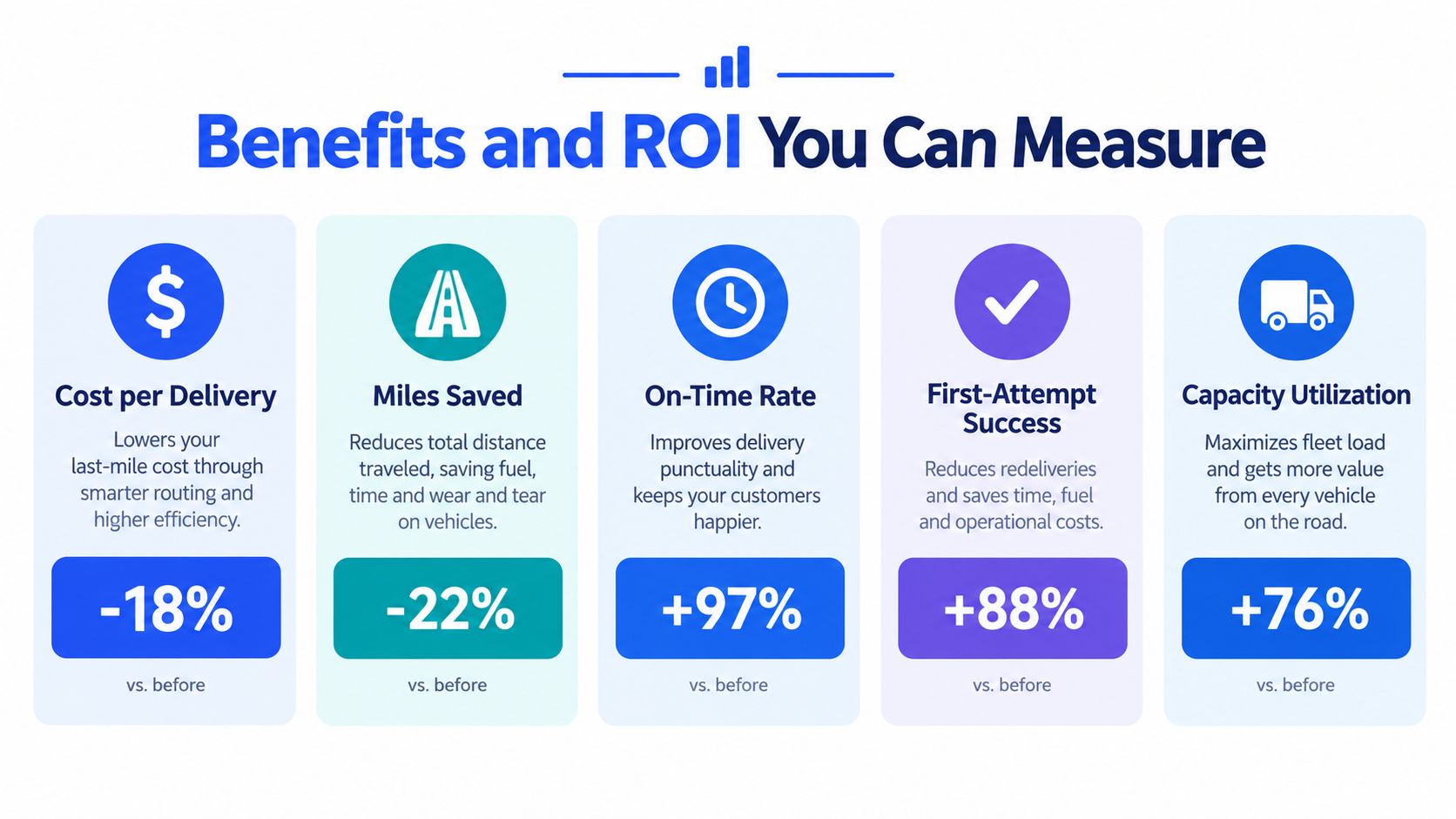
Trace each benefit to a decision
Lower cost per delivery may reflect fewer wasted miles, stronger route consolidation, and less dispatcher time spent rebuilding plans. Miles saved affect fuel use, vehicle wear, and driver hours. On-time performance improves when the plan reflects realistic delivery windows and known exceptions instead of treating every stop alike.
First-attempt success needs its own measure. A route can appear efficient on a map and still fail because an address is inaccurate, an entrance is hard to find, or the customer is unprepared. Grouping results by address type can expose different patterns among apartments, construction sites, rural properties, and commercial premises. Address quality is often the hidden cause of wasted miles, so a system should show whether the failure began with the location data or with execution at the stop.
Capacity visibility adds a second hidden driver. A vehicle leaving with unused space while another route is overloaded points to a planning issue, depot-assignment issue, or incomplete order data. Display item, weight, or volume totals when those limits affect loading. This turns capacity from a late loading surprise into a constraint considered during planning.
Establish a baseline before claiming ROI
Record the current process before implementation, using definitions the team can apply consistently:
- Cost per delivery: Include relevant driver, fuel, and re-delivery costs.
- Route effectiveness: Compare planned distance and time with actual completion data.
- Service reliability: Track on-time delivery and first-attempt completion by route, driver, and address type.
- Capacity use: Compare planned load with available vehicle capacity and review overload warnings.
- Exception volume: Count address corrections, customer calls, failed attempts, and manual route changes.
A government EPA case study on network optimization reported 400,000 fewer annual travel miles, two to three routes eliminated per day, and 96% on-time performance after network optimization. The example connects planning changes with mileage, route count, fuel, and service outcomes. Your baseline remains the valid comparison, rather than a borrowed target.
How to Implement and Integrate Without Disruption
A route can look efficient on screen and still fail at the first stop if the address is incomplete or the vehicle cannot carry the assigned load. Implementation should therefore begin with input quality and capacity visibility, then add automation in controlled stages. Treat the rollout like a supervised delivery run: verify each handoff before expanding the route.
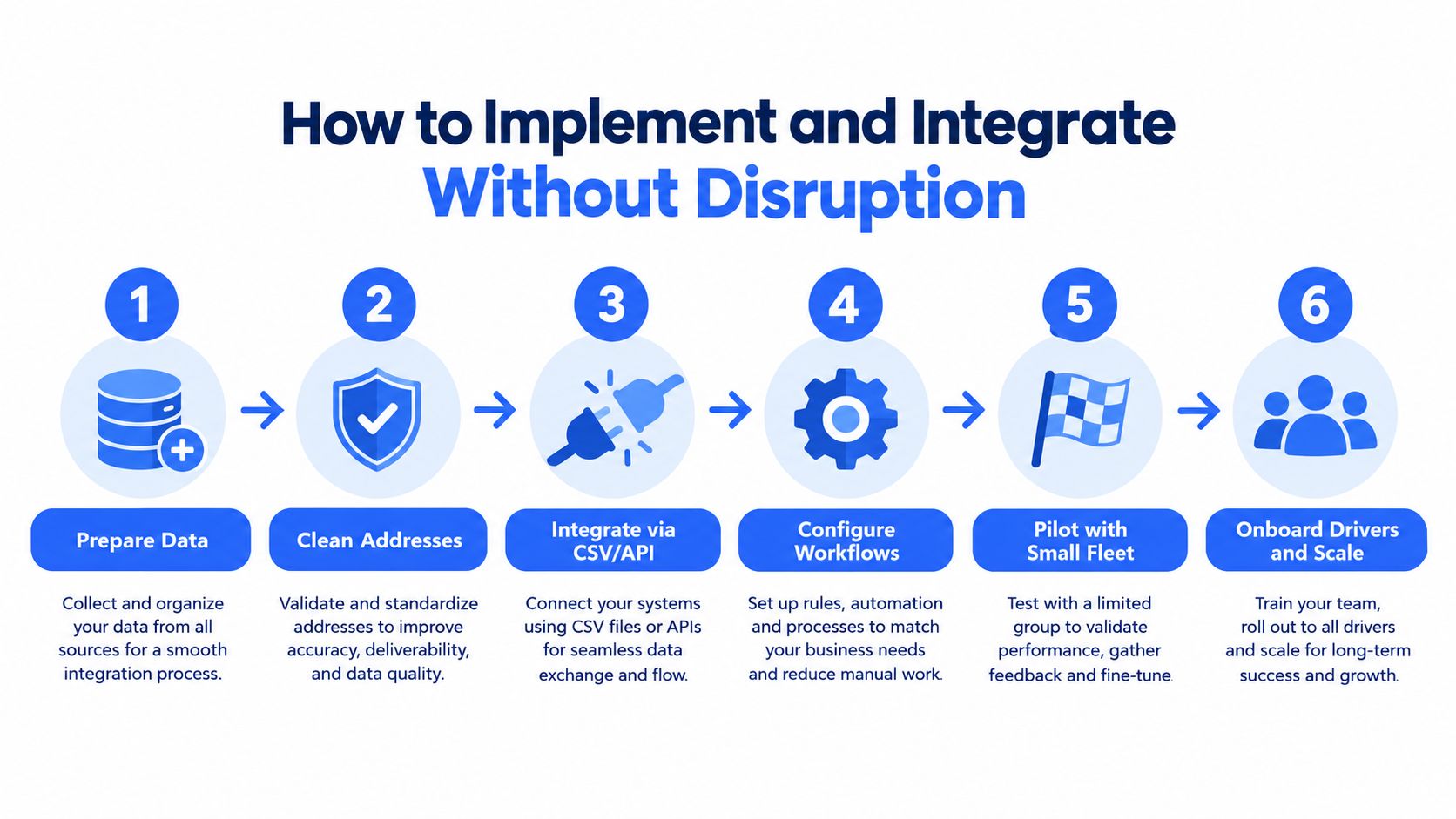
Prepare the inputs
Define the order fields dispatchers need before a stop can enter planning. Include the customer name, full address, contact details, delivery window, order contents, service notes, and item measurements when weight or volume affects loading. Import a representative spreadsheet first. Review its preview for blank, inconsistent, or incorrectly formatted fields before connecting live orders.
Create three queues in the import sheet: Ready, Needs Confirmation, and Blocked. Assign one owner to clear the Needs Confirmation queue each day before optimization runs. A weak address should not become a failed stop, extra call, or wasted mile. Use customer confirmation when the location remains uncertain, and keep capacity fields visible so an apparently short route does not overload the vehicle.
Connect gradually
A small fleet can start with CSV or XLSX imports, then connect Shopify, WooCommerce, Zapier, or an ERP through an API or webhooks. The Shopify delivery integration guide shows how a connection can reduce repeated order entry while keeping the rollout manageable.
Before the pilot, configure depots, zones, vehicle capacities, recurring route templates, delivery windows, and notification rules. Keep these settings close to current practice. If zones and exception rules become complicated immediately, the team may struggle to separate an operating problem from a configuration problem.
Pilot with a real but contained run
Choose a small route group containing routine orders and common exceptions. Test driver links, navigation, proof of delivery, customer messages, and dispatcher edits during actual work. Keep PDF trip sheets or the existing dispatch method available as a backup while drivers learn the new workflow.
A browser-based, PIN-protected driver link can let drivers begin without installing a native app. Train them on the actions that must be completed consistently: open the route, travel to the stop, record arrival or failure, capture proof, and report an exception. Ask which step slows the run, then adjust the workflow before expanding.
After the pilot, compare actual results with the baseline. Review address failures, overload warnings, manual edits, late stops, and customer contacts. Expand only when the team understands why results differ, rather than treating the generated route as proof that implementation is complete.
How to Choose the Right System for 1PL and SMB Fleets
A first-party logistics operator, or 1PL, runs its own delivery operation. That usually makes practical control more important than a long list of enterprise modules. A small or midsize business may need to plan from one depot today, add a second location later, bring in subcontractors during busy periods, and connect ecommerce orders without hiring a dedicated integration team.
Use the following matrix to separate essential operating capability from attractive extras.
Delivery Management System Selection Matrix for 1PL and SMB
| Selection Criteria | What to Look For | Why It Matters for 1PL and SMB |
|---|---|---|
| Address quality | Validation, geocoding, confidence flags, manual pin correction | Prevents weak locations from quietly entering routes |
| Capacity visibility | Item, weight, or volume totals with overload warnings | Helps dispatchers match orders to actual vehicle space |
| Driver experience | Browser-based, PIN-protected access with navigation | Reduces onboarding friction across company and subcontracted drivers |
| Depot planning | Separate boards for locations and operating dates | Keeps local teams from mixing loads and routes |
| Zone management | Configurable zones, groups, filters, and saved views | Supports territories without forcing rigid permanent boundaries |
| Ecommerce connectivity | Shopify, WooCommerce, CSV, Zapier, API, or webhooks | Limits manual order entry as volume grows |
| Proof of delivery | Signatures, photos, notes, and failure reasons | Creates an operational record for customer and internal follow-up |
| Analytics | On-time, first-attempt, route, cost, and capacity reporting | Gives owners evidence for process and investment decisions |
| Native app requirement | Optional app, or secure browser workflow | Avoids device and installation barriers for smaller fleets |
A system that promises advanced optimization but offers weak address handling may produce polished routes that still fail in the field. Likewise, a platform with excellent tracking won’t solve a vehicle that leaves overloaded or a depot that assigns the wrong inventory.
For a broader comparison of selection factors, use this guide to best last-mile delivery software. When evaluating products, ask vendors to demonstrate your own order file, delivery windows, depot structure, and vehicle constraints. A real workflow test reveals more than a generic feature tour.
Routelink is one web-based option for local delivery operations. It combines order intake, route planning, dispatch, customer notifications, live tracking, proof of delivery, capacity visibility, and analytics, with browser-based driver links rather than a required native driver app. That combination may suit an SMB that values a straightforward rollout, but each fleet should validate the fit against its data, vehicles, and service promises.
Common Pitfalls and Real World Results
A delivery run can fail before the vehicle leaves the depot. An unverified address may produce a tidy route on the screen, yet leave the driver searching, calling, or returning later. Capacity warnings create a second hidden risk. Accepting one more order can cause loading problems, unsafe handling, or a late final stop.
Zones should function like clear shelves, helping dispatchers filter and assign work. Too many exceptions turn them into a maze only one person can use. Driver feedback provides another data check. Repeated reports about incorrect customer notes or misleading location pins point to source data that needs correction, not isolated complaints to close one by one.
Mixed fleets add planning requirements. Coverage focused on delivery operations for 2026 identifies fleet downtime as the top operational challenge for 34% of delivery companies. It also notes that electric vehicles need maintenance processes for battery health, thermal management, and charging optimization, rather than routines designed only for ICE vehicles. This 2026 delivery operations guide supports a practical rule: capacity planning must include charging windows and vehicle readiness when both vehicle types share the operation.
Visibility problems often begin with missing or inconsistent operational data. A 2026 analysis of last-mile costs and challenges reports that 57% of supply-chain professionals cite lack of visibility as their top challenge, while 6% report full visibility. Adding another tracking screen will not correct that gap. Validate addresses, standardize status events, and give dispatchers one place to act on exceptions.
An EPA case study recorded 400,000 fewer annual travel miles, two to three routes removed per day, and 96% on-time performance after network optimization, as reported in the EPA case study. Use that pattern to audit your own pitfalls: if miles drop but on-time rate does not improve, investigate address quality and capacity warnings before adjusting zones. Track route miles, failed attempts, vehicle capacity, and on-time results together.
If dispatchers still move between spreadsheets, maps, messages, and tracking tools, visit Routelink to review a web-based workflow for intake, address checks, capacity-aware planning, driver dispatch, customer updates, tracking, and proof of delivery. Test it with a representative route file, compare results with your baseline, and decide from operating evidence.