Dispatch Scheduling Software: A Practical Guide
Learn what dispatch scheduling software does, how it works, and how to choose the right one for local delivery and 1PL operations.
Monday morning starts with three problems at once. A driver calls in sick, a customer wants an urgent delivery added, and a vehicle is still sitting in the yard because yesterday’s repair wasn’t finished. The dispatcher has a whiteboard full of stops, a spreadsheet open on one monitor, and customers waiting for arrival updates.
That routine works until the schedule changes faster than one person can rewrite it. Dispatch scheduling software gives the operation a shared control layer for deciding who does what, when the work should happen, and which vehicle or crew should handle it. The important question isn’t whether the software can create a route at 7 a.m. It’s whether that plan can survive a late driver, a canceled stop, a failed vehicle, or an urgent delivery at 11 a.m.
Table of Contents
- What Dispatch Scheduling Software Actually Does
- Core Features and How the System Fits Together
- Dispatch Scheduling Software vs Route Planners and TMS
- Benefits and ROI for 1PL and Local Delivery Teams
- An Evaluation Checklist for Buyers
- Real-World Examples of Impact in Local Delivery
- Implementation Tips and Common Pitfalls to Avoid
What Dispatch Scheduling Software Actually Does
A dispatcher’s manual process usually follows a familiar pattern. Orders arrive by phone, email, website, or sales system. Someone copies the details into a board or spreadsheet, checks which drivers are available, groups nearby stops, and calls the people who need to know. If a customer changes the delivery window, the dispatcher edits the board and starts checking every route affected by that change.
Dispatch scheduling software puts those decisions in one operating layer. It collects jobs, records customer notes and service windows, assigns work to drivers or crews, sequences stops, and shares updates with the field. You can think of it as the layer between order intake and the actual drive. A route planner may answer, “What is the most sensible order for these stops?” Dispatch software also asks, “Who can complete them, which vehicle can carry the load, what happens if the route slips, and how do we prove the job was done?”
The manual tasks become visible decisions
Suppose a local distributor receives a delivery request for a customer who needs access before a particular time. The dispatcher must consider the delivery window, the driver’s shift, vehicle capacity, nearby stops, site instructions, and any required equipment. A software system stores those constraints instead of leaving them in separate notes or in someone’s memory.
The same applies to changes during the day:
- A cancellation: The stop can be removed without forcing the dispatcher to rebuild every route by hand.
- A new urgent job: The system can show which driver has time and geographic proximity, while the dispatcher makes the final call.
- A late arrival: The office can update the schedule, recalculate affected arrival times, and notify the customer.
- A driver absence: Unassigned work becomes visible, so the dispatcher can move it to another qualified driver.
The software doesn’t eliminate judgment. A dispatcher still decides whether a tight delivery window is realistic or whether a customer should be called. It reduces the time spent searching through disconnected information.
Practical rule: A schedule is useful only when the dispatcher can change it quickly and the driver can see the change without relying on a chain of phone calls.
The operating layer also needs to connect with the physical workplace. A warehouse team may use NZ-compliant warehouse two-way radios for quick coordination while loading vehicles, while the dispatch platform manages job status, assignments, and customer-facing updates. For a broader view of how planning, dispatch, and delivery connect, see this guide to what delivery management includes.
The market reflects this shift from manual coordination to connected operations. The field service management software market, which includes dispatch scheduling capabilities, was valued at $5.10 billion in 2025 and is projected to reach $9.17 billion by 2030, with a projected 12.5% CAGR over that period, according to MarketsandMarkets’ field service management market data. Those figures describe a broad category, not every dispatch product, but they show why buyers increasingly expect scheduling to connect with execution.
Core Features and How the System Fits Together
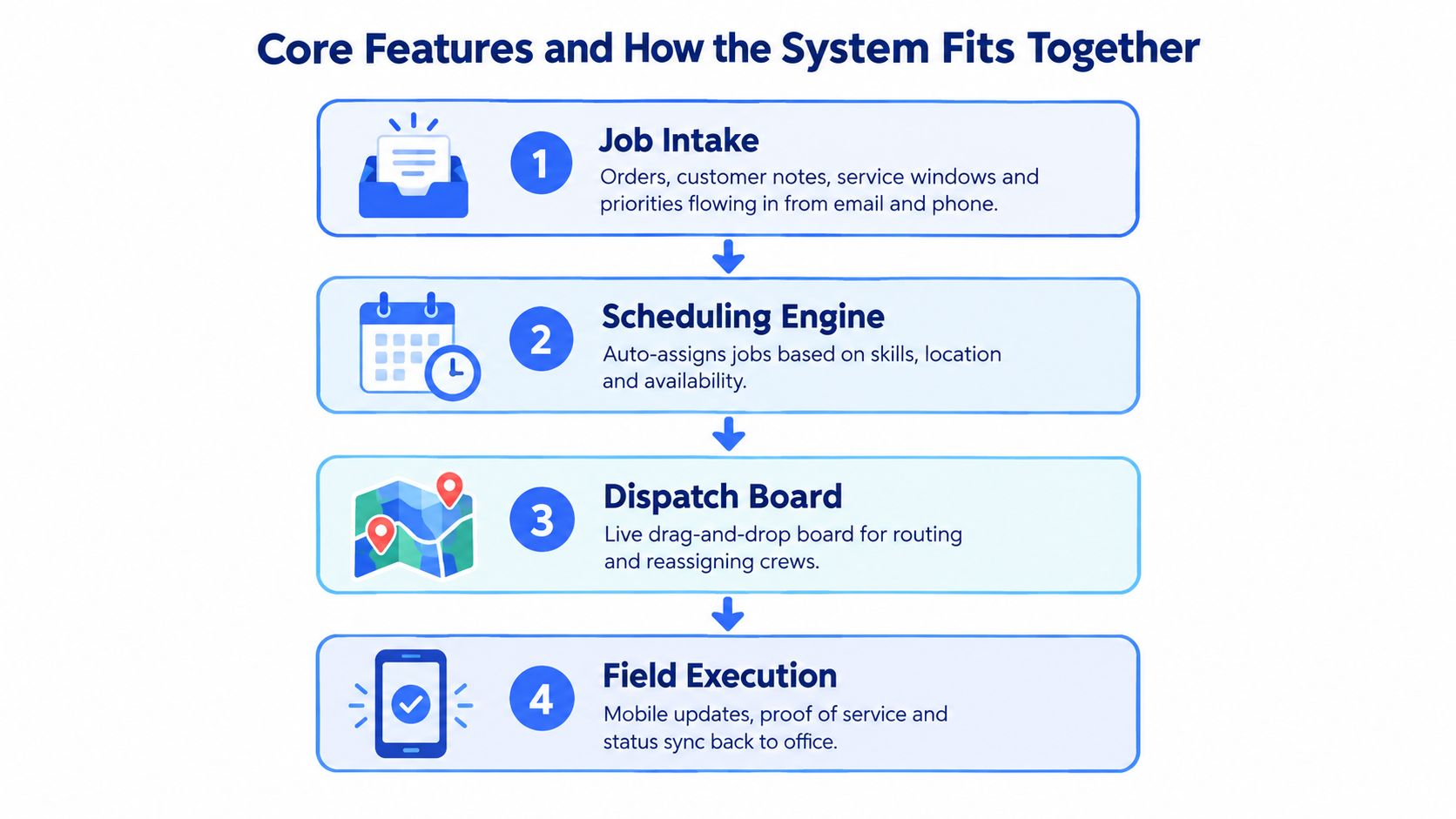
A useful dispatch platform resembles a relay team. The first person captures the order, the next builds the plan, another communicates the assignment, and the field worker closes the job. If each person keeps a different version of the information, the handoff fails. The same is true in software. The features matter less than whether they share one source of truth.
Start with clean job intake
The first layer turns an incoming request into a usable job. That record should include the address, contact information, delivery or service window, item details, priority, and instructions such as a rear entrance or a required signature. Intake may come from a phone call, email, ecommerce platform, ERP, or spreadsheet upload.
If the address is incomplete, the scheduler can produce a polished route that still fails at the curb. Job intake therefore needs validation, duplicate handling, and a clear way to edit details before dispatch.
Let scheduling logic handle the constraints
The second layer matches jobs with available resources. It may consider driver location, shift availability, vehicle capacity, skills, territory, and customer commitments. The system then sequences the work so the driver isn’t sent across town repeatedly while a nearby stop waits unassigned.
This is a difficult computational problem, not just a calendar exercise. Dispatch scheduling commonly models a vehicle routing problem with hard time windows and capacity constraints, where each stop must be assigned to one vehicle, completed within its allowed window, and loaded without exceeding capacity. The canonical Solomon CVRPTW benchmark contains 56 instances, while later benchmark families extend to 100 to 1,000 customers, as documented in CVRPTW benchmark comparisons. That complexity is why practical systems use heuristics or metaheuristics instead of trying every possible route.
Make execution part of the schedule
The third layer puts the plan in the field. Drivers need clear assignments, navigation, stop instructions, status buttons, and a way to report delays or failed attempts. Dispatchers need a live view of what’s assigned, in progress, delayed, completed, or blocked.
A vehicle breakdown is the useful test. The software should show the affected stops, identify available capacity elsewhere, support reassignment, and communicate the change. If the dispatcher still needs to compare three spreadsheets and call every driver, the platform is only a digital whiteboard.
The fourth layer closes the loop:
- Proof of service: Capture signatures, photos, notes, or delivery confirmation.
- Customer communication: Send status messages and updated arrival information.
- Operational records: Store timestamps and exception reasons for billing and review.
- Planning feedback: Use completed-job data to improve future assignments and service windows.
This workflow is why a dispatch board alone isn’t enough. The plan needs to travel with the driver, return with reliable completion data, and remain understandable to the office after the day ends.
The following video provides a visual introduction to how dispatch workflows can connect planning and field activity.
Dispatch Scheduling Software vs Route Planners and TMS
These tools overlap, but they answer different operational questions. A route planner focuses mainly on geography. Given a set of stops, it finds a sensible order or path, often before the vehicles leave. Dispatch scheduling software focuses on daily allocation and control. It decides which driver receives which work, tracks progress, and changes assignments when the original plan no longer fits.
A transportation management system, or TMS, usually reaches further into freight operations. It may manage carrier selection, tendering, shipment documentation, freight movement across multiple legs, and settlement. A local business running its own vans may not need that entire freight stack, but it still needs more than a static route map if its dispatcher handles live changes.
| Tool | Primary Decision | Time Horizon | Best Fit |
|---|---|---|---|
| Route planner | What order should the stops follow? | Before departure or route creation | A fixed set of deliveries needing geographic sequencing |
| Dispatch scheduling software | Who should handle each job, and how should the day change? | Before and during the operating day | Local delivery, field service, and 1PL fleets managing their own drivers |
| TMS | How should freight move across carriers, shipments, and financial workflows? | Shipment lifecycle | Freight, transport, and multi-leg logistics operations |
Where a 1PL operation usually fits
A 1PL, or first-party logistics operation, handles its own deliveries with its own people, vehicles, or regular subcontractors. Its central problem usually isn’t selecting an outside carrier. It’s keeping the internal schedule workable when a customer changes a window or a driver loses time at an earlier stop.
That operation may still benefit from route optimization. The difference is positioning. The route engine should support the dispatch workflow rather than become a separate tool that produces a plan nobody can update. A business comparing planning options can also review guidance on how to cut shipping costs, especially when route design and delivery operations are treated as connected decisions.
The distinction becomes clearer at the curb. A route planner may produce the order of stops. Dispatch software should show whether the driver is on time, whether the customer received an update, whether proof of delivery was captured, and which remaining jobs need attention. A TMS may then become relevant if the operation adds carrier tendering, complex freight documentation, or settlement workflows.
For a practical comparison of route-focused tools, see this explanation of a delivery route planner. Choose the category based on the decision you need to control, not the number of features listed on a product page.
Benefits and ROI for 1PL and Local Delivery Teams
The business case becomes clearer when you connect software decisions to the weekly operating sheet. A local delivery owner doesn’t need a vague promise of “greater efficiency.” They need to know whether drivers complete more useful work, whether fuel spend is controlled, whether dispatchers spend less time rebuilding routes, and whether customers receive deliveries on the first attempt.
Start with the cause, then measure the result. Grouping nearby jobs can reduce unnecessary travel. Assigning work according to vehicle capacity can prevent a second trip. Reassigning stops after a breakdown can protect completion rates. Accurate arrival updates can reduce calls to the office, although the team should still monitor whether those messages match field conditions.
Use a simple operating scorecard
The table below is a planning framework, not a claim that every operation will achieve the same results. Record your own baseline before rollout, then compare the same definitions after the pilot.
| Metric | Before Software | After 90 Days | Why It Moves |
|---|---|---|---|
| Stops per route per driver | Record actual completed stops | Compare completed stops under the same service mix | Better grouping and assignment can reduce wasted travel |
| Fuel cost per delivery | Track fuel and completed deliveries | Compare cost against similar routes | Fewer unnecessary miles can lower fuel use |
| On-time delivery rate | Define the promised window and record misses | Review performance by driver, zone, and window | Earlier visibility gives dispatchers time to intervene |
| Dispatcher hours per shift | Log planning and re-planning time | Separate routine planning from exception handling | Shared data reduces manual searching and re-entry |
| First-attempt completion rate | Record failed or rescheduled stops | Compare failure reasons | Better instructions, updates, and capacity matching can prevent avoidable failures |
The financial calculation should stay simple. Add labor time saved, fuel reduction, and avoided costs from missed or repeated deliveries. Subtract the software subscription, onboarding, hardware, and any required integration work. The result is only credible when the team uses the same measurement rules before and after implementation.
A useful review question: Which specific scheduling decision changed the number, and can the dispatcher repeat that decision tomorrow?
Review the evidence every week
A dashboard can make an operation feel controlled without improving it. Review completed stops, late arrivals, failed attempts, manual overrides, and exception reasons each week. If the team still solves most changes through phone calls, investigate the handoff rather than assuming the software has failed.
Delivery tracking also matters because dispatchers need to compare the plan with what happened. A guide to delivery tracking software can help teams think through the visibility required after a driver leaves the depot. The goal isn’t more screens. It’s a reliable link between a scheduling decision and an operating result.
An Evaluation Checklist for Buyers
A vendor demo should behave like a stress test, not a guided tour. Sales teams can make a quiet morning look easy. You need to see what happens when the schedule starts breaking.
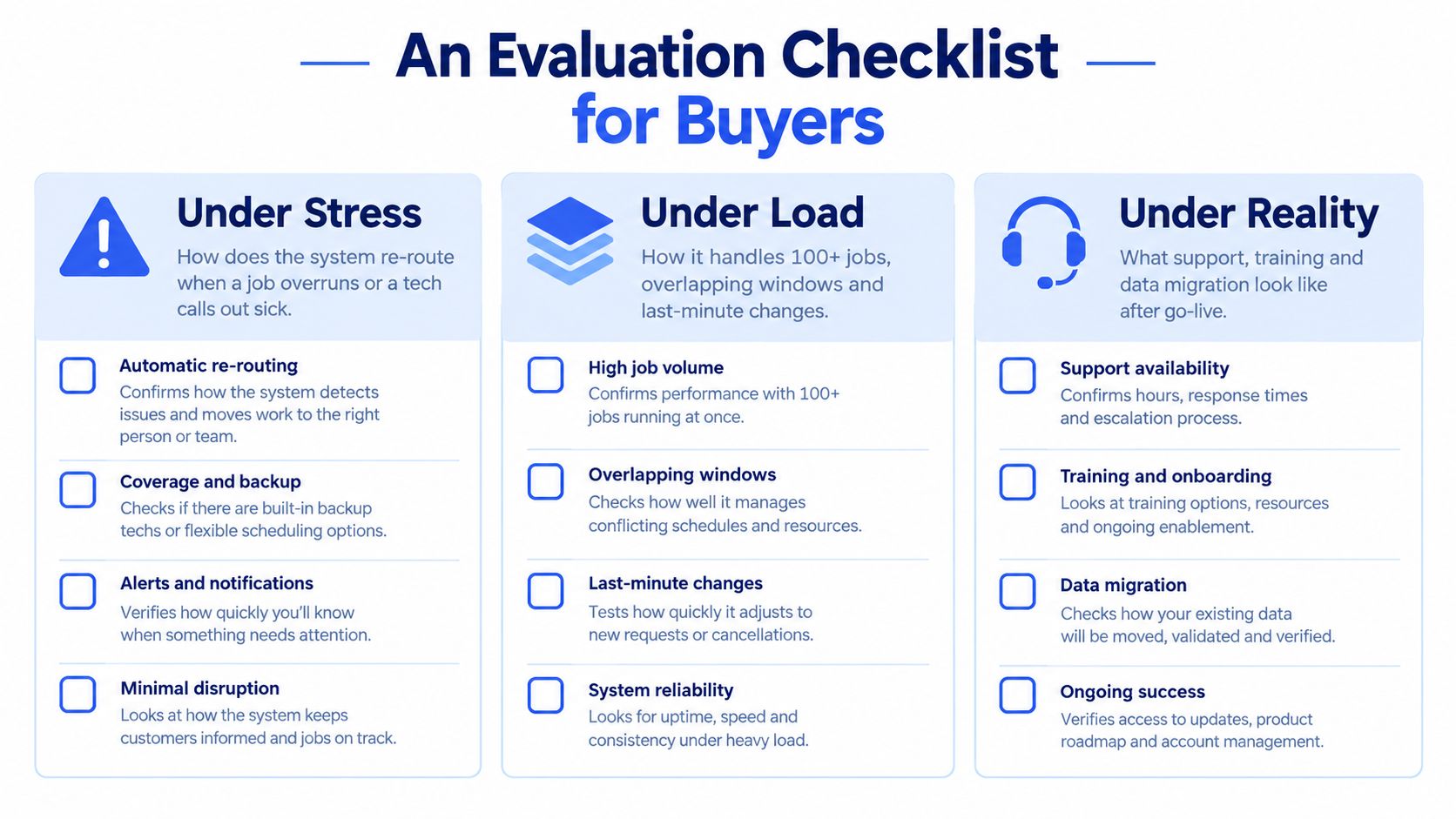
Test the stressful moments
Bring a realistic sample of jobs, drivers, vehicles, service windows, and notes. Then ask the vendor to demonstrate the following without resetting the account:
- Cancel several stops during an active route. Can the dispatcher remove them, see the available capacity, and confirm which arrival times changed?
- Add an urgent job. Can the system identify feasible assignments without ignoring capacity, skills, or promised windows?
- Call out a driver. Can the dispatcher reassign the remaining work while preserving a clear audit trail?
- Delay a stop. Does the system update estimated arrivals, or does someone need to recalculate them manually?
- Break the mobile connection. What can the driver still see, record, and submit offline? When does the data synchronize?
These scenarios expose whether the platform supports real execution or creates an attractive starting plan.
Check the data and integration boundaries
Ask how orders enter the system from your current source. A tool that requires constant rekeying may replace a whiteboard with another manual queue. Confirm how it handles duplicate jobs, address corrections, customer notes, zone changes, pricing changes, and canceled orders.
Then ask what you can export. You should understand who owns job history, proof of delivery, customer records, route data, and driver activity. A clean export path matters if your operation changes systems later.
Put support under the spotlight
Commercial terms deserve the same attention as scheduling features. Ask about contract length, onboarding fees, implementation responsibilities, data migration, training, support hours, and escalation procedures. Find out who answers when the dispatch team needs help at the beginning of a busy shift, not just during a scheduled account review.
A useful demo ends with a written record of what the vendor showed and what remains unconfirmed. Don’t accept “the system can do that” as an answer. Ask to see the exact workflow, including the user steps, permissions, notifications, and resulting record.
Real-World Examples of Impact in Local Delivery
The most useful examples focus on a decision point. They show what the dispatcher saw, what the software changed, and what would have happened if the team had stayed with the old process. The following scenarios are operational illustrations, not independently verified case studies.
The florist with a compressed morning plan
A florist with three drivers receives same-day orders throughout the morning. Before using a scheduling system, one person hand-sorts printed orders, checks addresses, and writes driver bundles on a board. The delivery windows remain in the order notes, so the dispatcher must repeatedly scan the paperwork to avoid assigning a late stop to the wrong route.
A scheduler imports the jobs, stores each window, and groups stops before the drivers leave. The dispatcher reviews the proposed routes, makes a manual adjustment for a large arrangement, and sends each driver a single assignment. The operational result is a shorter planning block, fewer calls asking what to deliver next, and a clearer view of which new orders can still fit.
The courier with a failed vehicle
A medical courier has a pickup route serving clinics and hospitals. Midday, one vehicle breaks down while several pickups remain. Without live assignments, the dispatcher has to call drivers, estimate who can take the work, and manually track the revised sequence while hospitals wait for confirmation.
With exception handling, the dispatcher marks the vehicle unavailable, views the affected jobs, and assigns feasible stops to another courier. The remaining drivers receive the updated instructions, and the office can contact the affected facilities with a more accurate arrival estimate. The software doesn’t make the breakdown disappear. It shortens the time between recognizing the problem and making a controlled decision.
The home delivery team with mismatched crews
A 1PL home delivery business handles items that sometimes require two people and sometimes don’t. The old process assigns crews based on habit, so a two-person team may receive a single-package stop while a difficult installation waits for the right skills.
The operator adds capacity and skill requirements to the job records. The scheduler then flags which stops require a two-person crew and which can go to a single driver. The manager reviews the assignments before dispatch, preserving specialized labor for the jobs that need it and avoiding a poor match between crew capability and delivery demand.
In each scenario, the benefit comes from making a constraint visible at the moment of assignment. Software won’t fix missing addresses, unrealistic windows, or weak operating rules. It gives the dispatcher a faster way to apply good rules consistently.
Implementation Tips and Common Pitfalls to Avoid
Buying the platform is the easy part. The difficult work is changing how people record jobs, communicate exceptions, and close out completed stops. A dispatcher who keeps a private spreadsheet, a driver who ignores status updates, and a manager who never reviews exceptions can turn a capable system into an expensive version of the old process.
Build the pilot around one real operating day
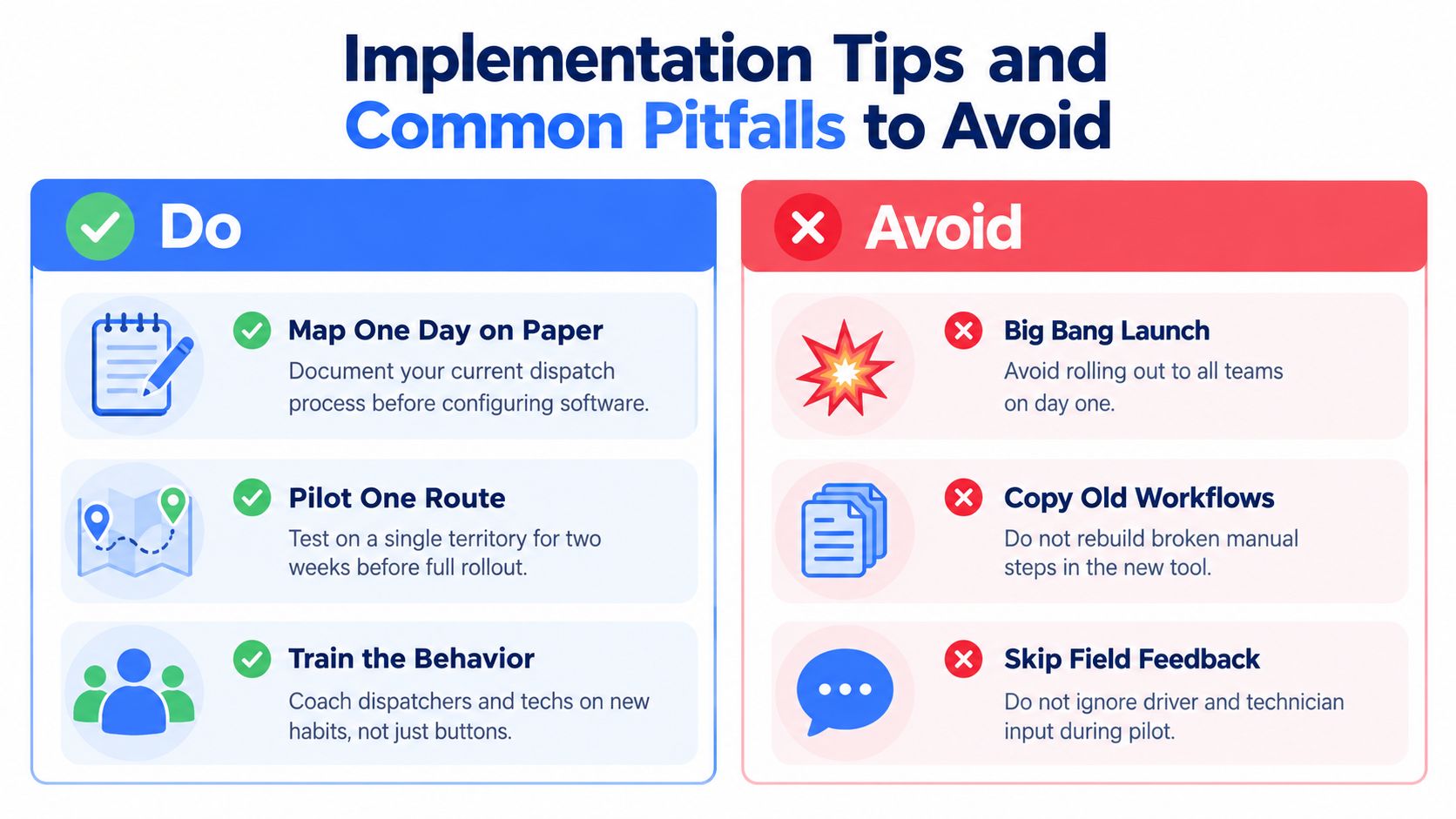
Start on paper. Map how an order arrives, who edits it, who assigns it, how the driver receives it, what happens during a delay, and where proof of delivery ends up. That map will reveal informal steps that a software configuration may otherwise miss.
Then pilot the workflow on one route or territory for two weeks. Import clean customer addresses, vehicle details, driver availability, zones, and service rules before testing route quality. Bad source data can make every later decision look unreliable.
Set measures that reflect the work:
- Count completed stops: Use the same definition before and during the pilot.
- Track missed stops: Record the reason, not just the total.
- Measure planning time: Separate initial planning from emergency rework.
- Review exception codes: Identify recurring causes such as access problems or late loading.
- Collect field feedback: Ask drivers which instructions are unclear or difficult to submit.
Avoid the rollout traps
A big-bang launch often hides problems until every team depends on the new workflow. A smaller pilot gives dispatchers and drivers room to identify confusing statuses, missing fields, weak notifications, and mobile limitations.
Don’t over-customize during the first week. Configure the essential workflow, observe real use, and change one rule at a time. Train dispatchers and drivers together so everyone understands assignment handoffs, exception codes, offline behavior, and proof-of-delivery expectations.
Field rule: If the driver can’t complete the required update quickly at the stop, the process needs redesign before the rollout expands.
Check performance after the pilot, again around the first month, and through a longer tuning period. Keep an escalation path for decisions the system can’t resolve, such as an impossible window, a missing vehicle, or a customer request that conflicts with capacity. Reports should support management review, not replace it.
Routelink connects job capture, route planning, dispatch, customer notifications, navigation, and proof of delivery in one workflow, with driver access through PIN-protected links rather than a required app download. Visit Routelink to see whether its planning and delivery tools fit the way your team needs to run the day after the schedule changes.