Equipment Rental Delivery: A Practical Operations Guide — Routelink
Run equipment rental delivery with fewer failed stops and tighter schedules. A practical guide to dispatch, routing, POD, and returns.
2 October 2026 · Routelink Team
Equipment Rental Delivery: A Practical Operations Guide
Run equipment rental delivery with fewer failed stops and tighter schedules. A practical guide to dispatch, routing, POD, and returns.
A customer books a mini excavator for tomorrow. The address looks correct, but nobody has checked the gate width, unloading surface, truck access, or who’ll be available to receive the machine. By the time the driver reaches the site, the route is already behind, the customer is calling for an update, and the dispatcher is deciding whether to reschedule, send another vehicle, or issue a credit.
That failure rarely starts at the curb. Equipment rental delivery is a chain of operational decisions, from the first request through pickup, inspection, and invoicing. A delivery management platform such as Routelink can support that chain, but the underlying process still needs clear rules, accurate data, and ownership at every handoff.
Table of Contents
- Why Equipment Rental Delivery Is an Operations System
- Qualifying Requests, Planning Capacity, and Assigning Crews
- Validating Addresses and Optimizing Routes Before Dispatch
- Running the Day From Dispatch Through Driver Workflow
- On-Site Delivery, Proof of Delivery, and Damage Capture
- Returns, Pickups, and Reverse Logistics
- KPIs, Continuous Improvement, and Your Next 90 Days
Why Equipment Rental Delivery Is an Operations System
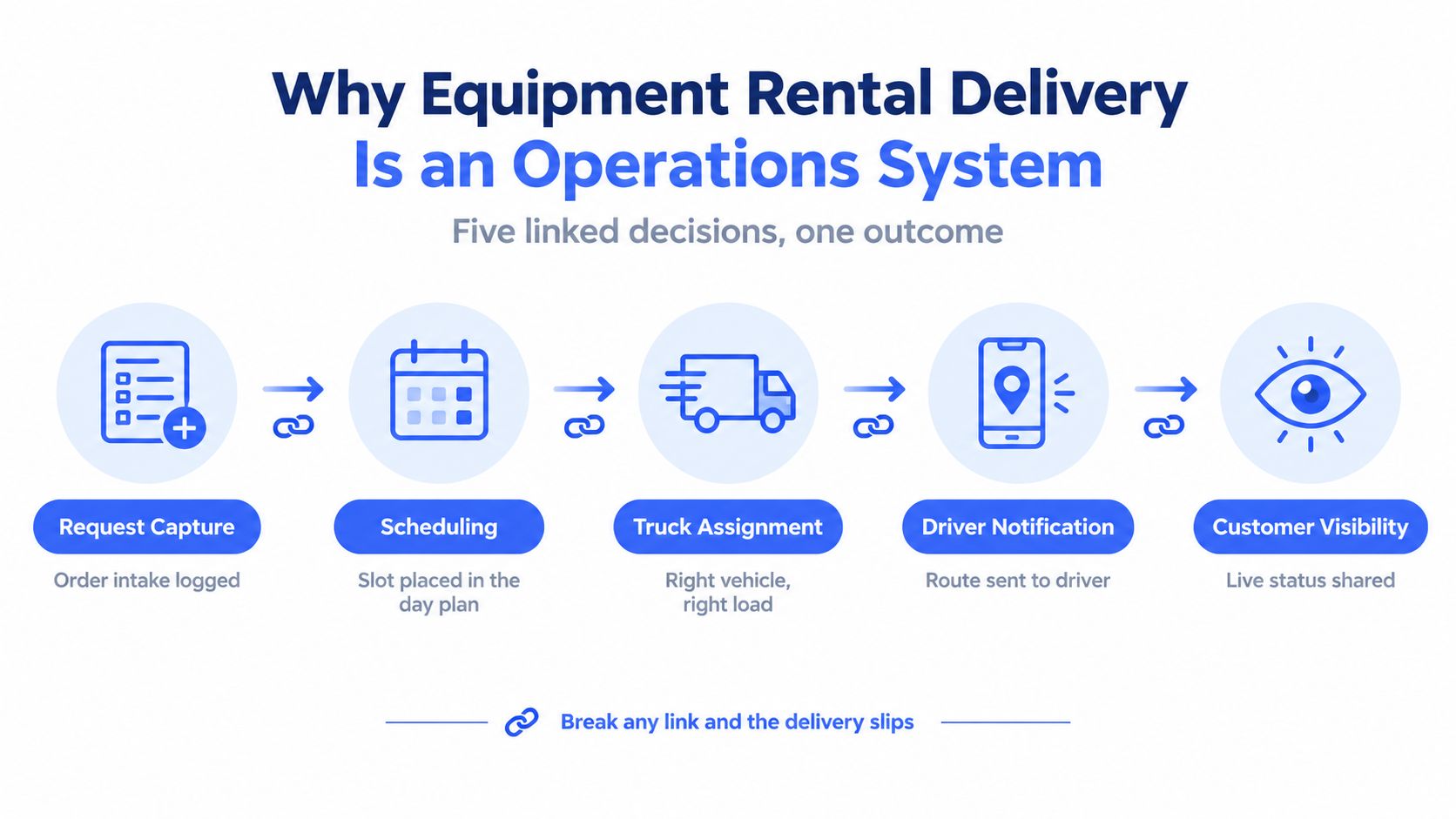
Equipment rental delivery isn’t just a truck moving an asset from a depot to a jobsite. It connects order intake, scheduling, vehicle selection, driver communication, customer visibility, proof of delivery, and reverse logistics. A missing access note at intake can become a failed delivery. A failed delivery can create a re-route, an idle crew, a customer complaint, and a disputed charge.
The market’s scale makes those handoffs commercially important. One independent estimate projects the global equipment rental and leasing market at USD 142.73 billion in 2026, rising from USD 136.12 billion in 2025 and reaching USD 181.04 billion by 2031, with a projected 4.86% CAGR. The same estimate says rental services represented 72.88% of revenue in 2025, which reinforces the operational role of depots, physical delivery, and on-site logistics (State of Rental Report 2026).
Own the handoffs, not just the vehicle
A practical delivery system answers five questions before the truck leaves:
- What is being delivered, swapped, or collected?
- Can the site receive it safely with the available vehicle and crew?
- Where does the stop belong in the day plan?
- How does the driver receive the route and exception notes?
- What evidence proves the handoff or explains the failure?
A spreadsheet can hold an address and date. It usually won’t enforce the relationships between equipment type, access conditions, service time, route capacity, customer notification, and return inspection. A structured delivery board can.
Operators also need to recognize the sector’s physical constraints. Equipment rental developed into a mature international industry with roots in the UK after the First World War, later consolidation in North America, and an American Rental Association founded in 1955. A 2019 estimate for EU, EFTA, and UK rental markets counted more than EUR 27.7 billion in rental turnover, 17,280 companies, and 133,480 employees, showing why delivery coordination matters across a large, distributed industry (historical and industry summary).
The system works as a loop. Intake creates the data, planning turns it into a feasible run, dispatch sends the plan to the crew, proof of delivery protects the transaction, and return data improves the next plan.
For unusual or oversized moves, a dispatcher may also need a specialist carrier. Reviewing regional equipment transport NSW options can help clarify what external transport capacity looks like when a standard rental truck isn’t suitable.
Qualifying Requests, Planning Capacity, and Assigning Crews
The first useful delivery decision happens before routing. A request should enter the planning queue only after someone has recorded the information that determines whether the job is feasible.
A weak intake record says, “Deliver plate compactor, Friday, 18 Main Street.” A clean record identifies the job type, equipment, weight, dimensions, contact, access conditions, unloading method, service window, and any crew requirement. It also distinguishes a delivery from a pickup, swap, or failed-attempt follow-up.
Build a dispatchable job ticket
Capture the details that change the route, not every detail that happens to be available. Site access deserves particular attention because customers often receive vague promises such as delivery being available within a broad window. Rental FAQs commonly qualify delivery by access, location, schedule, rental duration, and equipment type, while charges can vary with mileage, equipment size, and truck requirements (equipment rental delivery FAQ guidance).
| Field | Weak Intake | Clean Intake | Dispatch Impact |
|---|---|---|---|
| Job type | “Rental” | Delivery, pickup, swap, or recovery | Determines service workflow and stop duration |
| Address | Street address only | Validated address, access point, and pin | Reduces driver searches and wrong-site arrivals |
| Equipment | Item name only | Item, dimensions, weight, and attachment | Supports vehicle and payload selection |
| Site access | No notes | Gate width, surface, clearance, turning space | Flags specialist handling or customer preparation |
| Contact | Customer name | Authorized receiver and mobile number | Enables arrival coordination and signature |
| Timing | “Friday” | Confirmed service window and flexibility | Allows realistic route sequencing |
| Crew | Not specified | Driver only, driver plus helper, or specialist crew | Prevents unsafe or under-resourced drops |
Match capacity before sequencing
Daily planning starts with the depot, territory, and time window. Then add constraints such as truck class, hydraulic tailgate, load-bay capacity, tie-down requirements, and driver qualifications. A route that looks short on a map can still fail if the assigned truck can’t carry the equipment or the crew can’t unload it safely.
Use filterable fields rather than memory. Routelink can import structured delivery data, validate addresses, show item, weight, and volume totals, and expose overload warnings before dispatch. It can also separate planning boards by depot and date, which helps multi-depot operators prevent a nearby job from being assigned to the wrong yard.
A temporary or unusual fuel-related delivery needs the same discipline. For example, a request involving temporary natural gas delivery should identify the equipment, placement conditions, access route, and responsible contact before the stop is assigned. The exact product may differ from a construction rental, but the dispatch principle is the same, qualify the physical job before promising a time.
Use dispatch scheduling software for rental fleets when the operation has outgrown calls between the counter, yard, and drivers. The software won’t replace judgment, but it can make the relevant constraints visible to the person making the assignment.
Practical rule: If a dispatcher has to call the customer to discover whether the truck can reach the site, the request wasn’t ready for routing.
Validating Addresses and Optimizing Routes Before Dispatch
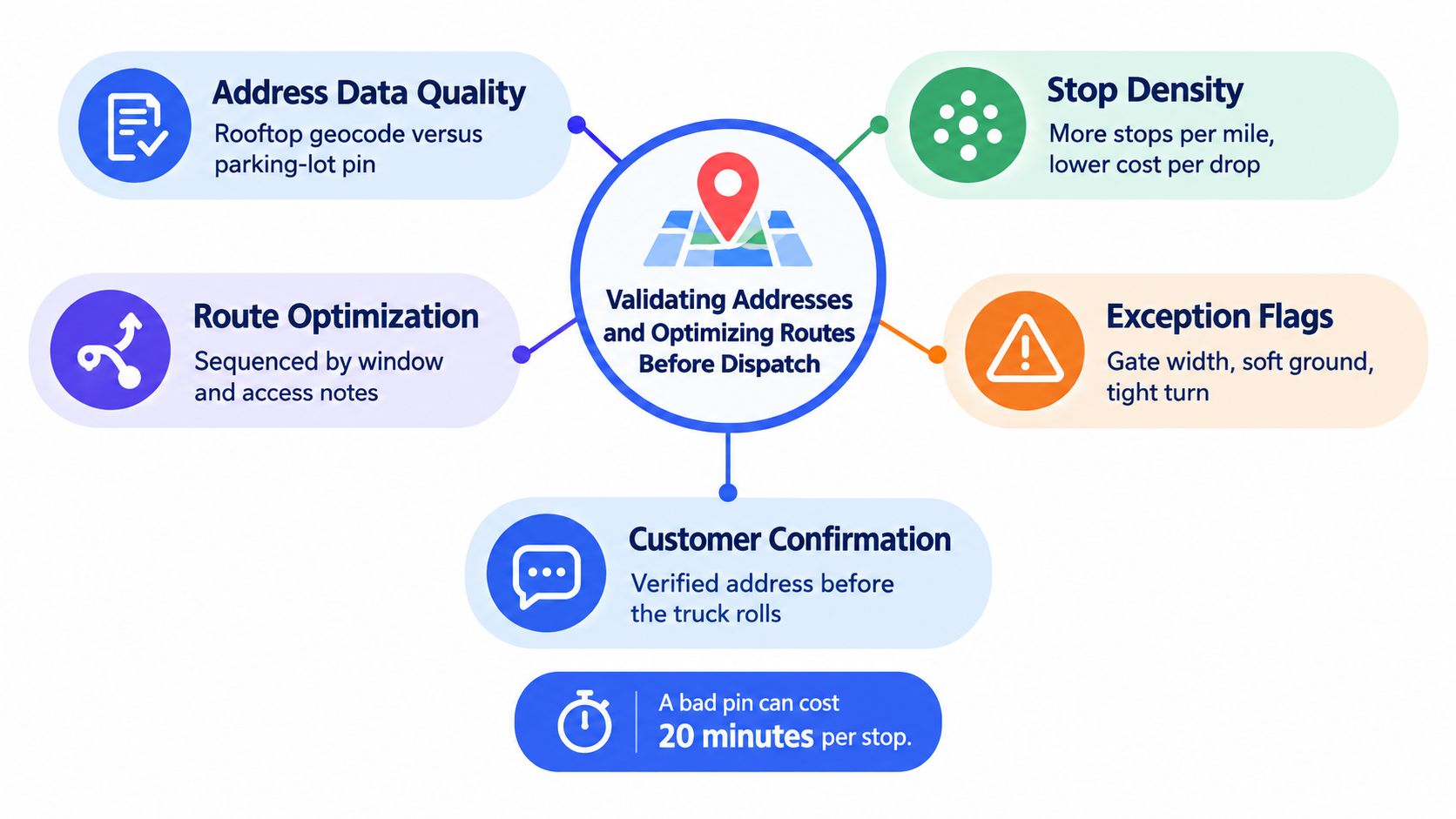
A route can be short and still fail. The driver may reach the wrong entrance, a neighboring property, or a parking lot instead of the unloading point. Route optimization cannot correct an address that was never verified.
Make each stop route-ready before it enters automatic planning. Confirm the geocoded position, review the match quality, verify the access point with the customer, estimate service time, and test the stop against working hours, vehicle limits, and promised time windows. Routelink can hold exceptions for review instead of allowing uncertain stops into the dispatch plan.
Treat address quality as a routing input
A rooftop geocode may work for a parcel. It can send a telehandler, generator, or trailer to the wrong side of a site. Capture the physical delivery point, not only the billing address. Record gates, site entrances, soft ground, restricted roads, low clearances, staging areas, and any approach direction the vehicle must use.
The pre-dispatch workflow should follow a clear sequence:
- Geocode: Accept only stops with a usable map position.
- Review exceptions: Send weak matches and failed geocodes to a dispatcher or customer confirmation queue.
- Estimate service time: Include unloading, inspection, paperwork, and customer handoff.
- Check feasibility: Compare the stop with route hours, vehicle capacity, crew skills, and time windows.
- Optimize: Sequence eligible stops, then edit the plan when site conditions require it.
Industry guidance reports that data-driven routing can raise on-time performance to about 95% from roughly 75%, while AI-optimized routes can reduce delivery time by 30% to 40% and fuel use by 20% to 25% compared with manual planning (last-mile delivery routing guidance). Those results are guidance, not a promise for every rental fleet. The operational point is straightforward: route quality depends on both the planning method and the stop data it receives.
Engineer density, not just distance
A route with more stops is not automatically better. Equipment dimensions, unloading time, access risk, and return commitments may make a smaller run safer and less expensive. Route optimization can reduce total mileage and improve efficiency, while increasing route density can reduce cost per delivery.
Before loading, Routelink should surface overloaded routes, stops outside the expected service radius, failed geocodes, and time-window conflicts. The dispatcher can split a run, resequence a cluster, assign another vehicle, or contact the customer while changes are still practical.
Use route optimization for last-mile delivery as a working discipline, not a one-click promise. The route is ready when the assigned vehicle and crew can complete it under actual site conditions.
Running the Day From Dispatch Through Driver Workflow
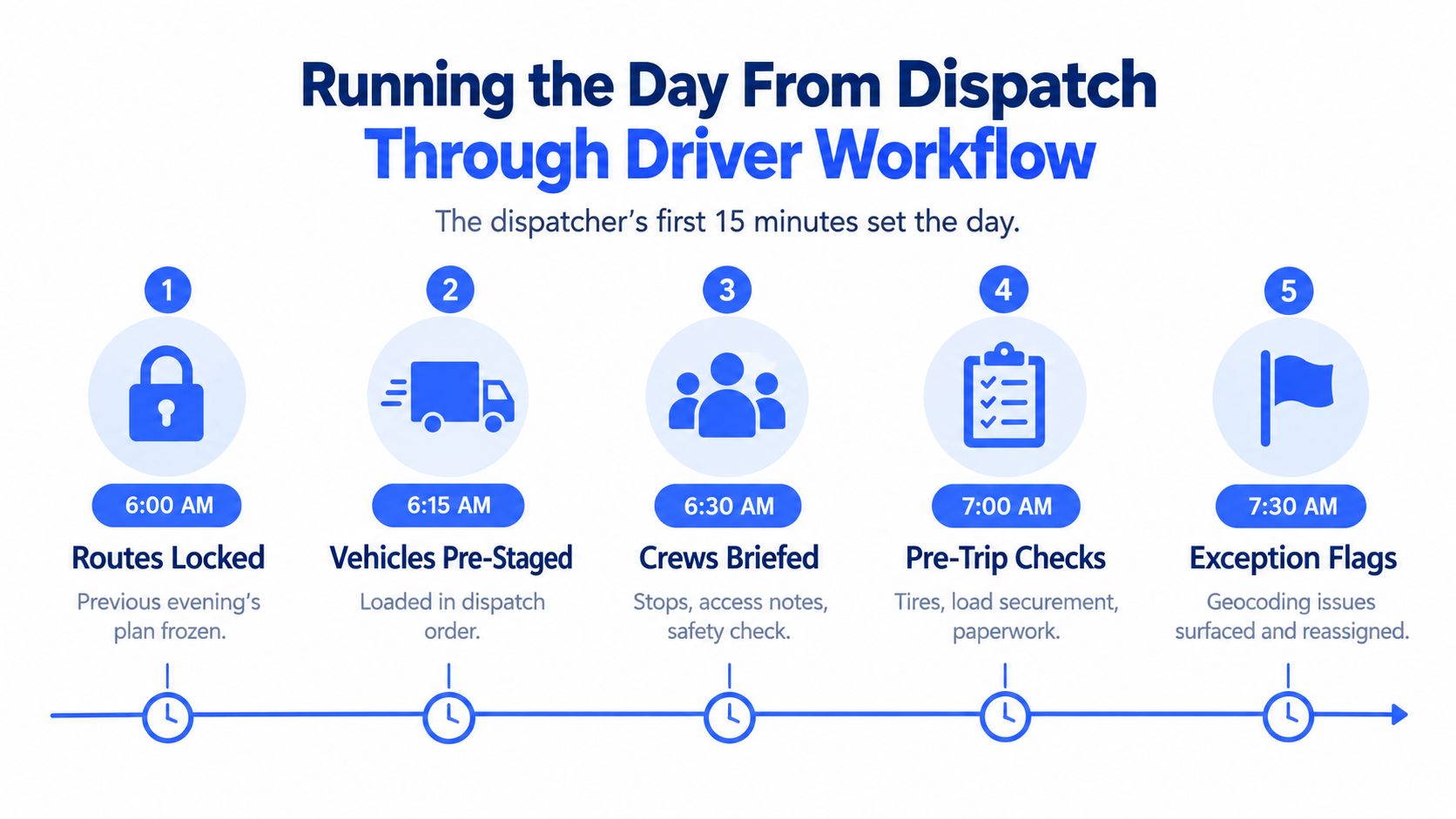
The first part of the morning determines whether the delivery plan survives contact with the road. The dispatcher should open with the previous plan, current vehicle status, unresolved geocoding exceptions, customer changes, and any equipment that wasn’t returned or inspected as expected.
Routes can be locked, vehicles staged in dispatch order, and crews briefed before the first departure. That creates a shared starting point. If the yard loads equipment in a different order from the planned sequence, the driver may need to reshuffle the truck at the first stop, which adds avoidable handling.
Make the pre-trip check rental-specific
A rental manifest should match the physical load. The driver or yard lead checks tie-downs, ramps, fuel state, visible condition, and scanned items. If an attachment belongs with the machine, it should be present in the manifest and verified before departure, not discovered when the customer is ready to work.
The dispatcher then watches for the exceptions most likely to disrupt the day:
- Locked or inaccessible sites: Contact the receiver and decide whether to hold, re-sequence, or return.
- Late-running routes: Send an updated ETA before the customer has to call.
- Wrong equipment or missing items: Stop the run from creating a larger failure downstream.
- Unsafe placement conditions: Escalate to a supervisor or specialist carrier.
A browser-based driver link reduces deployment friction for employees, subcontractors, and seasonal crews. The driver can open the secure, PIN-protected route on a phone, use turn-by-turn navigation, scan items, view customer notes, and send a structured “running late” or “unable to locate” status back to dispatch without installing a native app.
Give the customer useful visibility
“Where is my order?” calls increase when customers have no reliable status. Send a confirmation when the stop is scheduled, an arrival notification when the route is approaching, and a completion message with the delivery record when the handoff is finished. Branded tracking pages and configurable email, SMS, or WhatsApp notifications can keep the customer informed without exposing internal dispatch screens.
Before the truck rolls, require three confirmations: the manifest is clean, the driver checklist is complete, and the status has synced. These are small controls, but they prevent the dispatcher from managing two different versions of the day.
A route isn’t dispatched when it exists on a screen. It’s dispatched when the assigned crew has the right load, the right instructions, and a way to report exceptions.
On-Site Delivery, Proof of Delivery, and Damage Capture
A representative drop involves a mini excavator going to a residential backyard through a 10-foot gate. The ground is soft, the homeowner is waiting, and the curbside position doesn’t show whether the truck can safely reach the final placement area.
The driver starts with a curbside assessment. They confirm the gate and route, identify the firmest surface for the truck, discuss the drop zone with the authorized contact, and decide whether stabilizers or protective measures are needed. If the planned position isn’t safe, the driver records the condition and escalates instead of treating the customer’s first suggestion as an instruction.

Capture evidence while the facts are visible
The authorized receiver signs on the driver’s device after placement. The record should include the receiver’s name, timestamp, location, equipment identity, and any notes about the site or handoff. A signature alone doesn’t show machine condition, placement quality, or whether the correct asset arrived.
Use a mandatory photo set that matches the risk of the equipment:
- Identity photo: Serial number or asset label.
- Usage photo: Hour meter or relevant operating display.
- Condition set: Four-corner views that show pre-existing damage.
- Context photo: A wider image showing placement and surrounding access.
- Exception images: Gate, ground, surface, or obstruction evidence when conditions affect the drop.
A reason code makes the record searchable. “Surface damage observed before departure,” “receiver refused to sign,” and “soft ground placement approved” tell the office what happened without forcing staff to interpret a paragraph of free text. Notes add the detail that a code can’t capture.
Read how proof of delivery in logistics can connect signatures, photos, reasons, and notes to the stop record. The important control is consistency. If one driver photographs every machine and another records only a signature, the business can’t compare disputes fairly.
The driver should explain the final placement and confirm who accepted the equipment before leaving. Later, the same delivery photos can be compared with return photos, which gives the inspection team a reference point rather than an assumption about when damage occurred.
The video below illustrates the kind of on-site workflow that benefits from structured capture.
This record protects more than the invoice. It supports customer conversations, accelerates insurance documentation, and gives the rental team a defensible starting condition when the asset comes back.
Returns, Pickups, and Reverse Logistics
The return leg starts when the outbound order is booked. A pickup left only as a note in the rental contract must compete later with new deliveries, depot work, and emergency swaps. That creates staffing pressure and leaves equipment at the customer’s site longer than planned.
A failed pickup attempt can cost about $17.20 to $17.80 through rerouting, customer service, and redelivery expense, according to industry last-mile guidance (failed delivery attempt cost guidance). For rental fleets, the disruption can be greater when a truck, driver, or specialist crew is held up while another customer waits.
Design the reverse lane
Create the expected return from the outbound record. Confirm the collection window, site contact, access conditions, equipment list, and any changes to the original placement. Send reminders before collection. Routelink can carry those details into dispatch, route planning, driver tasks, and the return record, so the pickup is managed as part of the job rather than rediscovered at invoicing.
The return record should remain connected to the original delivery:
- Expected asset: Match the serial number or item identity at collection.
- Condition comparison: Review outbound photos before recording new damage.
- Reason code: Separate normal wear, customer damage, missing parts, failed access, and customer-caused delay.
- Charge rule: Apply the agreed logic for cleaning, fuel, damage, late pickup, or special handling.
- Exception file: Keep photos, notes, signatures, and correspondence with the same asset and order.
| Scenario | Standard Action | Configurable Fee Trigger |
|---|---|---|
| Planned return | Confirm window, route pickup, scan asset in | Standard return charge by zone or contract |
| Customer unavailable | Record failed attempt and reschedule | Redelivery or additional pickup charge |
| New damage found | Photograph, code, and attach to original POD | Damage assessment or repair charge |
| Low-value item return | Offer an approved depot drop-off | Reduced or waived pickup charge |
| Equipment swap | Deliver replacement and collect old unit in one stop | Swap handling or special transport charge |
| Fuel or cleaning issue | Record condition at intake | Contract-based fuel or cleaning charge |
A swap can reduce reverse miles and handling time. The replacement arrives while the failed unit leaves on the same stop, provided the vehicle has capacity and the manifest includes both movements. Routelink’s route and manifest rules can keep those directions visible to dispatch and the driver.
Zone rules can offer self-return for suitable low-value items while sending high-value or heavy equipment through a controlled pickup workflow. The right choice depends on asset risk, depot capacity, customer access, and transport cost.
Apply fee logic at scheduling, not after the return reaches accounts receivable. The driver should see the inspection requirements, and the customer should receive a clear record of the condition that triggered any charge. Return outcomes then feed depot KPIs, helping teams identify failed access, recurring damage, and avoidable collection delays.
KPIs, Continuous Improvement, and Your Next 90 Days
A delivery operation improves when each KPI points to a behavior. A low on-time rate may come from weak time estimates, overloaded routes, or late customer confirmation. A high damage claim rate may reflect loading practice, poor outbound photos, or placement decisions. The number matters, but the corrective action matters more.
Track a compact operating set:
- On-time delivery rate: Measures whether the promised window matches actual execution.
- First-attempt success: Shows whether intake and site qualification worked.
- Stops per route: Reveals whether route density is improving without creating unsafe runs.
- Cost per delivery: Combines mileage, labor, vehicle use, and failed attempts.
- Damage claim rate: Connects loading, placement, and inspection quality.
- POD completion within five minutes of the stop: Tests whether evidence is captured while the facts are visible.
- “Where is my order?” call volume: Shows whether notifications and tracking are answering basic status questions.
A dashboard can expose these measures by depot, route, vehicle, driver, equipment category, zone, and failure reason. Weekly spreadsheet work still has a place, especially for finance reconciliation, but it shouldn’t be the first place a dispatcher learns that a route repeatedly fails in one area.
Establish a review rhythm
On Monday morning, review the previous week’s exceptions by cause. Separate bad addresses from customer unavailability, vehicle mismatch, equipment readiness, unsafe access, and driver execution. On Friday, audit route density, unplanned stops, manual edits, late departures, and pickups that consumed more time than expected.
Operational test: Every red KPI should lead to a changed field, rule, checklist, or customer message.
Use the following rollout to turn the data into action:
| KPI or Milestone | Target Benchmark | Days 1-30 | Days 31-60 | Days 61-90 |
|---|---|---|---|---|
| Address quality | All planned stops validated or reviewed | Clean imports, correct pins, record access notes | Monitor failed geocodes by depot and zone | Make weak matches an approval gate |
| POD completion | Evidence captured at every eligible stop | Require signature, photos, and reasons | Audit missing or late POD records | Link return inspections to original POD |
| First-attempt success | Improve from a verified baseline | Record failure reasons consistently | Add customer confirmation for risky sites | Adjust intake rules and service promises |
| Customer visibility | Fewer status-chasing contacts | Send booking and dispatch notifications | Add branded tracking and arrival updates | Compare call volume by notification workflow |
| Route capacity | No avoidable overloads | Record item, weight, volume, and service time | Review route density and manual changes | Use repeatable route templates and constraints |
| Dispatch process | Fewer spreadsheet and phone handoffs | Centralize intake and depot boards | Add optimization and drag-and-drop review | Measure reassignments, late starts, and route completion |
| Reverse logistics | Planned pickups and documented condition | Create return jobs from outbound records | Configure zones and charge templates | Combine compatible swaps and pickups |
The first 30 days should focus on data hygiene and evidence. Don’t optimize a route built from unverified addresses, and don’t argue about damage without a consistent handoff record. Days 31 to 60 can add automated customer updates and structured failure reasons, so the office sees problems before the phone rings.
Days 61 to 90 are the point to reduce manual sequencing. Run optimization against cleaned data, review the result against vehicle and crew constraints, and keep dispatcher overrides visible for learning. A route that needs constant manual repair is telling you something about service-time assumptions, territory design, equipment attributes, or customer promises.
The strongest equipment rental delivery teams treat every stop as both a transaction and a data point. Intake data shapes dispatch, dispatch data shapes the driver workflow, the POD shapes the return inspection, and the return result shapes the next planning decision.
Routelink brings structured intake, depot-based planning, route optimization, browser-based driver workflows, customer notifications, proof of delivery, and post-run analytics into one delivery operation. If you’re ready to replace scattered calls and spreadsheets with a measurable equipment rental delivery process, visit Routelink and review how it can fit your next 90-day improvement plan.