WhatsApp Delivery Notification: A Practical Guide — Routelink
Learn how WhatsApp delivery notification works, the best message templates, common pitfalls, and how to set it up for your delivery business in 2026.
15 October 2026 · Routelink Team
WhatsApp Delivery Notification: A Practical Guide
Learn how WhatsApp delivery notification works, the best message templates, common pitfalls, and how to set it up for your delivery business in 2026.
At 10:42, the dispatcher has two vans on the road, four stops left, and a phone ringing every few minutes. One customer wants to know whether the driver is coming before lunch. Another says the SMS never arrived. A third has received an email saying “delivered” while the driver is still trying to find the right entrance.
That isn’t a messaging problem. It’s an operations problem exposed through messaging.
A useful WhatsApp delivery notification should reflect what has happened on the route, give the customer a practical next step, and leave your team with an auditable record. Poorly designed alerts create more calls, stale ETAs, disputed handoffs, and unnecessary message costs. Properly designed alerts reduce uncertainty because they connect customer communication to real delivery events.
Table of Contents
- Why Delivery Teams Are Switching to WhatsApp
- What a WhatsApp Delivery Notification Actually Does
- Message Types and Templates for Every Milestone
- Consent, Compliance, and What You Must Disclose
- The Hidden Gap Between Delivered and Handoff
- WhatsApp Business API vs Link-Based Delivery Platforms
- A Realistic Rollout Plan for Your First Week
- Cost Discipline and the Notification Budget
Why Delivery Teams Are Switching to WhatsApp
A small builder’s merchant can lose a morning to phone tag. The dispatcher calls a driver for an update, calls the customer back, then calls again when the route changes. Meanwhile, the driver is trying to reverse a loaded vehicle into a tight site entrance instead of answering the phone.
Email creates a different problem. Customers miss it, search for the order link, or reply to an address nobody monitors closely. SMS is useful, but it often acts as a one-way alert. The customer still calls when the delivery is late, the address needs clarification, or the driver leaves the site without a successful handoff.
WhatsApp fits the customer’s existing habit better because it supports a visible conversation, a tracking link, and a reply path in the same place. That doesn’t make it a marketing channel for delivery teams. It makes it a practical customer-service surface attached to route activity.
Operational reality: Every avoidable “Where’s my order?” call interrupts someone who should be planning, loading, driving, or resolving a genuine exception.
The right channel still needs the right workflow. A WhatsApp message sent when an order is created won’t answer the customer’s question at 11:00 when the van is delayed. The message needs to follow the route, not merely the order record. Teams reviewing the wider customer delivery experience should start with that distinction.
For businesses comparing communication options, BoloSign SMS WhatsApp capabilities provide useful context on combining text and WhatsApp messaging in customer workflows. The channel matters, but the trigger matters more.
That’s why WhatsApp has become a default customer-facing option for last-mile delivery operations in 2026. Customers want a clear status, a useful link, and a way to respond without entering a support maze. Dispatchers want fewer interruptions and fewer contradictory updates. The system has to deliver both.
What a WhatsApp Delivery Notification Actually Does
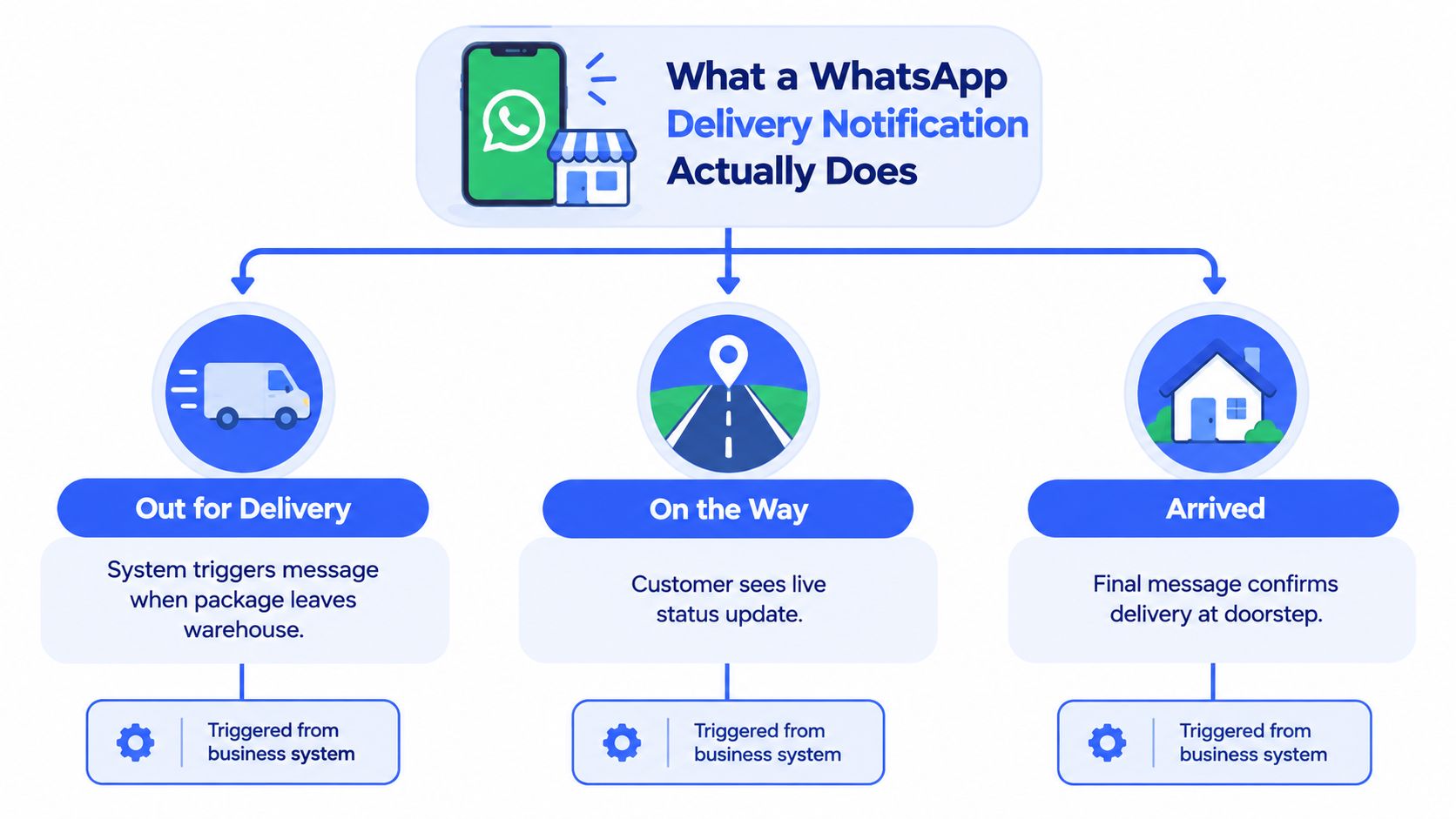
A WhatsApp delivery notification is a chain of messages triggered by operational milestones. It can begin with order confirmation, continue when the route is released, update when the driver approaches, and finish with a recorded outcome. The message isn’t the event. It reports the event.
Think of it as a flight status board. “Scheduled” means one thing. “Boarding” means another. “Arrived” is useful, but it still doesn’t tell you whether the passenger collected their luggage. Delivery notifications need the same discipline. Each label should correspond to a state your operation can verify.
A practical lifecycle looks like this:
- Trigger: Your order, route, geofence, or proof-of-delivery system records an event.
- Send: The messaging service submits the appropriate WhatsApp template.
- Sent: The platform has accepted the request for processing.
- Delivered: WhatsApp confirms delivery to the recipient’s device.
- Read: WhatsApp may report that the message was opened, if the customer’s privacy settings allow it.
- Follow-up: Your workflow either waits for the next milestone or starts an exception path.
Treat status events as operational data
A successful API response only confirms that the platform accepted the request. It doesn’t prove that the customer’s device received or displayed the message. Your system should persist the WhatsApp message ID, route or order ID, recipient identifier, current status, and event timestamps in durable storage.
Repeated webhook events are normal enough to plan for. Deduplicate them, use the message ID as an idempotency key, and prevent an old callback from moving a message backward. A late “delivered” event must not overwrite an already recorded “read” state.
Read status is optional evidence, not a performance target. A customer can suppress read receipts, so delivery confirmation may be the final available signal. Treating missing read status as proof that the customer is unreachable will send your team chasing a problem that may not exist. For a broader view of tracking expectations, see this guide to follow my delivery workflows.
Message Types and Templates for Every Milestone
A delivery operation needs separate templates for separate events. Combining every status into one long message creates a confusing timeline and makes it harder to identify which operational action caused the alert.
Use these five message types as a starting library:
Order confirmed
Trigger: The order passes validation and enters the delivery queue.
Send timing: Shortly after order acceptance, not when a driver has been assigned.
Include: Business name, order number, planned delivery date or window, tracking-page URL, and support route.
Example:
Hi Sam, your order 1842 is confirmed for delivery on Tuesday. Track updates here: [tracking link]. Reply to this message if you need help.
Keep this message factual. Don’t include an offer, product recommendation, or promotional banner. A confirmed order is a utility event.
Out for delivery
Trigger: The route is released and the driver has the stop in the active run.
Send timing: After the driver’s route is operationally ready, not when the order is merely assigned in the office.
Include: Order number, delivery window, business or depot name, tracking link, and support path.
Example:
Your order 1842 is out for delivery from Northside Depot. Follow the live status here: [tracking link]. Contact support if access details have changed.
This is usually the most valuable proactive message because it tells the customer the delivery is in motion.
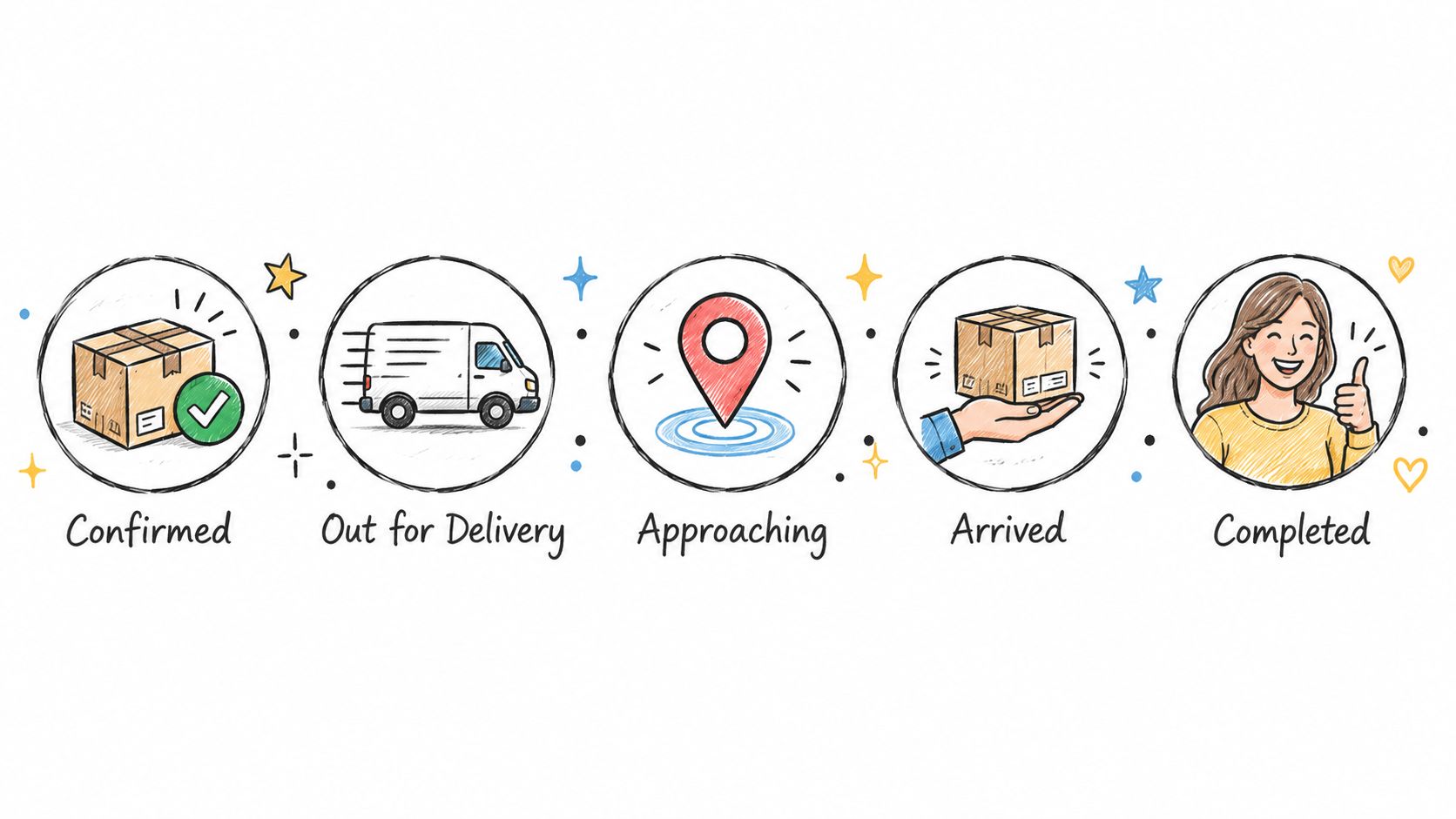
Approaching or ETA update
Trigger: The driver reaches a configured area or the system has a reliable route-position event.
Send timing: Close enough to be useful, not after the driver has already passed the address.
Include: Current ETA window, tracking URL, access reminder if it remains valid, and a reply option.
Example:
Your delivery is approaching. The driver expects to arrive during the current delivery window. Check the live route here: [tracking link].
Avoid copying internal route reshuffles into the customer message. A dispatcher may move stops several times while protecting the delivery window. The customer needs the latest useful expectation, not every internal calculation.
Arrived
Trigger: The driver enters the relevant geofence or records arrival at the stop.
Send timing: At arrival, before the handoff outcome is known.
Include: Arrival notice, access or contact instruction, and a clear way to report a problem.
Example:
The driver has arrived at your delivery address. Please meet the driver or follow the agreed drop-off instructions. Reply HELP if this isn’t your delivery.
Arrival is not completion. This separate message prevents your system from claiming a successful handoff before the driver records what happened.
Completed or failed
Trigger: Proof of delivery is captured, or the driver records a defined exception such as refusal, absence, blocked access, or a permitted safe-place drop.
Send timing: Immediately after the outcome is recorded.
Include: Outcome, timestamp, proof type where appropriate, tracking or support link, and correction path.
Example for completion:
Delivery for order 1842 has been completed. Proof of delivery is available here: [tracking link]. Reply HELP if the delivery outcome doesn’t match what you received.
Example for failure:
We couldn’t complete delivery for order 1842 because access was unavailable. Please reply or contact support to arrange the next step.
Use an approved utility template for transactional delivery communication. Keep each template tied to one real milestone. A message that starts as an ETA update but adds a discount or sales pitch stops looking purely operational and can create both approval and trust problems.
Consent, Compliance, and What You Must Disclose
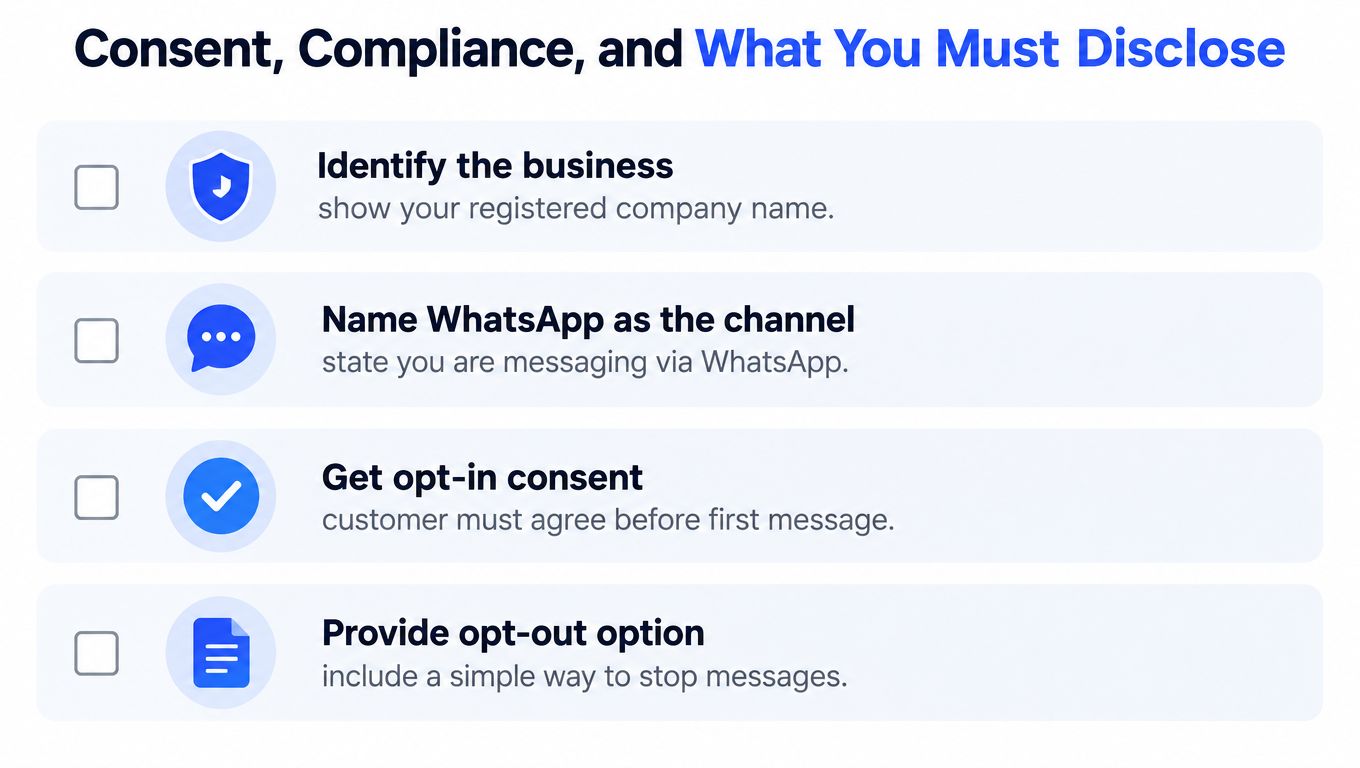
The rollout should start with consent, not with template copy. Before sending a business-initiated WhatsApp delivery alert, identify the business, name WhatsApp as the channel, explain the type of notification the customer will receive, capture voluntary opt-in, explain how to stop messages, and provide relevant privacy information.
A practical consent statement can be direct:
We’re [Business Name]. With your permission, we’ll send delivery updates through WhatsApp, including route and delivery-status notifications. You can stop these messages at any time by replying STOP. See our privacy information here: [privacy link].
Store the consent source, timestamp, purpose, and opt-out status with the customer or order record. Don’t leave that information in a spreadsheet that the messaging service can’t check. The send decision should query the current consent state immediately before dispatch.
Keep utility content genuinely transactional
A delivery template can contain stable, order-specific fields such as:
- Order number: Identify the transaction clearly.
- Delivery date or ETA window: Give the customer a useful expectation.
- Depot or brand name: Make the sender obvious.
- Tracking-page URL: Offer live context without cramming route details into the message.
- Support path: Give the customer a way to correct an issue.
Don’t embed mutable route details that may become stale after dispatch changes. Don’t turn “Your order is out for delivery” into “Your order is out for delivery, and your discount expires tonight.” The first is a utility update. The second introduces marketing language and should not share the same operational template.
Make opt-out enforcement immediate
An opt-out isn’t a note for the next batch job. When a customer replies STOP or uses your stated opt-out method, update the suppression record immediately and block future WhatsApp delivery sends. Customer service should see the same status, so an agent doesn’t manually trigger a message while the automation is suppressing another.
Business-initiated messages generally require an approved template, and approval alone doesn’t guarantee delivery. Customer-specific variables must be valid, the recipient must be eligible, and later delivery events must be processed correctly. The WhatsApp consent guidance supports this operational approach.
Your customer-service lead should be able to answer four questions without searching through systems:
- Which consent did this customer give?
- What notification type did they agree to receive?
- When did they opt out, if they did?
- Which system prevents the next WhatsApp send?
If the answers aren’t available, the account isn’t ready for a reliable rollout.
The Hidden Gap Between Delivered and Handoff
A system-marked “delivered” status isn’t proof that the goods reached the intended recipient. It can mean the message reached the customer’s device, or that the driver marked the stop complete, depending on which system you’re looking at. Neither label alone proves a successful physical handoff.
Separate the final mile into three events:
- Arrival: The driver reaches the address or configured geofence.
- Handoff: The recipient, named neighbor, or authorized site contact receives the goods, or the driver uses an approved drop location.
- Exception: The driver records absence, refusal, unsafe access, damage, temperature concern, or another defined failure.
A builders’ merchant dropping pallets has different evidence needs from a furniture retailer using a two-person crew. An LPG distributor needs a clear recipient outcome for cylinders. A cold-chain wholesaler may need delivery timing and condition notes. In each case, “delivered” is too blunt to support a complaint investigation.
Driver rule: Never let “stop complete” stand in for the evidence that explains who received the goods and what happened at the address.
Put evidence behind the status
The completion notification should reflect the proof captured at the stop. Depending on the operation, that proof may be a signature, recipient name, photograph, delivery reason, driver note, or permitted safe-place record. The message should also offer a correction path, such as “Reply HELP if this outcome is incorrect.”
A practical driver checklist looks like this:
- Confirm arrival at the correct location.
- Record the recipient or authorized outcome.
- Capture the configured proof type.
- Record an exception when the handoff fails or differs from the plan.
- Trigger the completion or exception notification only after saving the record.
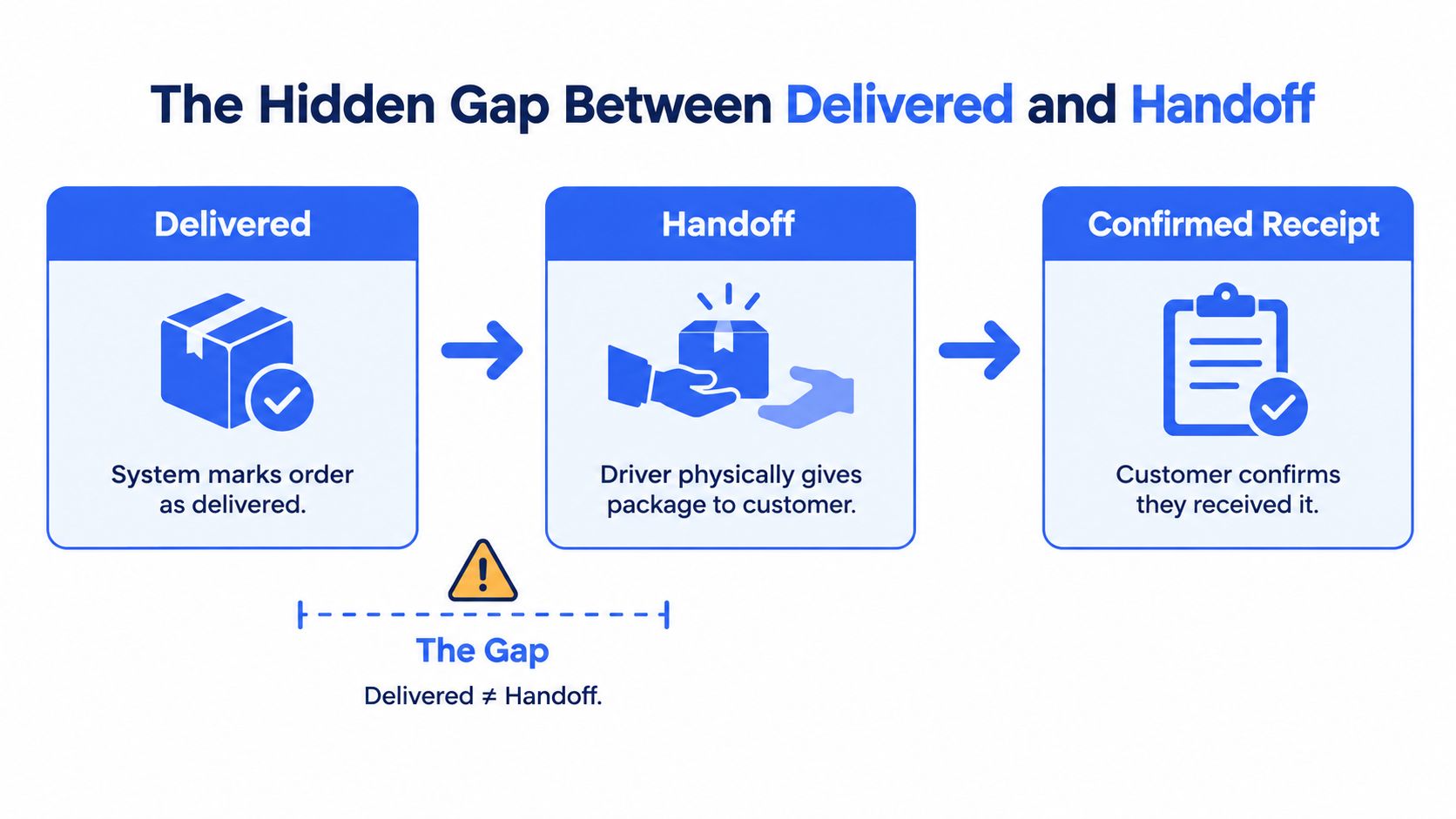
This distinction matters during a “delivered but not received” complaint. The support agent needs to see whether the driver arrived, whether someone accepted the goods, what proof was captured, and whether the customer has a route to dispute the result. A basic proof of delivery workflow gives the notification something solid to report.
The strongest design sends different messages for arrival, handoff, and exception. It doesn’t hide uncertainty behind a cheerful completion label. That is what separates a generic WhatsApp delivery notification from an auditable operational record.
WhatsApp Business API vs Link-Based Delivery Platforms
There are two sensible ways to build this capability. A team can integrate directly with the WhatsApp Business API, or it can use a delivery platform that connects route activity, tracking, proof of delivery, and messaging in one operational workflow.
Direct API integration gives a large operation control over templates, customer data, routing logic, event storage, and support experiences. It also gives that operation the responsibility for consent records, template approval, webhook processing, idempotency, status ordering, fallback rules, monitoring, and ongoing maintenance.
A link-based platform trades some custom control for faster operational deployment. For a typical local fleet, that can be the better decision because the hard part isn’t sending one message. It’s connecting the message to the correct route event every day.
| Dimension | WhatsApp Business API | Link-Based Platform, such as Routelink |
|---|---|---|
| Time to first message | Requires account setup, integration work, template configuration, testing, and event handling | Uses existing delivery workflows and connects notifications through configured integrations |
| Compliance burden | Your team owns consent, templates, suppression, webhook records, and account controls | The platform can centralize operational settings, but your business still owns lawful consent and message content |
| Customization | Maximum control over payloads, logic, conversation handling, and data models | Faster standard workflows for scheduled, active, delivered, or failed stops |
| Total cost of ownership | Development, maintenance, monitoring, messaging fees, and support operations | Subscription or platform cost plus integration and message charges, with less custom code to maintain |
| Operational integration | Best when your ERP, dispatch engine, CRM, and support stack need bespoke orchestration | Best when order intake, route planning, driver links, tracking, and notifications should share one workspace |
For teams comparing customer communication tooling, this guide for enterprise social care teams is useful context because delivery alerts often become support conversations after the first reply.
Match the path to the operation
Choose the direct API route when you already have strong engineering ownership, complex custom workflows, and a clear reason to control every message event. It makes little sense to build that stack solely to send a few standard delivery milestones.
Choose a link-based platform when you need a working process across a small or growing fleet, especially when route planning, driver access, branded tracking, proof of delivery, and customer notifications are currently split across tools. Routelink can connect those delivery workflows with WhatsApp notifications through integrations and approved templates.
The recommendation is simple. Buy operational speed when your process is standard. Build deep integration when your process is unique.
A Realistic Rollout Plan for Your First Week
Don’t launch every notification type across every depot at once. Run a controlled week with one route, a small customer set, and a clear rollback path.
Day 1, fix the data and consent
Audit the order fields your messages will need: recipient identifier, mobile number, order number, delivery window, tracking URL, depot or brand, and consent state. Deliverable: a clean test list where every eligible stop has a usable mobile number and recorded consent.
Day 2, write and submit templates
Create separate utility templates for confirmation, out for delivery, approaching, arrival, completion, and exception. Keep variables stable and avoid route details that can change. Deliverable: approved template submissions with example values that resemble real orders.
Day 3, map operational triggers
Connect order creation, route release, geofence entry, proof-of-delivery capture, and failure reasons to the correct template. Deliverable: a trigger map showing the event, message, recipient, and required fields for every milestone.
Day 4, define the fallback path
Set a service window for missing delivery confirmation. If WhatsApp hasn’t produced the required delivery signal within that window, send an SMS or flag the stop for manual contact. Use email when the message needs to remain a searchable paper trail, such as a delivery summary or proof reference.
Day 5, pilot one route
Run the workflow with one dispatcher and one driver group. Watch for wrong recipients, missing variables, duplicate webhooks, stale links, and messages sent before the driver is active. Deliverable: a route log with every trigger, status event, and exception.
Day 6, review customer and support signals
Check opt-outs, replies, failed deliveries, manual corrections, and calls that still reached the office. Deliverable: a short defect list ranked by operational risk, not by how easy each fix is.
Day 7, expand carefully
Apply the corrected workflow to the wider fleet only after the pilot has stable status handling and clear driver instructions. Deliverable: a published operating procedure covering consent, trigger timing, proof requirements, fallback, and escalation.
Keep the SMS fallback as a safety net when a customer needs the alert but WhatsApp doesn’t confirm delivery. Keep email as the paper trail when the customer or support team needs a durable reference. Neither channel should duplicate every WhatsApp message. Fallbacks exist for missing outcomes, not for making the system noisier.
Cost Discipline and the Notification Budget
Since July 1, 2025, Meta has charged businesses per delivered message rather than primarily per conversation, and utility messages sent outside an active customer-service window can incur a fee, as described in the WhatsApp Business Platform pricing guidance. When a customer messages the business, a 24-hour service window opens, and utility messages sent during that window don’t incur a Meta fee according to the WhatsApp Business Platform FAQ.
That changes the design decision. Sending every internal ETA adjustment, route reshuffle, and minor delay through WhatsApp can create cost without improving the customer’s understanding. A multi-stop route needs a notification budget, not a stream of every system event.
Use three practical tiers:
- Tier A: Send real operational milestones through WhatsApp, such as out for delivery, arrival, completion, and a meaningful exception.
- Tier B: Use SMS or email for lower-priority changes, such as a minor delay or address reminder, when WhatsApp adds little value.
- Tier C: Keep internal route calculations, temporary stop reordering, and dispatcher notes inside the operations system.
Before setting a budget, review the wider economics of what text message campaigns cost, then test delivery, replies, support load, and opt-outs by market. Rates vary by country and category, so don’t copy a cost assumption from another operation.
The rule is straightforward: send only when a real operational event has happened. If the customer needs certainty, send the milestone. If the system only changed its internal plan, keep it internal. Cost discipline and customer trust follow the same rule.
Routelink connects order intake, route planning, driver dispatch, branded tracking, proof of delivery, and customer notifications through integrations, including WhatsApp delivery updates. Visit Routelink to see how you can map operational milestones to clearer customer communication without building the entire workflow from scratch.