Last Mile Delivery Optimization Playbook — Routelink
Master last mile delivery optimization with this actionable playbook. Learn route planning, dispatch workflows, and tech strategies to cut costs and boost
10 October 2026 · Routelink Team
Last Mile Delivery Optimization Playbook
Master last mile delivery optimization with this actionable playbook. Learn route planning, dispatch workflows, and tech strategies to cut costs and boost
The shortest route isn’t always the cheapest route. A truck carrying pallets, appliances, cylinders, or bulky building materials can lose more time searching for a legal loading position than it saves by taking a shorter road. A sequence that looks efficient on a map may still create late arrivals, unsafe unloading, blocked traffic, and a second visit when the customer can’t receive the order.
Last mile delivery optimization has to measure the complete service, not just the distance between pins. That means combining road travel with parking search, loading-bay access, unloading time, customer availability, vehicle capacity, and the likelihood of a failed delivery. The dispatch plan is only efficient when the driver can execute it safely and the customer can complete the handover.
Table of Contents
- Redefining Route Efficiency Beyond Simple Mileage
- Building a Clean Data Foundation for Auto-Planning
- Managing Curb Constraints and Delivery Timing
- Frictionless Dispatch and Driver Workflows
- Preventing Failed Deliveries Through Better Visibility
- Implementation Checklist and Quick Wins
Redefining Route Efficiency Beyond Simple Mileage
Last-mile delivery is expensive because the final stage combines dispersed destinations, time-window constraints, failed-delivery risk, and urban congestion. A 2024 World Economic Forum assessment reported that last-mile activity represented approximately 53% of total shipping cost in 2023, up from 41% in 2018, a 12-percentage-point increase over five years (assessment summary).
That cost profile changes the question dispatchers should ask. Instead of “Which route has the fewest miles?”, ask, “Which feasible route completes the work with the least total operating effort?” A route with extra road distance can win if it reaches a usable loading bay, avoids a restricted street, reduces reversing, and gives the driver enough time to unload safely.
The curb is part of the route
A routing engine sees roads and travel times. A driver sees gates, bollards, parking restrictions, forklifts, stairs, narrow access roads, and customers who may need to move a vehicle before unloading can begin. Those details determine whether the planned arrival becomes a completed stop or an expensive delay.
For builders’ merchants, furniture retailers, LPG distributors, and wholesalers, service time can vary sharply between stops. A pallet delivery may require a tail lift and customer assistance. A cylinder exchange may need a safe stopping position and controlled handling. An appliance installation may involve access through a building rather than a quick kerbside handover.
Model each stop with operational attributes such as:
- Vehicle suitability: Record whether the location can accept a rigid truck, van, tail-lift vehicle, or another vehicle type.
- Loading access: Identify permitted bays, rear entrances, delivery gates, and local restrictions.
- Service duration: Estimate unloading and handover time rather than assigning every customer the same default.
- Customer timing: Separate strict appointment windows from preferred arrival periods.
- Completion risk: Flag locations with poor geocodes, difficult access, or a history of missed handovers.
Practical rule: A route is efficient only when its planned sequence survives contact with the curb.
Use the right routing model
The vehicle routing problem becomes more realistic when it includes capacity, depots, time windows, and service constraints. A useful primer on the underlying planning challenge is Routelink’s vehicle routing problem guide, but the operational principle is straightforward: optimize the work the fleet can perform.
Distance still matters. Lower mileage can reduce fuel use and driver hours, and research has reported material savings from optimized vehicle-routing approaches. But mileage should sit beside route-hours, fuel, completion time, first-attempt completion, and emissions in the scorecard. If the system minimizes distance while ignoring unloading delays, it may produce a mathematically neat plan that performs badly in the field.
Building a Clean Data Foundation for Auto-Planning
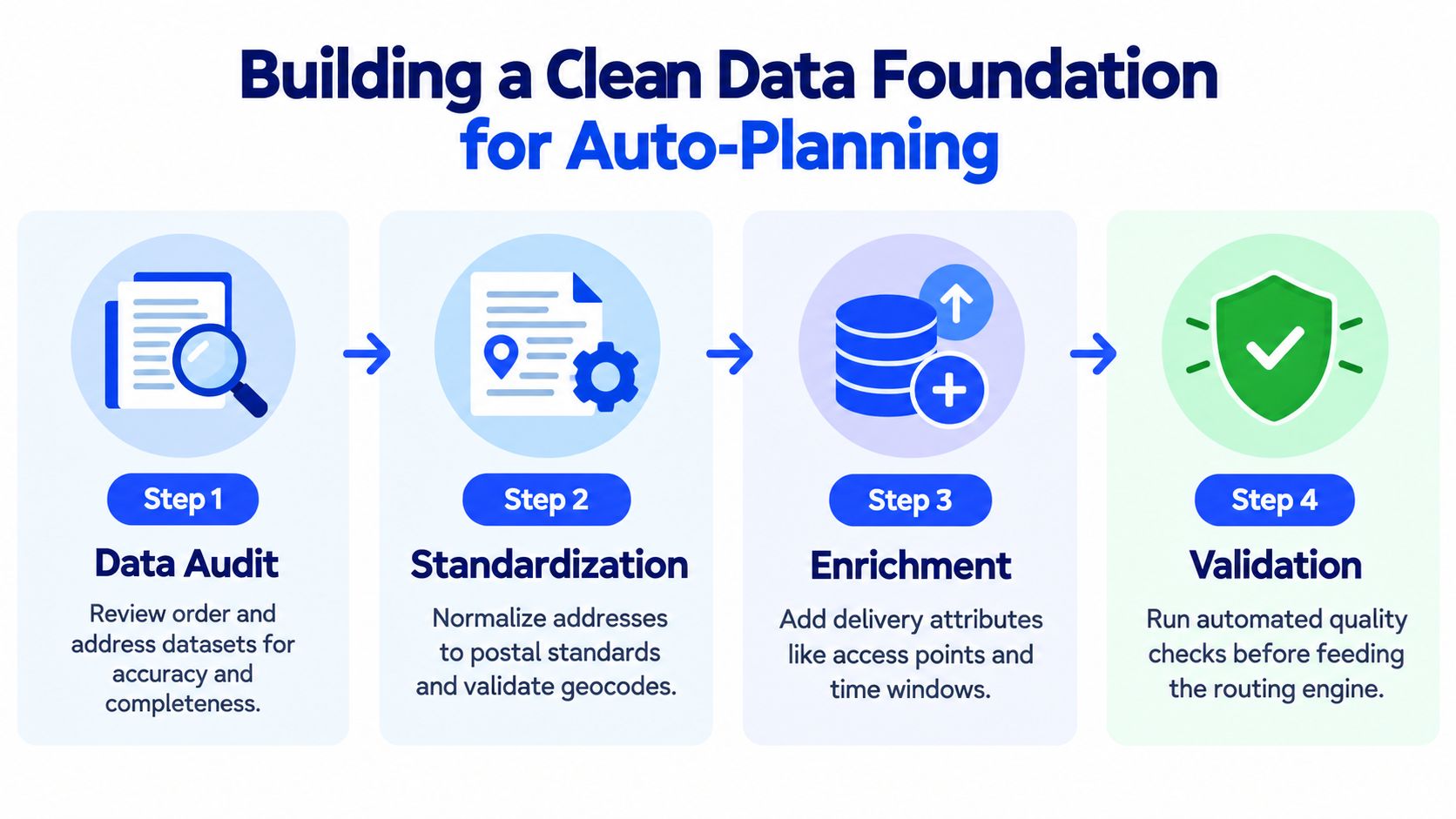
No routing engine can repair an order that has the wrong address, missing access notes, or an impossible load. Before auto-planning, consolidate every order source into one operational dataset. That might include an ecommerce platform, ERP export, CRM record, spreadsheet, or a dispatcher’s intake inbox.
A practical urban delivery workflow should treat planning as a time-dependent vehicle-routing problem with loading-bay assignment. The recommended sequence is to validate and geocode stops, cluster them by depot and constraints, then calculate routes against the road network and time-specific traffic conditions (urban delivery routing study).
Audit the intake before geocoding
Start by defining the minimum fields required for a deliverable order:
- Customer identity: Keep the customer name, order reference, phone number, and delivery contact together.
- Address structure: Separate building number, street, locality, postal code, and country instead of relying on one free-text field.
- Delivery requirements: Capture time windows, requested date, service duration, access notes, and whether a signature or photo is required.
- Load attributes: Record item count, weight, volume, handling requirements, and any vehicle restrictions.
- Depot ownership: Assign each order to a possible depot or leave it unassigned for a rules-based allocation.
Then remove duplicates and resolve conflicting records. If the same order appears in an ERP export and a spreadsheet, the planner needs a clear rule for which source is authoritative. Automation should reduce manual entry, not hide duplicate work behind a polished map. Teams that are consolidating fragmented operational data can also use this guide to data pipeline automation to think through repeatable import and validation flows.
Reject weak locations instead of hiding them
Geocoding should happen as orders enter the system. A strong match can proceed to planning. A weak match should receive a failure flag and remain outside automatic dispatch until someone reviews it. Manual correction may require a pin drop, a corrected postal address, a delivery entrance, or a note explaining that the customer is served from a rear access road.
This gate prevents one bad address from corrupting an entire route. It also creates a useful queue for the office team, because dispatchers can focus on exceptions instead of scanning every order manually. Routelink’s spreadsheet import workflow supports structured imports with a preview before the data reaches route planning.
Turn the load into a hard constraint
A route isn’t feasible because the vehicle has enough stops left. It’s feasible when the remaining weight, volume, item type, and access requirements fit the assigned vehicle and territory. Set capacity thresholds that trigger overload warnings before dispatch, and treat mixed loads carefully when one item blocks access to another.
The planner should also test depot assignment. A nearby depot may reduce drive distance but lack the correct vehicle or loading equipment. A slightly more distant depot can be operationally better if it provides the right capacity and keeps the route within its service territory.
Managing Curb Constraints and Delivery Timing
The shortest route often loses at the curb. A sequence can look efficient on a map and still break down when the driver reaches a street with no legal place to stop, a blocked loading bay, or a customer who is not ready to receive. INRIX found that delivery drivers in Seattle spend nearly six minutes searching for parking on average, and the share of curb space dedicated to loading ranges from 0.5% in Portland to 12.8% in San Diego (curb access analysis). The same analysis reported that nearly 80% of parking in designated commercial vehicle loading zones in a Seattle smart-curb project was occupied by unauthorized users.
For heavy-goods and local delivery, that is not a side issue. It is the work.
If the driver reaches the right address and still cannot stop legally or unload safely, the planned ETA stops meaning much. What the customer feels is the missed window, the rushed handoff, or the call saying the truck is outside but cannot get in. Dispatchers who review only mileage and drive time miss the cost that wrecks the day.
Measure the service at each stop
Build each stop around what has to happen on site. The address alone is not enough. A useful stop profile records expected unload duration, the vehicle footprint required, stopping requirements such as bays, rear access, height limits, or safe standing areas, any customer assistance needed, and access uncertainty where gates, security desks, or chronic parking problems create delay.
That information changes planning in a practical way. A furniture drop to a city-centre flat should not be treated like a quick carton handoff to a trade counter. A pallet with a tail lift requirement should not land on a vehicle that can physically carry it but cannot serve the site cleanly.
Then compare planned arrival, actual arrival, dwell time, access delay, and completion time after each run. Over time, the route should reflect what really happens at that customer. If one stop always needs extra unloading time or repeated calls to gain entry, the template should absorb that instead of pretending every stop is interchangeable.
Dispatchers who want a refresher on sequencing basics can review this guide on how to plan route with multiple stops. In practice, multi-stop logic gets much better once curb access and handling time are treated as first-order constraints instead of notes in a comment field.
Customer timing can beat shorter routes
Timing is a route variable, not just a promise to the customer. Shifting delivery times from morning to afternoon or nighttime can substantially reduce emissions and air pollution in urban areas.
That does not mean every operator should push work into the night. Noise restrictions, customer availability, driver safety, and site rules still decide what is workable. It does mean timing deserves the same attention as route order.
Grouped slots and off-peak options can make a route easier to execute, especially where morning congestion and curb competition are worst. In many operations, a wider promise window produces better service because the plan allows for actual unloading conditions, not just optimistic drive times. The right comparison is not only shorter versus longer mileage. It is which option gives the best mix of cost, driver hours, on-time probability, customer acceptance, and route density.
Frictionless Dispatch and Driver Workflows
The dispatch plan has to be easy to execute under pressure. Drivers shouldn’t need a complicated installation process, a special device, or a separate conversation for every route change. A browser-based, PIN-protected driver link can open on an existing smartphone or tablet, provide navigation through Google Maps, and capture proof of delivery without adding a native app rollout.
That matters when a fleet uses subcontractors, seasonal drivers, or vehicles shared across depots. The office can assign a route, send the secure link, and keep the driver workflow consistent. A single device can also handle multiple routes during a working day without forcing a new installation each time.
Build dispatch around exceptions
A useful dispatch board starts with a clear view by depot and date. Orders should be filtered by territory, vehicle, capacity, and delivery window, then assigned automatically where the rules are clear. Dispatchers still need to drag, drop, resequence, or reassign when a vehicle breaks down, a customer changes availability, or a loading bay becomes unusable.
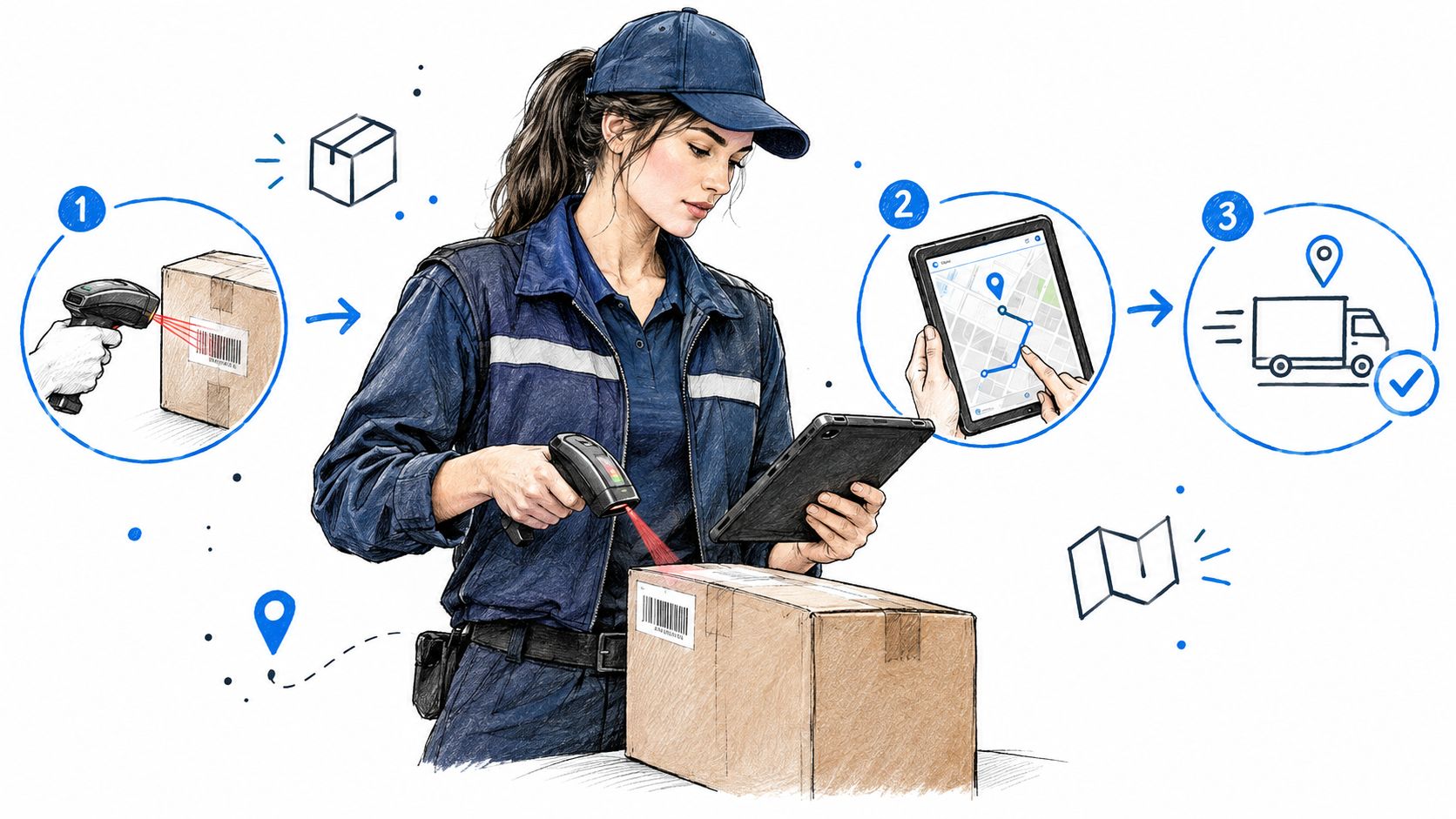
The driver workflow should contain only the actions needed at the stop:
- Open the task: Show the address, access notes, customer contact, and planned arrival.
- Start route guidance: Launch road navigation without retyping the destination.
- Complete the handover: Capture a signature, photo, reason code, note, or other required proof.
- Report an exception: Make failed access, refusal, damage, or customer absence easy to record.
- Move on: Send status back to dispatch without requiring a phone call.
When teams compare platforms, a practical guide on work order software selection can help them assess mobile usability, assignment rules, proof of completion, and reporting rather than choosing on route maps alone.
Give customers visibility before they call
A branded tracking page and configurable SMS, email, or WhatsApp notification can show the order status, route progress, and expected arrival. Customers receive useful information without tying up the dispatch desk with repeated status requests.
Routelink is one example of a web-based platform that combines order intake, multi-depot planning, driver dispatch links, customer notifications, live tracking, proof of delivery, and post-run analytics. Its automated dispatch software approach uses browser-based driver access rather than requiring native app installation.
The important design choice is not the number of features. It’s whether the driver can complete the job quickly and whether the dispatcher can see which stops need intervention.
Preventing Failed Deliveries Through Better Visibility
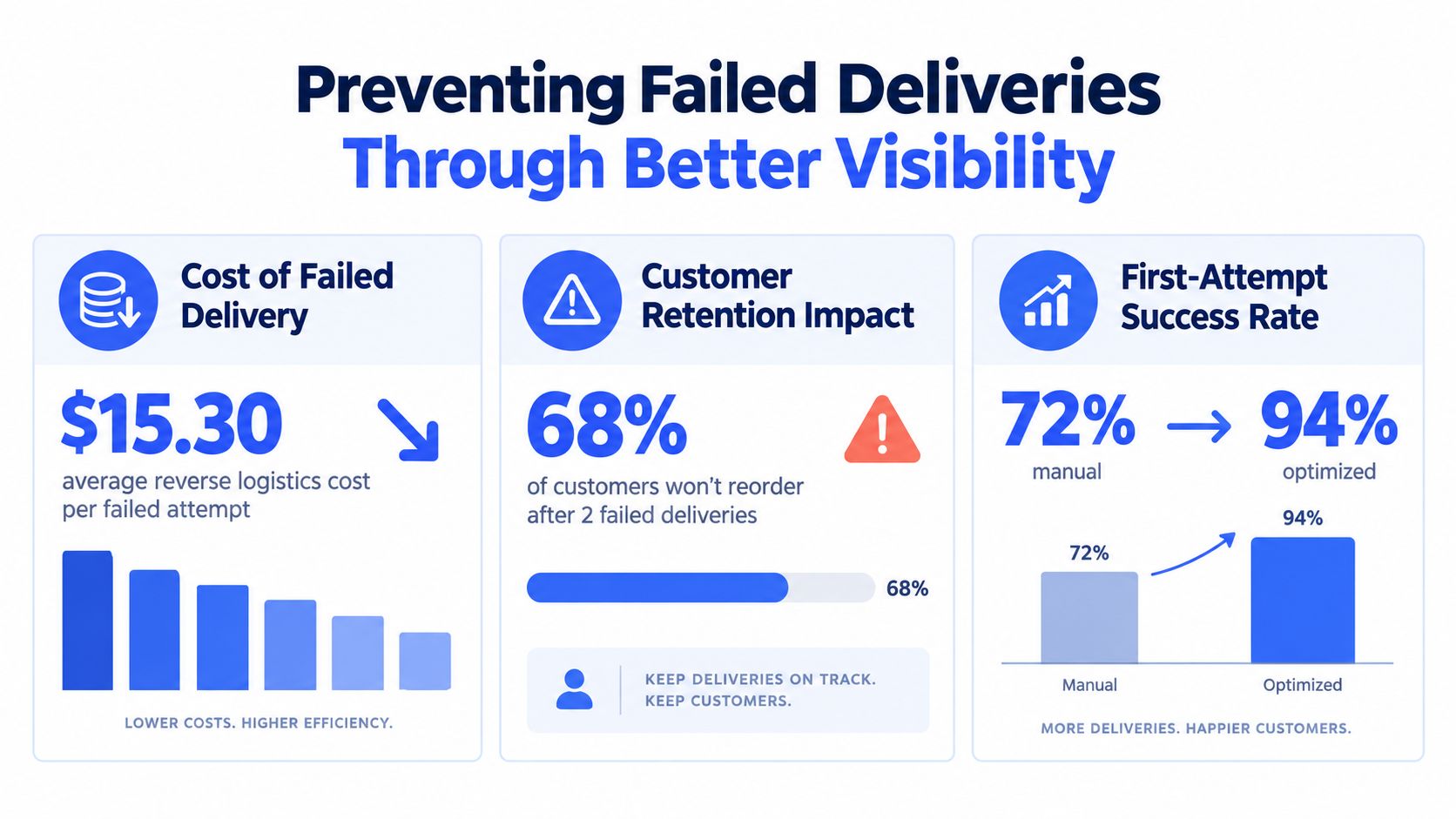
A failed delivery is a routing failure with a customer attached. The truck has already spent time reaching the stop, but the business still has to arrange another attempt, absorb additional capacity pressure, and explain the missed handover. Treating failure as a customer-service issue alone hides the planning causes.
Available research and industry analysis commonly report first-attempt failure rates around 5–8%, with one cited North American estimate placing the average direct cost of a failed package at $17.20 (failed-delivery cost analysis). At 100,000 annual stops, an 8% failure rate implies 8,000 reattempts and approximately $137,600 in direct redelivery cost, before lost capacity, support work, congestion, or customer churn are counted.
Classify the reason, not just the outcome
“Failed” isn’t a useful diagnosis. A customer absence needs a different intervention from a bad geocode, an inaccessible site, a refusal, or a vehicle problem. Use a controlled reason taxonomy and require the driver to select the closest cause, then add a photo or note when the situation needs context.
Start with historical proof-of-delivery records and identify failure-prone stops. Look for patterns by depot, zone, customer segment, time window, vehicle, and driver. If the same location repeatedly fails because the delivery entrance is behind the building, that address needs an operational instruction. If customers are absent during a particular window, the promise needs to change before the next route is planned.
Dispatch rule: Every failure code should answer one question, what must change before this stop is attempted again?
Join routing with customer availability
Capture customer availability during intake instead of treating it as an afterthought. Validate the address, record access instructions, and use a realistic delivery window. Then send a pre-arrival notification with a tracking link so the customer can prepare for the driver.
Live tracking helps the office identify delays before the promised window expires. It also gives the customer a more useful arrival estimate than a generic “out for delivery” status. For bulky goods, the message should remind the recipient about access, unloading space, assistance, or signature requirements where relevant.
Measure prevention separately from completion
Total deliveries completed can conceal repeated failure. Track:
- First-attempt completion: Did the order succeed without a reattempt?
- Reattempt cost per stop: What direct and operational cost followed the failure?
- Notification lead time: Did the customer receive enough warning to act?
- Address-correction rate: How often did intake data require repair?
- Preventable failure share: Could better data, timing, or instructions have avoided the problem?
That final measure gives the operations team a feedback loop. The aim isn’t merely to work harder after a failed delivery. It’s to make the next route less likely to fail.
Implementation Checklist and Quick Wins
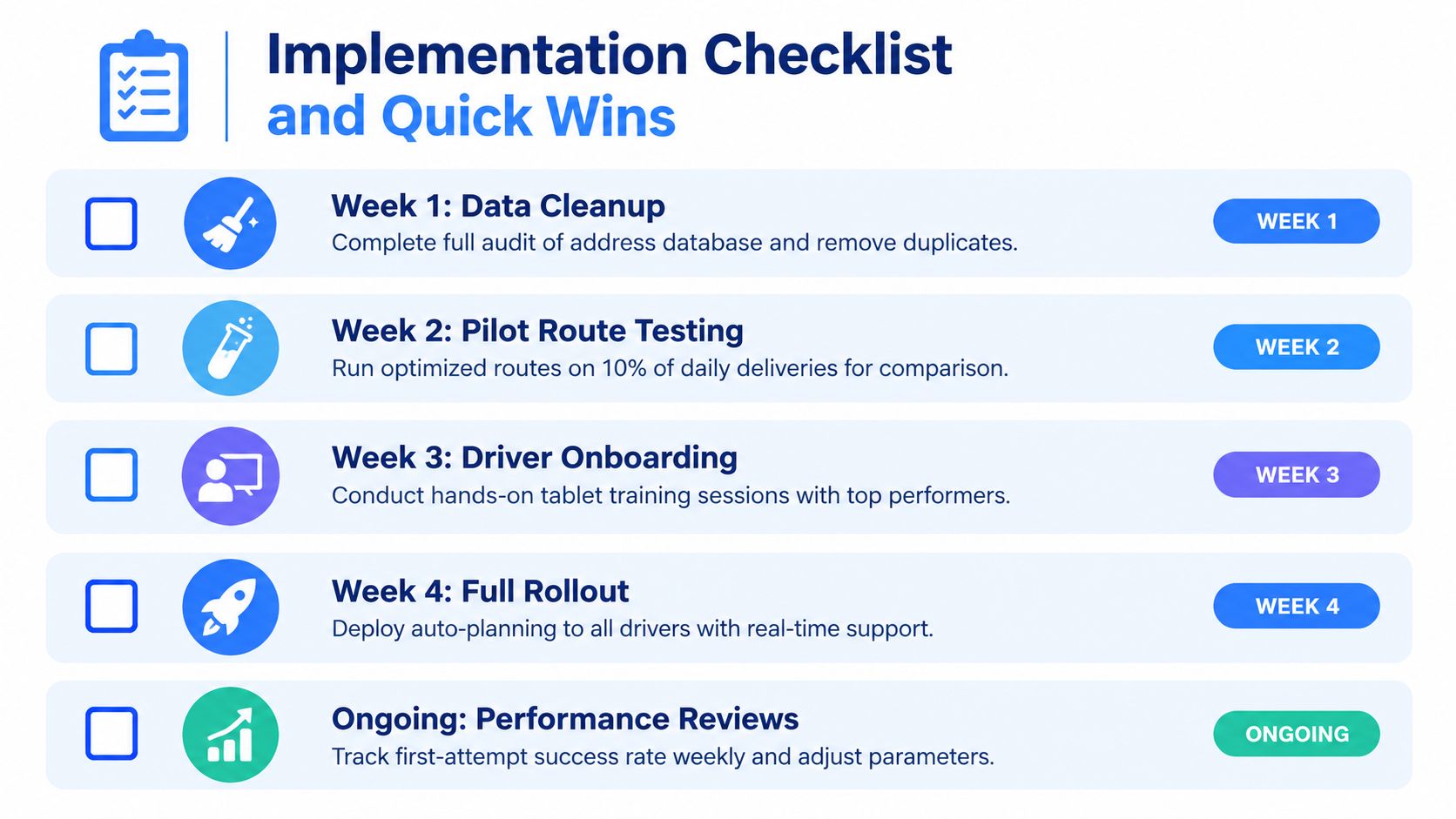
Rollouts fail when teams start with the optimizer and leave the messy operational work for later. The order should be the reverse. Expose the weak points in dispatch first, measure the current baseline, and add controls in a sequence the office and drivers can absorb.
Start where the daily friction is obvious. Consolidate order sources, remove duplicate records, validate addresses, and review the stops that always need a dispatcher to step in. Then add the fields the planner needs to make usable decisions: capacity, access constraints, service time, and timing commitments. If those inputs are thin, the route may look efficient on a map and still fall apart at the curb.
Establish a controlled pilot
Run the pilot against a two-to-four-week baseline comparison. Keep the test controlled. Compare routes with similar stop density, vehicle type, service profile, and delivery difficulty. A day full of apartment blocks, restricted loading areas, or heavy-goods drops should not be judged against a simple suburban run with easy parking and short handoff times.
Track normalized measures such as:
- Kilometres per delivered stop: Shows whether completed work is becoming more geographically efficient.
- Route-hours per stop: Captures congestion, parking search, unloading, and service time.
- Fuel per shipment: Connects route decisions to operating cost.
- First-attempt completion: Shows whether planning and visibility prevent rework.
- Time-window violations: Exposes promises the route cannot realistically keep.
- Planned versus actual dwell: Reveals curb and customer constraints that need better modelling.
Normalization matters because total mileage and total route hours rise and fall with volume. Per-stop measures show whether the operation is getting better at using capacity and handling real stop conditions.
Roll out in operational stages
First, stabilize intake. Every order should pass address validation and geocoding review before it reaches auto-planning. Weak matches need correction or an explicit manual decision. Letting doubtful stops flow straight into the route just moves the problem downstream to dispatch and the driver.
Next, test auto-assignment and sequencing. Keep a dispatcher in the loop while the rules are still being proven. The system can handle repeatable decisions, but someone still needs to catch vehicle mismatches, loading access issues, customer commitments, and awkward exceptions that software will miss early on.
Then, give drivers one usable workflow. Route access, navigation, proof of delivery, and exception codes should sit in the same browser-based flow. Watch for hesitation points. If drivers keep calling the office, skipping fields, or writing free-text notes, the process is still too loose to scale cleanly.
After that, automate customer communication. Send updates at moments that help the recipient act: route release, departure, delay, and imminent arrival. Messages that do not help with access, timing, or readiness only create noise.
Finally, turn repeated manual fixes into rules. If dispatchers keep adjusting the same zone logic, vehicle assignment, service duration, or access instruction, encode that knowledge into templates, geofences, zones, or stop profiles.
Keep expectations realistic
Results vary with demand density, fleet mix, delivery windows, and the quality of the starting operation. One vehicle-routing study reported operating-cost reductions ranging from 29.8% in a high-demand scenario to 55.76% in a low-demand scenario when an integrated optimized service was compared with conventional last-mile transportation. Those figures are case-study results, not a forecast for every fleet.
What carries across operations is the method. Clean the inputs. Model the physical constraints at the stop, not just the road distance between stops. Give drivers a practical workflow. Notify customers early enough to reduce failed handoffs. Measure completed service, dwell, and rework, because those are usually the costs that steadily erode last mile performance.
Routelink brings order intake, multi-depot route planning, driver dispatch links, customer notifications, live tracking, proof of delivery, and post-run analytics into one web-based workflow. Visit Routelink to see how your team can test curb-aware last mile delivery optimization against its current routes and delivery data.