Furniture Delivery Software: Optimize Logistics for 2026
Transform your logistics with furniture delivery software. Optimize routes, improve customer satisfaction, & cut costs in 2026. Discover key features like POD.

By 9:15 a.m., the day is already off track. One driver is waiting outside a gated estate with the wrong contact number. Another truck is running late because a “quick drop” turned into a carry-up and partial assembly. Your office team is answering the same question over and over: “Where’s my delivery?” Then the worst one lands. A customer took time off work for a booked window, and your crew missed it.
That’s normal in furniture delivery when the operation still runs on spreadsheets, phone calls, and driver memory.
Big and bulky delivery breaks generic last-mile processes. Sofas don’t behave like parcels. Mattresses need slot planning. Dining tables may need two people, protective wrapping, careful handling, and extra service time on site. Even simple barcode and tracking choices upstream can affect how smoothly products move into the final mile, especially for mattress and furniture sellers. For retailers thinking through that side of operations, these Bedhead Marketing insights for mattress retailers are a useful read.
What fixes the daily scramble isn’t “more hustle.” It’s a system that plans around the reality of large-item delivery. Good furniture delivery software gives dispatchers better control, gives drivers cleaner instructions, and gives customers visibility before they pick up the phone. If you want a practical look at where route planning fits into that picture, this guide to last-mile route optimization is a strong companion piece.
Table of Contents
- The End of Delivery Day Chaos
- What Is Furniture Delivery Software Exactly
- Essential Features for Big and Bulky Items
- The Business Case for Upgrading Your Operations
- Integrating Software into Your Existing Workflow
- Your Implementation and Migration Checklist
- Measuring Success and Real-World Examples
The End of Delivery Day Chaos
A furniture operation rarely fails because people don’t care. It fails because too many moving parts depend on manual coordination.
The dispatcher builds routes in a spreadsheet. Sales promises windows without checking truck capacity. Drivers call the office when customers don’t answer. A white-glove stop takes longer than expected, and every appointment after that starts slipping. By late afternoon, the team is doing damage control instead of running a delivery business.
That kind of day creates three costs at once:
- Operational cost: trucks drive extra kilometres, crews wait, and planners keep reworking the day.
- Customer cost: buyers lose confidence when windows move and updates stop.
- Brand cost: the delivery experience becomes the part customers remember most.
Practical rule: If your team is still rebuilding the day manually after the first delay, the process is too fragile for big and bulky work.
Furniture delivery software changes the operating model. Instead of treating each run as a separate fire to put out, it gives your business a shared system for planning, dispatching, customer updates, and delivery confirmation. That matters more in furniture than in courier work because the margin for error is smaller. One missed parcel is annoying. One missed sofa delivery can tie up a truck, a crew, a customer, and a return slot.
The pressure is only increasing. The global furniture logistics market is projected to grow by USD 45.2 billion between 2023 and 2028 at a CAGR of 6.78%, which points to growing delivery complexity for large-item retailers, according to Technavio’s furniture logistics market analysis.
The store owners who get ahead of this don’t just buy software. They tighten the handoff between sales, warehouse, dispatch, driver, and customer. That’s when delivery day starts feeling controlled again.
What Is Furniture Delivery Software Exactly
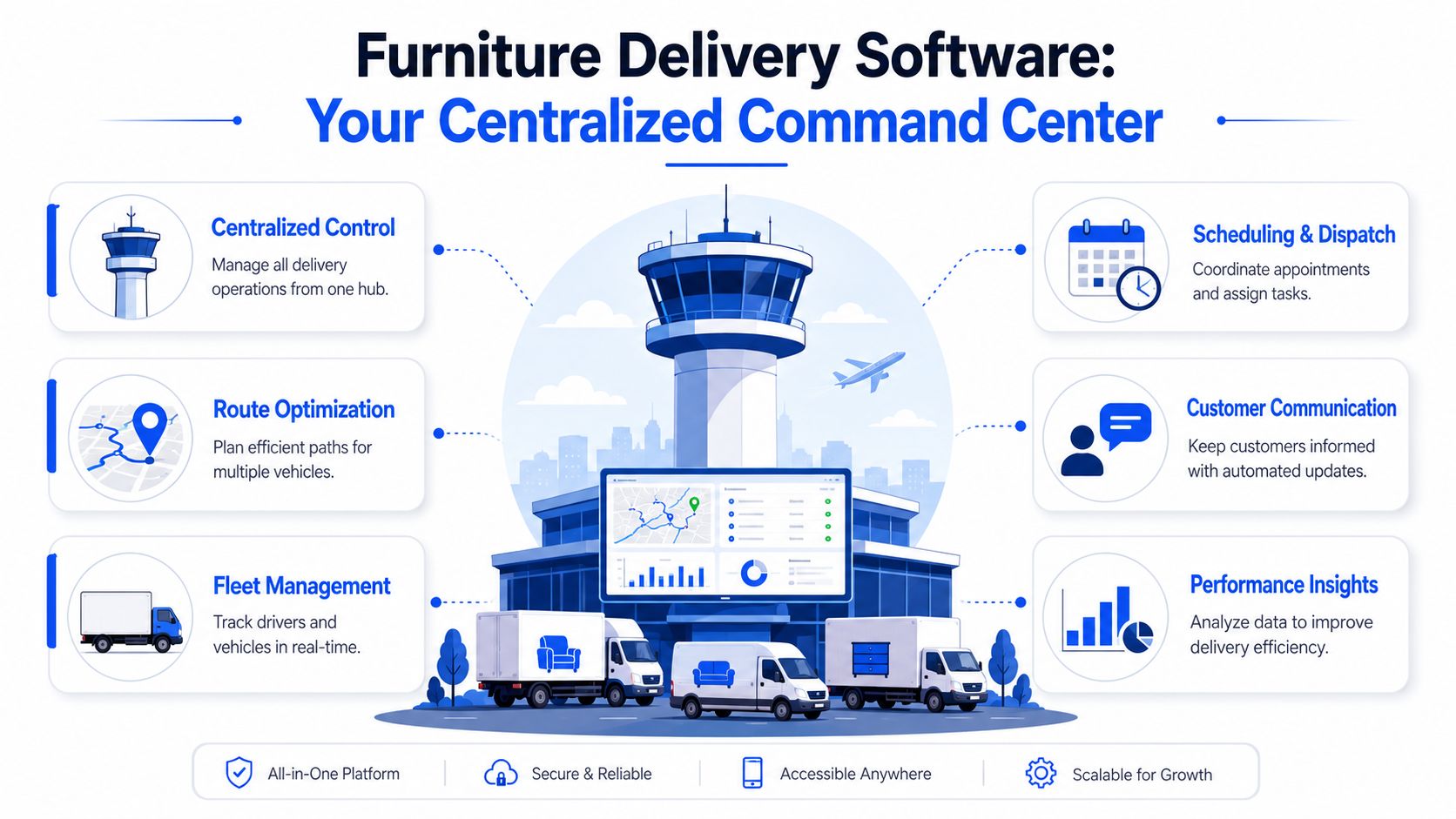
Furniture delivery software is best understood as air traffic control for your trucks, crews, and delivery appointments.
It sits in the middle of the operation and coordinates the work that usually gets scattered across paper manifests, WhatsApp chats, spreadsheets, phone calls, and driver guesswork. Orders come in, jobs get organised, routes are built, crews are assigned, customers are updated, and proof of delivery comes back into one place.
Why furniture needs its own category
A generic parcel app usually assumes one driver, one package size pattern, short stop times, and broad delivery windows. That logic breaks down fast when the job is a sectional sofa, a king mattress, or a wardrobe that needs upstairs placement.
Furniture delivery software is built to deal with details that matter in this trade:
- Vehicle suitability: not every truck can take every load.
- Crew requirements: some jobs need a two-person team, not the nearest available driver.
- Time windows: customers often need booked appointments, not “arriving today.”
- On-site work: carry-in, assembly, positioning, or packaging removal change stop duration.
- Delivery evidence: photos and signatures matter when damage claims appear later.
The software becomes the operational layer that makes these constraints visible before the truck leaves the yard.
What it should control every day
At minimum, a solid platform should act as one command center for these tasks:
- Job intake: import deliveries from your store, ERP, or spreadsheet.
- Planning: assign jobs by geography, capacity, service type, and appointment window.
- Dispatch: send the right run to the right crew with clear stop information.
- Tracking: monitor route progress and exceptions while trucks are on the road.
- Customer updates: send ETA messages and status changes without office staff chasing each stop.
- Completion: capture signature, photos, notes, and delivery outcomes.
If the software can’t understand the difference between a boxed bedside table and a two-person lounge suite with assembly, it’s not furniture delivery software. It’s just a courier tool wearing a different label.
That distinction matters because the market is getting larger and more operationally demanding. As noted earlier, furniture logistics is expanding quickly, and that growth puts more pressure on retailers to use systems built for large-item delivery rather than forcing parcel workflows onto heavy goods.
Essential Features for Big and Bulky Items
The right feature list isn’t about having more buttons. It’s about whether the platform can cope with the awkward, expensive realities of furniture delivery.
A sofa delivery can fail because of route order, access limits, poor customer communication, weak crew matching, or bad proof at handover. Good software handles those weak points before they become complaints.
Route optimization that respects real constraints
For furniture, route optimization isn’t just “shortest path.” It has to account for traffic, vehicle capacity, item size, promised time windows, and how long each stop will take.
That matters because AI-driven route optimization can reduce driving time by 20 to 30%, cut fuel consumption by 15 to 25%, and improve on-time performance by 18 to 22% when it uses real-time traffic, capacity constraints, and service-time windows, as outlined in this route optimization research paper.
What doesn’t work is forcing a dispatcher to choose between efficient mileage and realistic appointments. The system should do both.
Scheduling that includes service time
Parcel logic treats every stop as roughly equal. Furniture stops aren’t equal at all.
A boxed chair left at a reception desk is one kind of job. A room-of-choice bed delivery with light assembly is another. Your scheduler needs service-time rules so dispatch isn’t pretending those stops take the same effort. If it doesn’t, the route may look fine at 8:00 a.m. and collapse by lunch.
Look for scheduling controls that can handle:
- Appointment windows: morning, afternoon, or specific booked slots.
- Service tiers: doorstep, room-of-choice, assembly, haul-away, or white-glove.
- Access notes: gated estates, apartment lifts, stairs, narrow roads, loading bays.
- Buffer logic: extra time where delays commonly happen.
Two-person crew and vehicle matching
Many software solutions fall short. Big and bulky delivery often needs more than a vehicle assignment. It needs a capability assignment.
A good system should know which jobs require two people, which need a larger vehicle, and which stops need special handling. If a wardrobe goes onto a one-person route because dispatch only saw postcode and weight, the software failed long before the truck arrived.
Field advice: Match the job to the crew and truck together. Separating those decisions is how you create rework, overtime, and damaged goods.
Protective handling also matters. If your team is moving upholstered or high-finish items, practical materials like covers for moving protection help reduce scuffs and dirt in transit. Software won’t replace handling discipline, but it should make special handling requirements visible on the job.
Digital proof of delivery that ends arguments
Furniture retailers deal with a different class of delivery dispute than parcel carriers. The issue isn’t just “delivered or not delivered.” It’s “wrong room,” “corner chipped,” “customer says the packaging was already torn,” or “team never completed setup.”
That’s why digital proof of delivery has to be richer than a tick box. You want timestamped completion, signatures, photos, notes, and exception codes. A practical overview of what that should include is covered in this guide to proof of delivery software.
The best setups make it easy for crews to record the condition of goods, the exact handover outcome, and any issue on site before they drive away.
Customer notifications that prevent no-shows
When customers buy furniture, they’re not casually waiting at home all day. They’ve moved rooms around, arranged access, and often taken time off work.
Automated communication is one of the most useful features in the whole stack. It reduces incoming calls, helps customers prepare for arrival, and gives your office staff breathing room. For big and bulky work, the key isn’t just sending a message. It’s sending the right message at the right point: booking confirmation, route-start update, live ETA, delay notice, and delivered confirmation.
Good communication doesn’t eliminate every failed stop. It does eliminate a lot of preventable ones.
The Business Case for Upgrading Your Operations
Most owners don’t need convincing that delivery is messy. They need a reason to spend money fixing it.
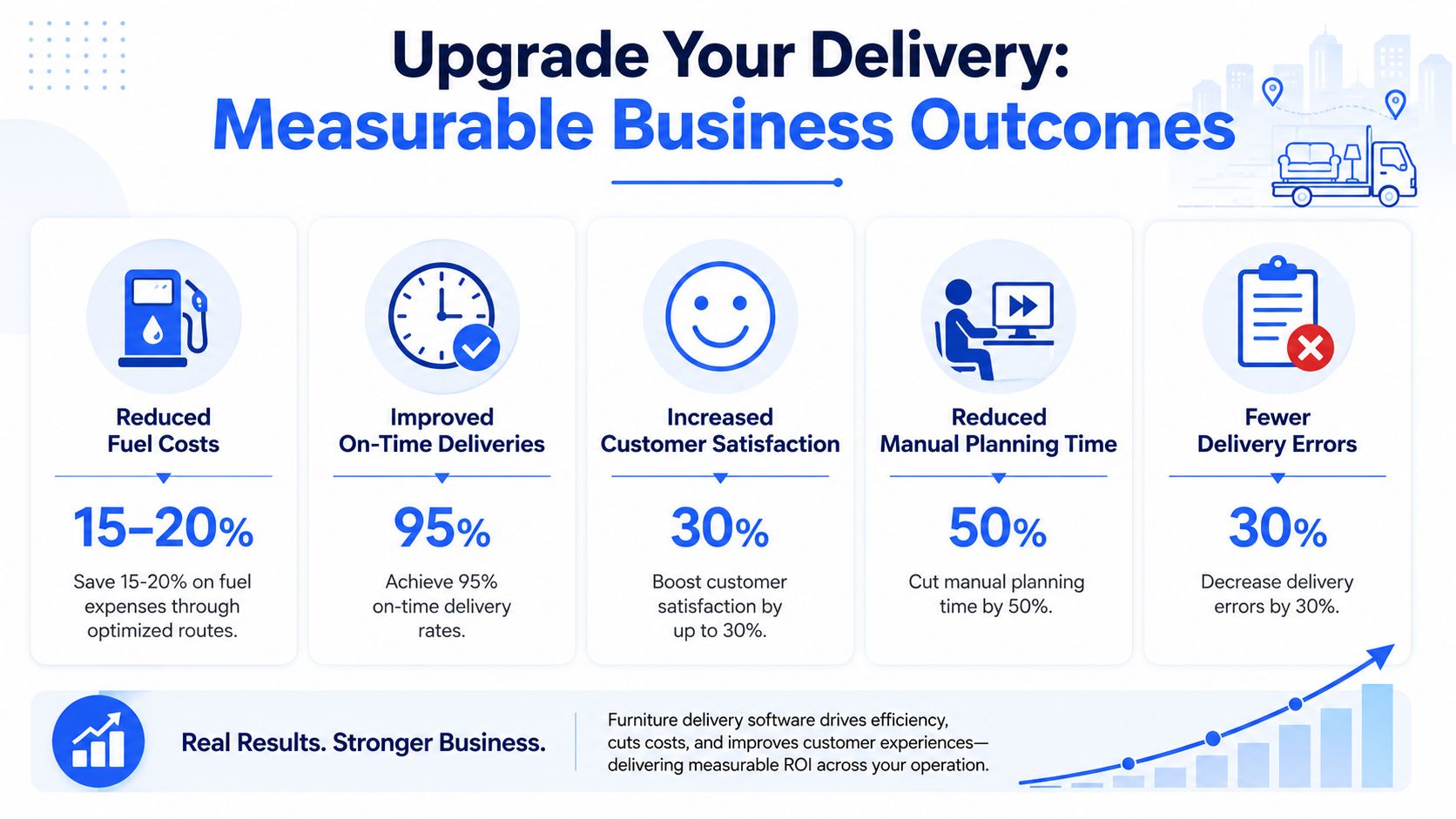
The business case for furniture delivery software is simple. It improves capacity, cuts wasted effort, reduces failed stops, and lowers the admin load that keeps your office team buried in reactive work.
Where the return actually comes from
The strongest return usually comes from four places.
First, planners stop building routes by hand. Industry deployment benchmarks published by Bringg say automated dispatching connected to platforms like ERP, Shopify, or WooCommerce can cut manual planning time from 2 to 3 hours to under 15 minutes per route, and the same category of professional delivery platforms can increase daily delivery stops per vehicle by 12 to 18%. Bringg also notes they can reduce customer inquiry calls by 35 to 40% and lower failed-delivery rates from 8% to under 3% through transparent, automated communication in furniture operations, based on Bringg’s furniture delivery overview.
Second, you get more from the fleet you already have. Better sequencing, cleaner capacity use, and fewer route breakdowns create room for more completed work without adding additional trucks.
Third, the customer experience stops depending on whether someone in the office had time to send an update. That’s especially important for retailers managing direct-to-consumer growth. If you’re weighing whether to keep delivery in-house, outsource parts of it, or blend the two, this piece on E-commerce logistics for SA makers helps frame the operational trade-offs.
Fourth, disputes become easier to resolve. The office no longer has to reconstruct a delivery from memory, phone records, and a driver’s handwritten note.
Manual Planning vs. Furniture Delivery Software
| Operational Task | Manual Method (The Old Way) | With Delivery Software (The New Way) |
|---|---|---|
| Route building | Dispatcher pieces together runs in spreadsheets | System plans routes using delivery constraints |
| Crew assignment | Based on memory or availability | Based on crew requirement and job type |
| Customer updates | Office staff call or text manually | Automated status messages and ETA updates |
| Delivery confirmation | Paper note or verbal confirmation | Signature, photo, and digital record |
| Exception handling | Office reacts after the complaint | Exception captured at the stop and logged immediately |
| Peak season scaling | More admin strain and rushed planning | Faster dispatch and clearer operational control |
The hidden cost of manual planning isn’t just labour. It’s the chain reaction after the first bad assumption.
If your store is already handling enough volume that dispatch feels like a daily rescue mission, the upgrade usually pays back in control before it pays back on paper.
Integrating Software into Your Existing Workflow
One of the biggest objections I hear is, “Our current setup is too messy to integrate.” Usually it isn’t. It’s just inconsistent.
Modern furniture delivery software doesn’t require a perfect tech stack. It needs a reliable way to pull in delivery jobs, organise them, and return status data to the people who need it.
How orders move into the system
There are usually three workable paths.
The first is direct integration with your selling or back-office platforms. That’s the cleanest option if your team already uses Shopify, WooCommerce, or an ERP that stores order and customer details properly.
The second is scheduled import from a file export. Many retailers start here. A daily CSV or Excel upload is often enough to move from manual chaos to structured dispatch.
The third is a hybrid workflow. Some jobs arrive automatically from e-commerce channels, while trade orders, replacements, or service calls get added manually or by file.
If you need a plain-language overview of what sits inside a delivery system beyond route planning alone, this guide on delivery management software is useful.
What a clean workflow looks like
The best workflow isn’t the most advanced one. It’s the one your team can maintain without workarounds.
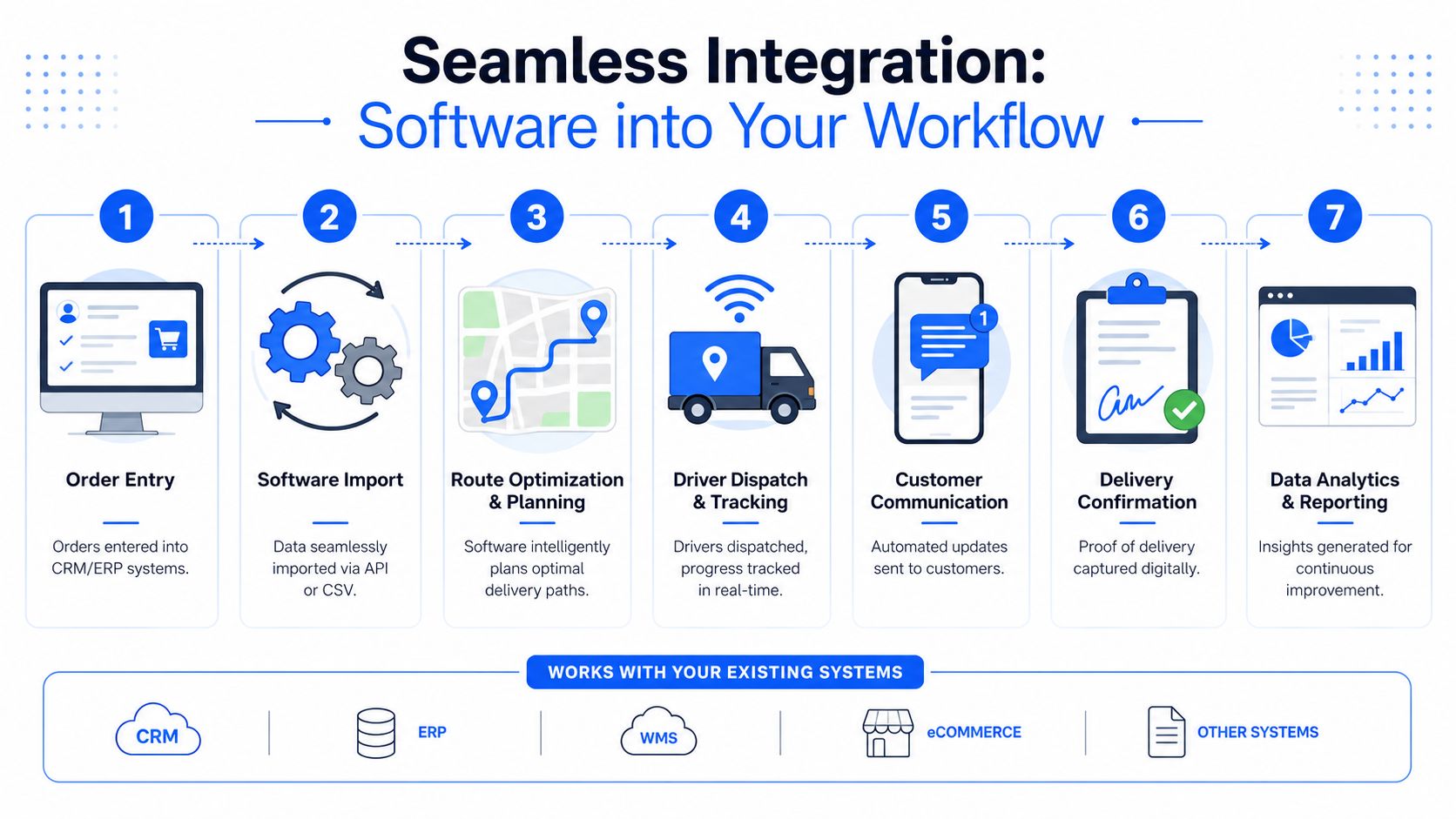
A practical setup usually follows this pattern:
- Capture the order correctly: customer details, address, product notes, service type, and any access constraints.
- Import jobs into the delivery platform: by API where available, or by file upload where it isn’t.
- Apply planning rules: capacity, time windows, crew requirements, and service duration.
- Dispatch routes to drivers: with clear stop-by-stop information.
- Update customers automatically: before and during the run.
- Capture completion and exceptions: signature, photos, notes, and delivery status.
- Feed reporting back to operations: so planners can see where the process is slipping.
A weak integration usually shows up in bad master data, not bad software. Missing phone numbers, vague access notes, and inconsistent service codes will break any system. Clean those inputs first, and implementation gets much easier.
Your Implementation and Migration Checklist
The biggest mistake in software rollout is trying to digitise a broken process without defining the rules first. If the team doesn’t agree on delivery types, crew requirements, and exception handling, the software will only expose the confusion faster.
That’s why a good rollout starts with operations discipline, not demos.
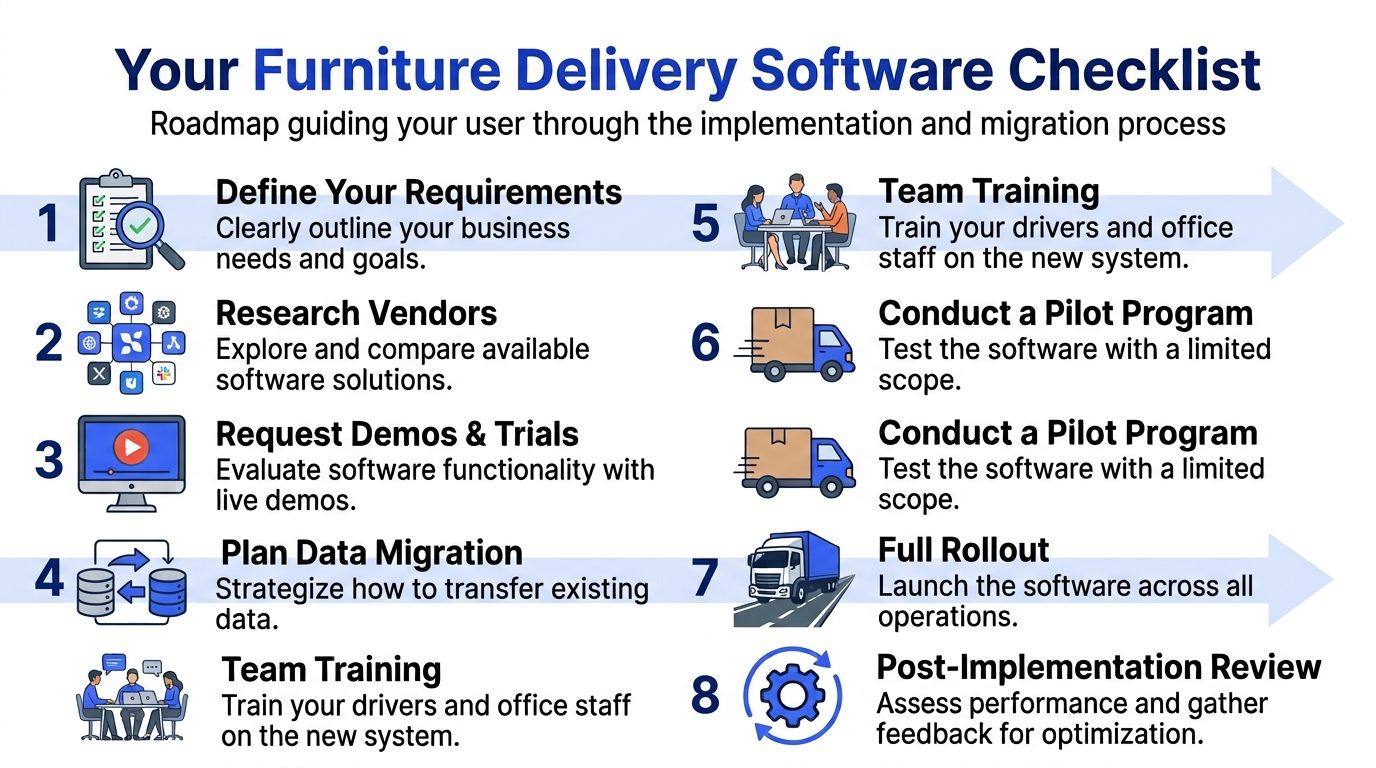
The rollout checklist
Use this as a practical starting point.
- Define your delivery rules: List the constraints in your business. Include truck types, crew requirements, service levels, appointment logic, and common access issues.
- Clean your job data: Standardise addresses, phone numbers, product descriptions, and service notes before migration.
- Map your order sources: Decide what comes from e-commerce, what comes from ERP, and what still needs manual entry.
- Choose a pilot area: Start with one route group, one branch, or one delivery type rather than flipping the whole operation at once.
- Train dispatch and drivers separately: They use the same system differently, so don’t run one generic training session and hope it sticks.
- Write exception rules: Late customer, damaged item, refused delivery, missing stock, inaccessible address. Decide what crews must record in each case.
- Review after the pilot: Look for route quality, driver adoption, office workload, and customer communication gaps before wider rollout.
Start with the routes that hurt most. High-failure white-glove work usually exposes the value of the system faster than simple drop-offs.
Key questions to ask a vendor
Not every platform that says it handles last-mile delivery is suited to furniture. Ask direct questions.
- Can the system handle two-person jobs and service-time rules?
- Can it assign by vehicle type and crew requirement at the same time?
- How are proofs of delivery captured for high-value items?
- What customer notifications are built in?
- Does the driver need an app, or can temporary crews work without one?
- How are changes handled after dispatch?
- What reporting can operations managers see without exporting everything manually?
- How does import work for our current systems, and what does setup require?
Don’t get distracted by polished dashboards if the vendor can’t answer the operational questions clearly. In furniture delivery, the boring details matter more than the demo.
A phased migration is usually safer than a hard cutover. Run manual and software-assisted planning side by side for a short period, compare outcomes, then move the rest once the team trusts the workflow.
Measuring Success and Real-World Examples
Software only counts as an upgrade if you can see the operational change in your numbers and in your day-to-day workload.
The wider market is moving that way. The last-mile delivery software market is projected to grow from USD 16.8 billion in 2026 to USD 45.9 billion by 2036, according to Future Market Insights on last-mile delivery software. That projection reflects a broader push toward automating local delivery workflows, including heavy-goods operations.
KPIs that matter in furniture delivery
Track metrics that reflect big and bulky reality, not generic courier dashboards.
- On-time delivery rate: especially for booked appointment windows.
- First-attempt delivery success: a core indicator for wasted crew and truck time.
- Cost per delivery: useful when comparing route quality across days or service tiers.
- Customer contact volume: rising “Where is my order?” calls usually signal poor visibility.
- Proof-of-delivery compliance: whether crews are capturing signatures, photos, and notes.
- Exception categories: damage, no answer, access issue, stock issue, refused delivery.
What good results look like in practice
A local furniture store often sees the first improvement in the office, not on the road. Dispatchers stop rebuilding routes manually, and customer service spends less time chasing drivers for ETAs.
An appliance and furniture retailer usually gets value when the software starts distinguishing simple drop-offs from jobs that need carry-in, extra handling, or a two-person team. That prevents avoidable misallocation.
A mattress seller with scheduled residential deliveries typically benefits most from cleaner customer communication and faster proof capture. Fewer ambiguous handovers mean fewer after-the-fact arguments.
The point isn’t to chase software for its own sake. It’s to run a delivery operation that doesn’t fall apart the moment one stop takes longer than planned.
If your team is dealing with missed windows, rising delivery admin, and too many customer calls, Routelink is worth a look. It’s built to help businesses plan routes, dispatch work, notify customers, and capture proof of delivery in one workflow, without adding unnecessary complexity to local delivery operations.