Dispatch Software for Small Business Explained Simply — Routelink
Learn how dispatch software for small business streamlines planning, tracking and delivery. Features, costs, and how to choose the right fit.
18 September 2026 · Routelink Team
Dispatch Software for Small Business Explained Simply
Learn how dispatch software for small business streamlines planning, tracking and delivery. Features, costs, and how to choose the right fit.
You’re halfway through the morning and the dispatch spreadsheet already has too many colors. One driver is waiting for an updated address, another is texting that the previous stop ran late, and three customers have called to ask where their orders are. You’re trying to rebuild routes while copying notes between a phone, a spreadsheet, and an inbox.
That system can work while deliveries are predictable and the owner can remember every exception. It starts to fail when orders arrive through several channels, drivers change during the day, or customers expect accurate updates. Dispatch software for small business replaces scattered coordination with a shared workflow that follows each job from order capture to completed delivery.
The shift isn’t about buying an enterprise system with a long implementation project. Modern cloud platforms grew out of earlier field-service tools and became more accessible when cloud computing reduced the cost and complexity that once kept smaller companies out. The delivery management software market was valued at USD 2.3 billion in 2024 and is projected to reach USD 5.1 billion by 2030, with a projected 14.2% CAGR, according to Strategic Market Research’s delivery management software analysis.

By the end of this guide, you’ll know what dispatch software controls, which capabilities matter for your delivery model, how to compare pricing beyond the headline, and how to launch without overwhelming your drivers.
Table of Contents
- What Dispatch Software Really Does Behind the Scenes
- Key Features That Make Dispatch Work for Small Teams
- How to Choose the Right Dispatch Software for Your Operation
- Implementation Steps From Import to Proof of Delivery
- Real World Use Cases and ROI for Small Businesses
- Next Steps to Streamline Your Dispatch Operation
What Dispatch Software Really Does Behind the Scenes
A useful way to understand dispatch software is to think of it as an air traffic controller for deliveries. An air traffic controller doesn’t just draw the shortest path between airports. The controller coordinates arrivals, departures, timing, capacity, changing conditions, and communication. Dispatch software performs a similar role for jobs moving through a local delivery operation.
The category evolved from paper routing, phone coordination, and office-only scheduling. Field-service automation has roots in mainframe-based efforts from the 1960s, expanded as personal computers became more affordable in the 1980s, and became much more accessible to smaller businesses when cloud computing matured. Mobilogic’s FieldDesk release in 2007 and FieldOPS release in 2013 offer examples of that progression, as described in ServiceBridge’s history of field service management software.
Core idea: Dispatch software is an execution control system. It connects the order, the plan, the driver, the customer, and the final delivery record in one workflow.
The Capture to Deliver flow
The workflow usually has five connected movements:
- Capture: Orders enter from Shopify, WooCommerce, an ERP, a warehouse system, or a spreadsheet upload. The system creates a structured job instead of leaving details buried in email or chat.
- Plan: The platform considers addresses, service windows, vehicle capacity, driver schedules, stop duration, and other operating rules. It builds a workable plan rather than sorting addresses.
- Dispatch: The dispatcher assigns routes and sends the right job details to each driver. If a driver becomes unavailable, the office can adjust the assignment without rebuilding the entire day from scratch.
- Notify: Customers receive delivery information through channels the business supports, such as branded tracking pages, email, SMS, or WhatsApp.
- Deliver: The driver completes the stop, records the outcome, and captures proof such as a photo, signature, or delivery note.
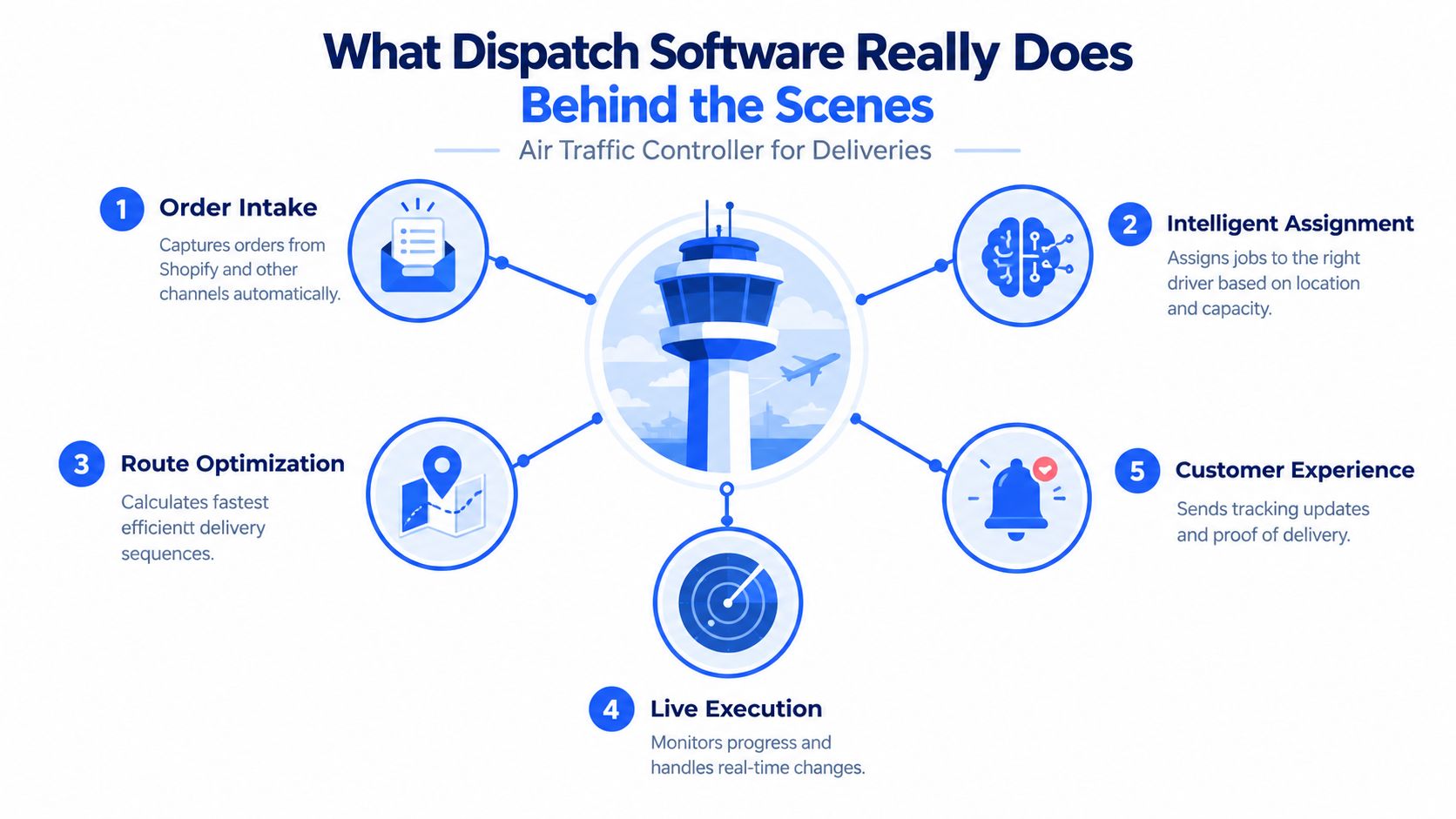
The important distinction is that dispatching isn’t only about route sequencing. It’s about keeping the plan and the day connected. When a stop changes, the driver needs the latest instruction, the customer may need a new expectation, and the office needs a reliable record of what happened.
Key Features That Make Dispatch Work for Small Teams
Small teams don’t need every feature offered by a large transportation suite. They need the capabilities that remove repeated decisions and keep information attached to the correct job.
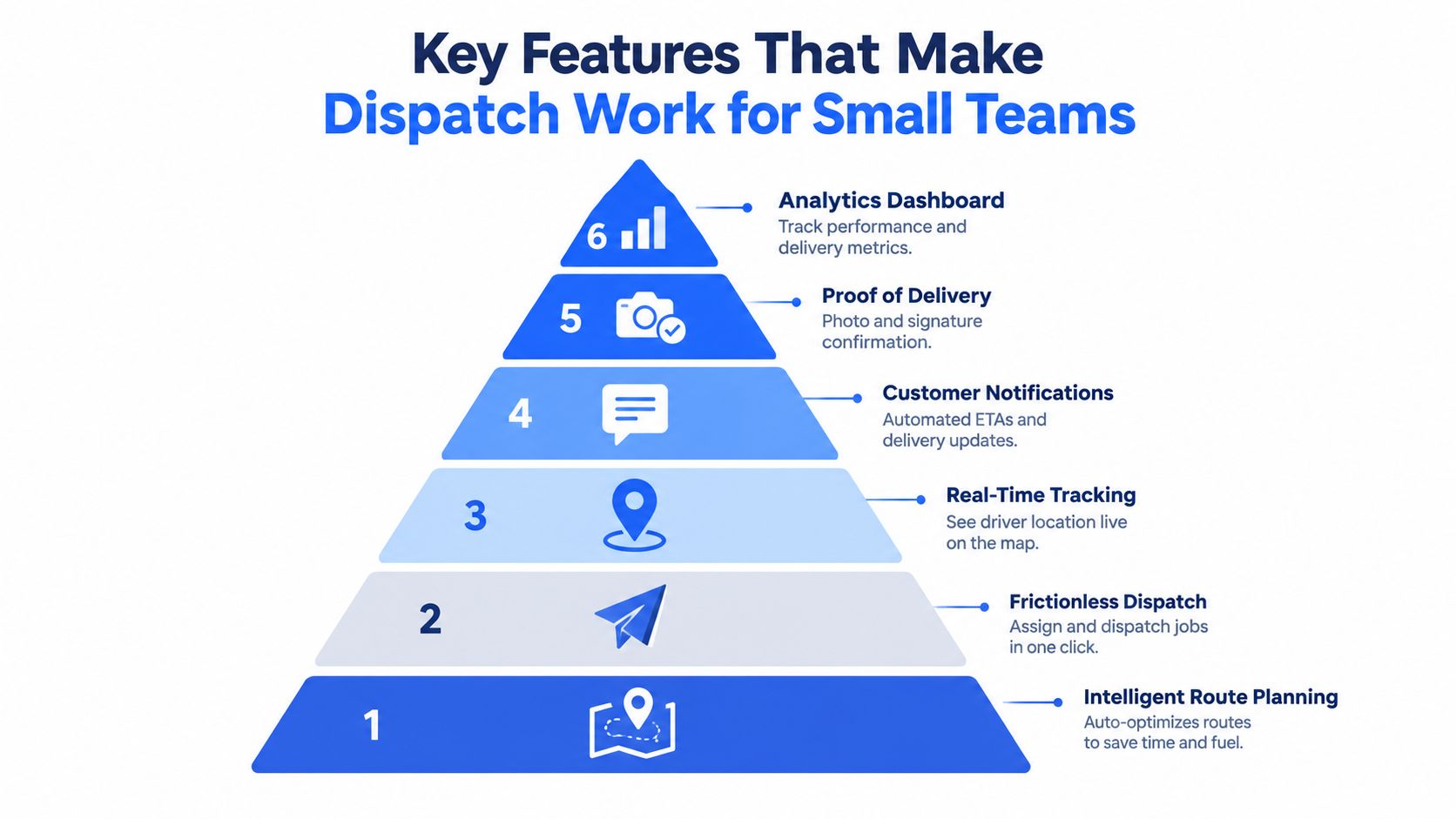
Route planning that respects real constraints
A basic map can sort stops by proximity. A useful dispatch platform goes further by considering service time, time windows, vehicle capacity, and driver schedules at the same time. Logistics guidance describes route optimization as a way to reduce miles driven, improve fleet utilization, and lower late deliveries by replacing manual route construction with automated planning. See Geotab’s explanation of dispatch and routing tools for the operational reasoning behind constraint-based routing.
For a bakery, that might mean protecting morning delivery windows. For a building-supply business, it may mean keeping heavy or oversized orders with suitable vehicles. The best route isn’t always the shortest route. It’s the route the operation can complete.
Dispatch that doesn’t create another admin job
Once routes are ready, assigning them should take a few clear actions. Drivers need addresses, customer notes, stop requirements, and timing information in one place. If subcontractors can receive a secure link instead of installing and learning a new app, seasonal staffing becomes easier to manage.
Live progress for the office
A dispatcher should be able to see whether a driver is en route, at a stop, delayed, or finished. Live visibility gives the office a basis for decisions instead of forcing staff to call every driver for a status update. It also helps the team identify a problem early enough to adjust the remaining workday.
Customer updates that reduce interruption
Customers usually don’t need a long explanation of your internal route board. They need a clear delivery expectation and an update when the status changes. Automated ETAs, branded tracking, and arrival messages can reduce “where is my order?” calls while giving customers a more professional experience.
Proof of delivery that closes the loop
A completed delivery should leave a usable record. Photos, e-signatures, notes, and completion status should stay attached to the job so the office can review what happened without searching through text messages. For a deeper look at this capability, explore proof of delivery software for modern delivery workflows.
Integrations and operational reporting
Orders shouldn’t need to be typed into a dispatch board after they’ve already been entered elsewhere. Look for connections to your store, ERP, inventory, warehouse, invoicing, or accounting tools. Reporting then becomes more useful because it draws from the same completed-job records that support customer service and billing.
This six-part workflow is easier to understand in motion:
How to Choose the Right Dispatch Software for Your Operation
Start with the shape of your work, not the length of a vendor’s feature list. A local retailer with seasonal subcontractors has different needs from a building-supply company with heavy scheduled deliveries, even if both operate delivery vehicles.
Perishable deliveries need dependable time-window handling and fast customer communication. Scheduled goods need capacity rules, service durations, and clear site instructions. A business that uses subcontractors needs low-friction access, especially when drivers don’t want to install an app for temporary work.
The following checklist helps separate useful capability from attractive but impractical software.
| Evaluation Criteria | What to Ask | Why It Matters for Small Business |
|---|---|---|
| Constraint handling | Can the system account for time windows, service duration, vehicle capacity, driver schedules, and delivery zones? | A route must fit the real workday, not just look efficient on a map. |
| Driver access | Can employees and subcontractors receive jobs through a secure link without an app installation? | Temporary or external drivers can start with less training and resistance. |
| Customer communication | Are branded tracking pages, email, SMS, and WhatsApp available? | Customers get consistent information without creating manual work for dispatchers. |
| Proof of delivery | Can drivers capture photos, signatures, notes, and completion status from the job? | The business retains a clear record for service questions and billing. |
| Data portability | Can job history, notes, and customer records be exported to CSV or another usable format? | You’re less exposed if you change systems later. |
| Pricing model | Is billing based on users, vehicles, routes, orders, messages, or a combination? | The cheapest headline price may not suit your workforce structure. |
| Onboarding and support | Who imports data, trains drivers, and handles setup questions? | A small team can’t afford a rollout that depends on a dedicated administrator. |
Pricing deserves special attention. Buyer guidance highlights questions that many product pages leave unanswered, including whether adding technicians changes the price, whether setup or message overage fees apply, whether data can be exported to CSV, and who manages carrier registration for business texting. Another small-business dispatch guide notes that paid tools often sit roughly between $25 and $99 per user per month, while some products charge per vehicle instead, so the source of the fee matters as much as the headline amount. Review dispatch management software pricing questions for SMB buyers before you compare plans.
Texting also has an onboarding requirement that can delay launch. In the United States, business texting under a company name requires A2P 10DLC registration, and approval can take time, as explained in independent guidance on dispatch software for small service businesses. Ask whether the vendor supports the registration process, what messages require approval, and how communication works for subcontractors who may use their own phones.
For broader comparisons, logistics software for small businesses can help you place dispatch tools alongside warehouse, transport, and operational systems. If customer communication is central to your workflow, the comparison of IllumiChat vs help desk tools) is also useful for thinking about where customer conversations should live.
Implementation Steps From Import to Proof of Delivery
A smooth rollout follows the physical journey of the order. Don’t begin by customizing every screen. Begin with one repeatable delivery flow and make sure the information survives each handoff.
Start with clean job data
Import orders from Shopify, WooCommerce, your ERP, or a CSV or Excel file. Check addresses, phone numbers, delivery notes, time windows, quantities, and any vehicle requirements before you optimize routes. If you’re starting with a spreadsheet, Routelink’s spreadsheet import instructions can help you prepare the source file.
A common mistake is importing only the address. Drivers also need the information that affects the stop, such as access instructions, customer preferences, product details, and contact information. Missing context becomes a phone call later.
Configure the rules before planning
Set the constraints your team uses. Add driver availability, vehicle capacity, delivery windows, stop duration, territories, and any special handling requirements. If these rules aren’t in the system, the optimization engine can produce a route that appears tidy but doesn’t match reality.
Optimize, then use human judgment
Let the platform create an initial plan, then review it on a map and timeline. Dispatchers should be able to drag and drop stops when a customer requests a change, a vehicle becomes unavailable, or a driver has local knowledge the algorithm doesn’t have.
Dispatch without slowing adoption
Send each driver the route and job details through the access method they can use confidently. Routelink’s workflow includes unique, PIN-protected driver links, which can support employees and subcontractors without requiring an app download. Test the link with a real driver before the first full operating day.
Notify, track, and capture completion
Turn on customer notifications only after the message content, sender identity, and timing are clear. Begin any required A2P 10DLC registration early, because SMS approval isn’t always immediate. During delivery, monitor progress and let drivers record photos, signatures, notes, and completion status directly against the job.
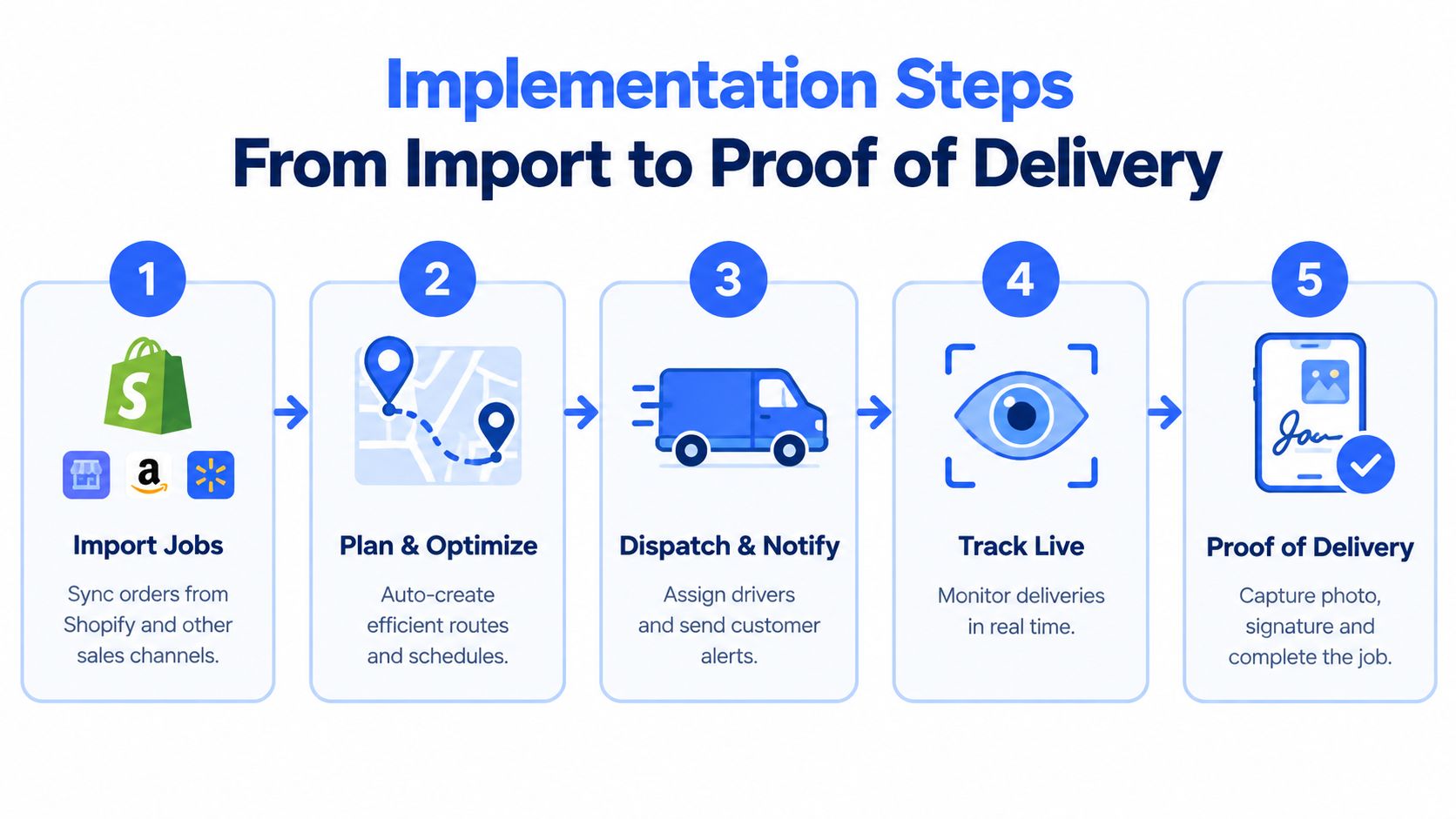
Keep the first rollout focused. Choose a small group of drivers, run familiar jobs, collect their feedback, and adjust the workflow before adding complex automations. Over-customizing on day one makes it harder to tell whether a problem comes from the software or from a process nobody has tested.
Real World Use Cases and ROI for Small Businesses
A bakery delivering perishable orders cares about timing and customer confidence. The owner can import orders, group stops by delivery window, and give drivers clear instructions for each address. Automated ETA messages reduce uncertainty, while delivery photos or signatures create a record when an order is left at a reception desk or commercial kitchen.
A building-supply shop has a different operating problem. Its dispatcher needs to match loads with vehicle capacity, respect scheduled arrival windows, and include site notes that help drivers find the right entrance. Route optimization can reduce unnecessary miles, while live progress makes it easier to warn a customer when a site delay affects the next stop.
A local retailer with seasonal subcontractors needs speed of adoption more than a complex driver portal. Secure links, clear job details, and browser-based completion can help temporary drivers participate without installing unfamiliar software. The office keeps assignments, customer updates, and proof of delivery connected even as the people completing routes change.
These examples share the same financial logic. A business improves its return when it spends less staff time rebuilding routes, avoids preventable empty travel, completes more planned work, reduces failed communication, and creates records that support faster resolution of delivery questions. The actual return depends on order density, labor, vehicle costs, service windows, and the price structure of the chosen platform, so measure your own baseline rather than relying on a generic promise.
Customer messaging deserves its own preparation. For businesses selling through Shopify, this Shopify SMS guide from YipSMS Inc. provides useful background on planning text communication, while your dispatch vendor should explain how delivery alerts, consent, sender registration, and opt-out handling work in the operational workflow.
Next Steps to Streamline Your Dispatch Operation
The practical shift is simple: stop treating dispatch as a route board and start treating it as a Capture to Deliver system. Orders enter once, planning applies the constraints, drivers receive current instructions, customers get useful updates, and proof returns to the same job record.
Before choosing a platform, write down your current handoffs. Note where orders arrive, how routes are built, how drivers receive changes, which customer messages are manual, and where delivery proof is stored. Then evaluate a trial against those real tasks, not a scripted product tour.
Use this short readiness check:
- Prepare sample data: Bring representative orders, addresses, delivery windows, notes, and vehicle requirements.
- Test the driver experience: Ask both an employee and a subcontractor to open a job, follow the route, update status, and submit proof.
- Review the price model: Confirm user, vehicle, setup, message, overage, registration, and export terms in writing.
- Start with one workflow: Run a familiar route before adding advanced rules or broad integrations.
- Include drivers early: Their feedback will expose unclear instructions and unnecessary steps faster than an office-only review.
For more ideas on reducing repeated handoffs, see this practical guide to workflow optimization for small businesses. The right dispatch system should make the day easier to operate, not give your team another dashboard to maintain.
Routelink brings order capture, route planning, driver dispatch, customer notifications, live delivery visibility, and proof of delivery into one workflow, with app-free access for drivers and subcontractors. Visit Routelink to review how its delivery management platform can help you replace spreadsheet coordination with a clearer, more connected operation.