Delivery Route Planning Software Explained and How to Choose — Routelink
Learn what delivery route planning software does, how it works, and how to choose the right delivery route planning software for your operation.
20 September 2026 · Routelink Team
Delivery Route Planning Software Explained and How to Choose
Learn what delivery route planning software does, how it works, and how to choose the right delivery route planning software for your operation.
At 7:15 a.m., someone in your business is probably doing route planning with too many tabs open.
Orders came in late last night. A driver called out. One customer wants an earlier arrival. Another entered an address that looks incomplete. Someone exported a spreadsheet, copied stops into a map tool, rearranged the order by gut feel, and texted drivers one by one. By 10:30 a.m., the plan is already wrong.
That’s the moment when many teams start looking at delivery route planning software. Not because they want another dashboard, but because they’re tired of rebuilding the day every morning.
If you run your own deliveries, the problem usually isn’t just routing. It’s the whole chain around routing. How orders get captured, how dispatch hands work to drivers, how customers get updates, and how the business proves the delivery happened. Good software ties that chain together. Weak software gives you a route and leaves the rest to phone calls and patchwork.
Table of Contents
- Introduction to Delivery Route Planning Without the Chaos
- What Delivery Route Planning Software Really Is
- How Delivery Route Planning Works From Capture to Proof of Delivery
- Core Features Benefits and Real ROI of Route Optimization
- How to Choose the Right Delivery Route Planning Software
- Real World Use Cases for Delivery Route Planning Software
- Implementation Roadmap and Best Practices for Lasting Results
Introduction to Delivery Route Planning Without the Chaos
A local retailer with its own vans doesn’t usually fail because drivers can’t follow a map. It struggles because the day starts with scattered information.
One order sits in Shopify. Another came from phone support. A wholesale customer emailed a change. The warehouse packed one order late. A driver knows a shortcut that the dispatcher doesn’t. By the time those details get stitched together, the route already carries hidden mistakes.
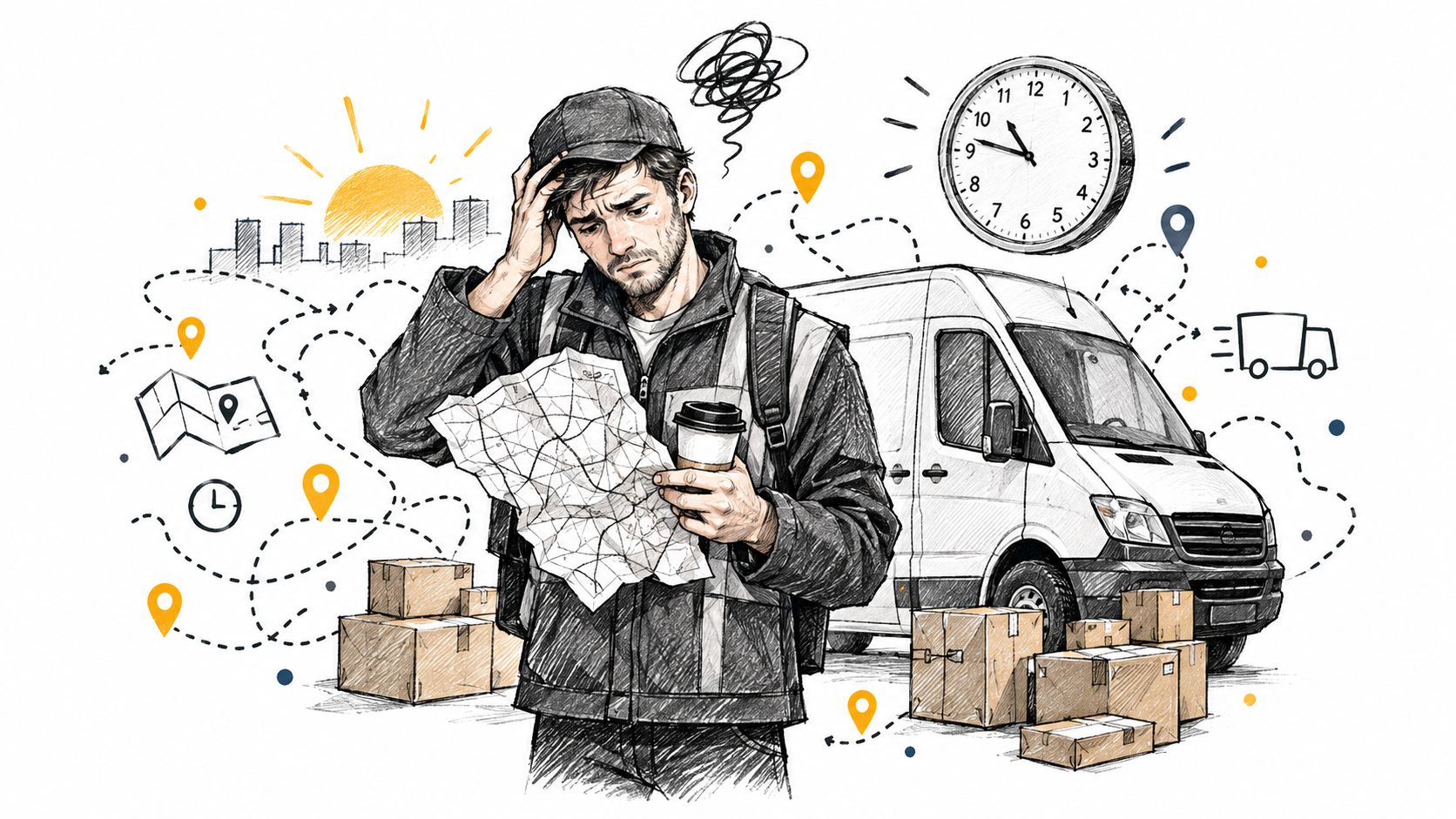
That’s why manual planning feels exhausting. You’re not just choosing roads. You’re juggling people, timing, stock, vehicle limits, customer expectations, and last-minute exceptions. A basic map app can help a driver get from one stop to the next, but it can’t manage the operating reality behind the route.
Where the pressure comes from
Customer expectations have changed. Teams now deal with tighter delivery windows, live tracking expectations, and denser local delivery patterns. At the same time, route planning software has become a major technology category. One industry estimate values the global route optimization software market at USD 12.3 billion in 2025, projecting USD 40.0 billion by 2034 at a 13.62% CAGR, while another estimate places the broader market at USD 6.1 billion in 2023 and USD 15.8 billion by 2032 at an 11.5% CAGR according to this market overview.
That matters because it shows this is no longer a niche tool for large fleets. It’s now part of how ordinary delivery operations run.
Practical rule: If your dispatcher is rebuilding routes manually every day, the business already has a systems problem, not just a routing problem.
What makes this topic confusing
Many articles reduce delivery route planning software to a feature checklist. They compare route optimization, GPS tracking, proof of delivery, and notifications as if each feature stands alone.
In practice, buyers usually get stuck somewhere else. They ask whether their order data is clean enough, whether drivers will use the system, whether dispatch can still override the plan, and whether the software fits their real workflow from order capture to proof of delivery.
Those are the questions that determine whether software helps or becomes another tool people work around.
What Delivery Route Planning Software Really Is
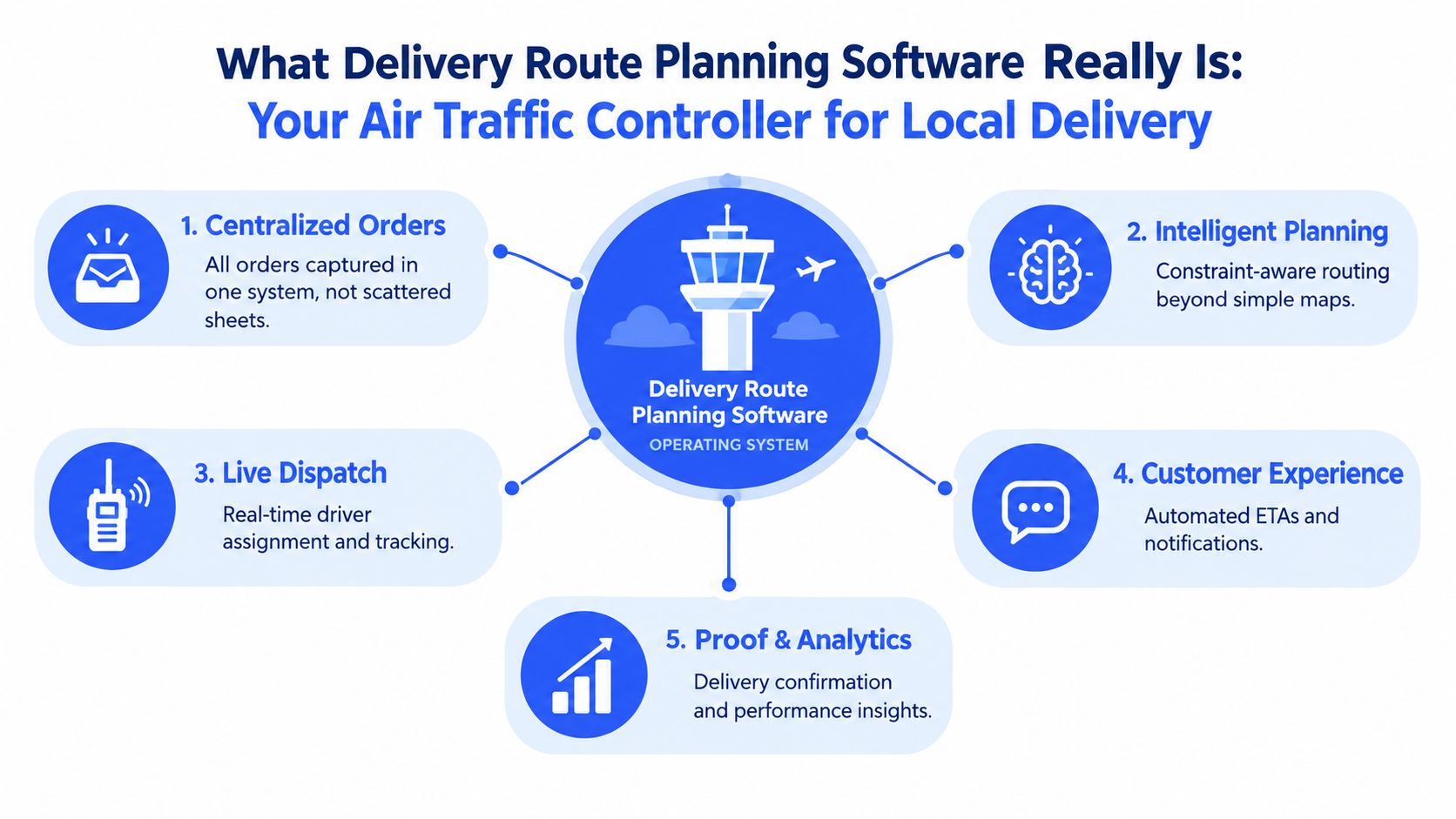
Delivery route planning software is easiest to understand if you stop thinking of it as a map and start thinking of it as an operating system for local delivery.
A map app tells one driver how to reach one address. Delivery route planning software decides which driver should handle which stops, in what order, under what constraints, with what customer updates, and how the business records completion.
Think air traffic controller, not satnav
The simplest analogy is an air traffic controller for vans.
An air traffic controller doesn’t just show pilots a map. The controller sequences movement, manages constraints, reduces conflicts, and keeps the whole system running safely and on time. Delivery route planning software does the same for local deliveries. It coordinates orders, vehicles, drivers, timing, and customer communication so the day works as one connected operation.
That’s why a navigation app and route planning software aren’t the same thing.
- Navigation apps help after a stop is assigned.
- Route planning software helps decide the assignment itself.
- Delivery management tools go further by connecting assignment, dispatch, customer updates, and completion proof.
Who actually needs it
This software is especially useful for 1PL operations, meaning businesses that handle their own deliveries instead of handing everything to third-party carriers.
That includes:
- Retailers with local delivery fleets who need to balance same-day orders with scheduled drops
- Grocers and food businesses where timing matters and routes change quickly
- Wholesalers sending heavier loads that must respect capacity and vehicle type
- Field teams that still need route logic even when each stop includes service work
A useful practical primer on this topic is the OnRoute route efficiency guide, which helps explain why stop order, dispatch control, and execution matter together.
Why the category got bigger
This category grew because delivery operations became harder to run by memory and spreadsheets. More stops, more service expectations, and more last-minute changes make manual planning fragile.
The software category also matured because businesses saw that routing isn’t just a dispatch convenience. It can become a strategic capability when planning quality affects labor use, customer experience, and transport cost. Once a company sees routing that way, it stops shopping for a map tool and starts looking for a system that manages the entire delivery day.
Good delivery route planning software doesn’t replace human judgment. It gives human judgment a structured place to work.
How Delivery Route Planning Works From Capture to Proof of Delivery
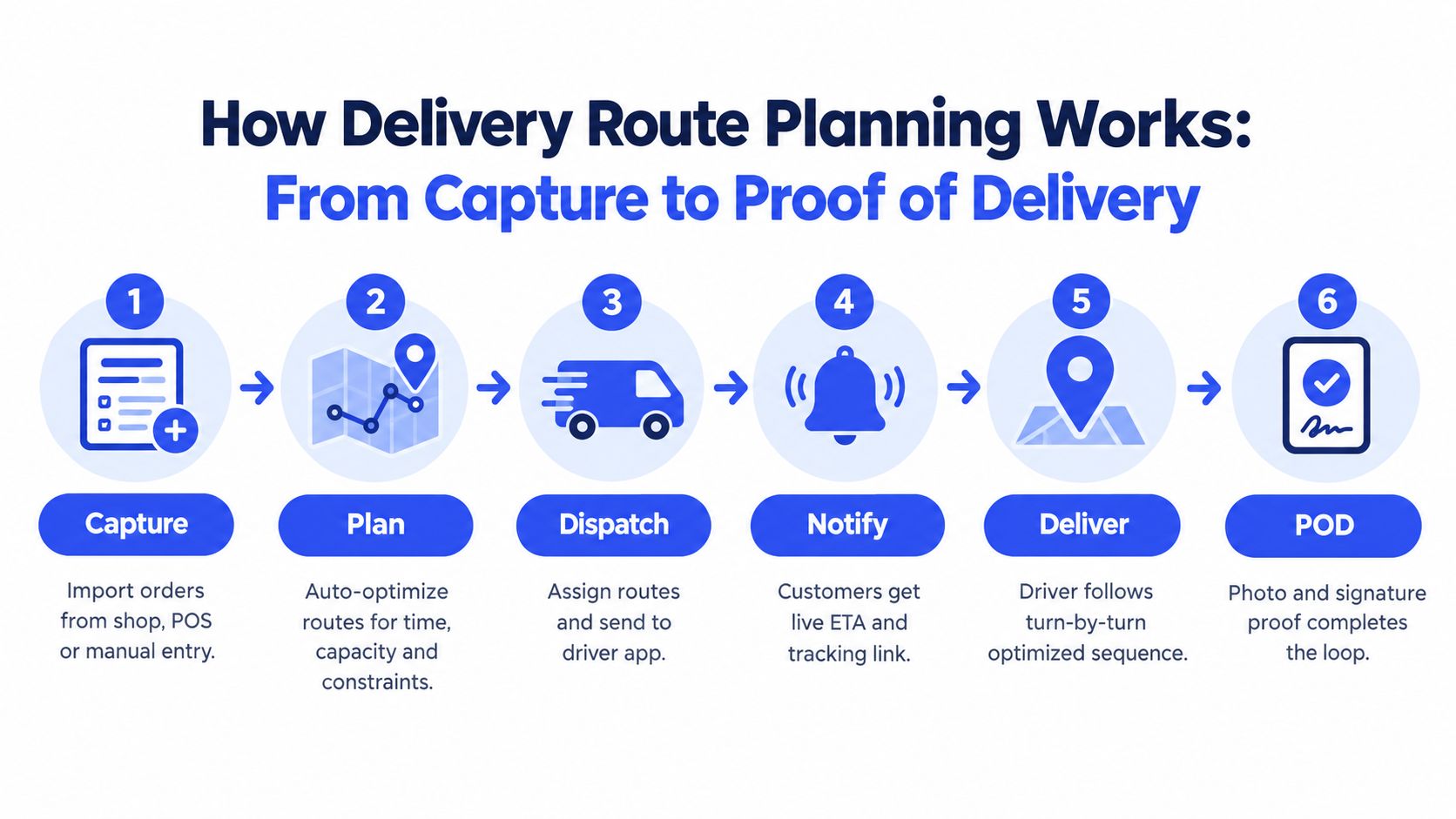
The cleanest way to understand the workflow is to follow one order through the day.
A customer places an order at 9:00 p.m. for local delivery tomorrow. The business promises a delivery window, packs the order in the morning, assigns it to a route, notifies the customer, sends the stop to the driver, and captures proof when the item arrives. If any link in that chain breaks, the route may still exist, but the operation feels messy.
Capture the job correctly
Everything starts with intake.
Orders may come from Shopify, WooCommerce, an ERP, a point-of-sale workflow, or a CSV upload. What matters isn’t just getting the order in. It’s getting the right fields in. Address, contact details, delivery notes, promised timing, item size, and any special handling instructions need to travel with the order.
If this upstream step is sloppy, the optimizer inherits bad assumptions.
- Bad address data sends drivers to the wrong place
- Missing service time makes routes look shorter than they really are
- Incomplete vehicle requirements can assign a stop to the wrong driver or van
Teams thinking through broader fulfillment design may also find ECORN on ecommerce fulfillment useful, because routing only works well when the order handoff from commerce to operations is clean.
Plan the route with constraints
Once orders are captured, the planning engine groups and sequences them.
Real delivery route planning software separates itself from simple mapping tools. It doesn’t just calculate the shortest path. It considers route constraints such as delivery windows, driver availability, van capacity, territory logic, and stop priority.
Dispatchers also need override control. They may drag and drop a stop, keep a preferred customer with a familiar driver, or separate fragile orders from a dense route. Good planning software gives them that room.
For readers looking specifically at the completion side of the workflow, this guide to proof of delivery software helps show why route planning and delivery confirmation should be connected rather than managed in separate tools.
Here’s a quick visual of the workflow in action:
Dispatch, notify, deliver, confirm
After planning, the system has to turn routes into real driver action.
Some platforms do this through a driver app. Others can send a unique, PIN-protected route link so temporary drivers or subcontractors can start without a full app rollout. That reduces friction on busy days when speed matters more than perfect standardization.
Then the customer side kicks in. The best experience usually includes:
- An expected arrival update so the customer knows the delivery is scheduled
- A live tracking link so they can see progress without calling support
- A completion record such as photo proof or an e-signature once the order arrives
The driver follows the route with turn-by-turn navigation, completes the stop, and captures proof of delivery. That proof closes the loop for the customer, the dispatcher, and the finance or support team that may need to verify what happened later.
Useful test: If a tool can optimize stops but can’t cleanly hand work to drivers and close the delivery with proof, you’re still managing part of the day manually.
Core Features Benefits and Real ROI of Route Optimization
The value of delivery route planning software comes from how well it handles tradeoffs. The route isn’t “good” because it looks short on a map. It’s good if the team can execute it with fewer detours, fewer exceptions, and less wasted capacity.
What the strongest features actually do
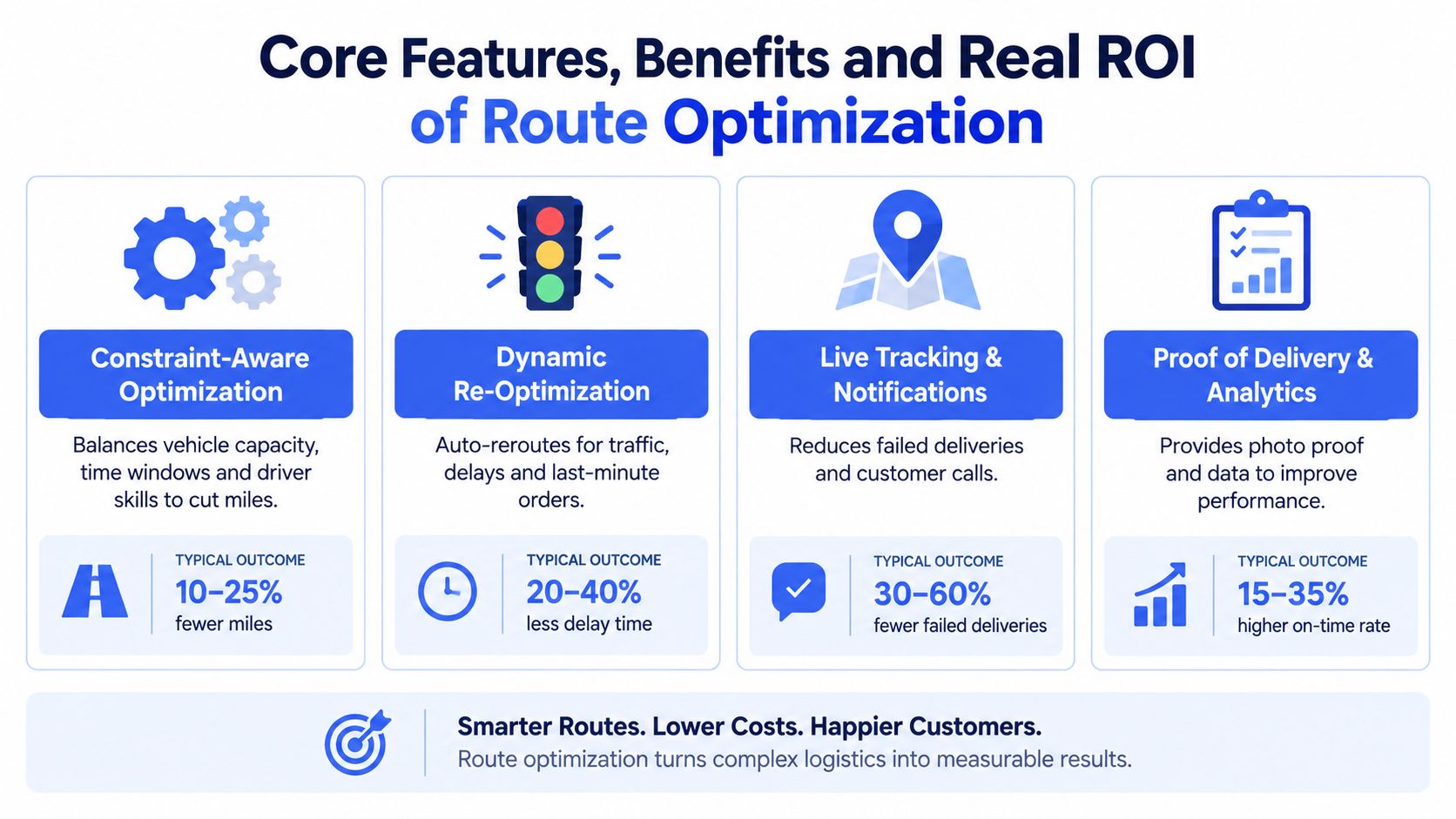
A few capabilities matter more than long feature lists:
- Constraint-aware optimization balances capacity, distance, route direction, and timing instead of chasing the shortest road segment.
- Dynamic re-optimization adjusts when traffic, weather, or road obstacles disrupt the original plan.
- Fleet utilization logic helps businesses avoid underloading some vehicles while overloading others.
- Proof of delivery and analytics make it possible to compare the plan against what really happened.
The evidence is strongest when optimization accounts for real operating constraints. Route optimization using capacity, distance, and route-direction constraints can deliver substantial vehicle and time savings.
A separate 2025 stochastic optimization study modeled traffic, weather, and road obstacles explicitly and validated by simulation that performance improved when the routing engine adapted to changing conditions, showing why static plans break down in dynamic urban delivery networks in this route re-optimization research.
Manual versus optimized operations
| Metric | Manual Approach | With Optimization |
|---|---|---|
| Vehicles needed | Often based on habit, rough balancing, or dispatcher judgment | Can drop when route and capacity constraints are optimized together |
| Planning time | Rebuilt manually when orders or drivers change | Faster replanning with system-driven sequencing |
| Miles driven | More backtracking and route overlap | Lower mileage when stop order is optimized |
| On-day changes | Phone calls and spreadsheet edits | Re-optimization and controlled dispatcher override |
| Delivery proof | Often split across paper, texts, and photos | Captured in one workflow with route history |
If you want a deeper look at the routing side itself, this guide on route optimization for last-mile delivery is a useful companion topic.
The clearest real-world proof
The most cited operational example is UPS and its ORION system. ORION began development in 2003 and rolled out starting in 2012 after years of testing and piloting. It reportedly reduces miles on a typical route by 6 to 8 miles per day, cuts about 100 million driving miles annually, and saves roughly US$300 million to US$400 million each year as summarized in this ORION history.
That example matters because it proves route planning can move from dispatch support to board-level economics.
How to Choose the Right Delivery Route Planning Software
Most buying mistakes happen because teams compare screens instead of comparing operating fit.
A polished demo can hide a weak implementation path. The route looks beautiful, but the software may struggle with your order inputs, your exception process, or your driver onboarding reality.
Start with must-have questions
Use these questions before you score vendors:
| Decision area | Must-have | Nice-to-have |
|---|---|---|
| Order intake | Connects to your real order sources or accepts structured uploads | Deeper automation across more systems |
| Route logic | Supports your actual constraints such as time windows, capacity, or territories | More advanced scenario testing |
| Dispatcher control | Manual override, drag-and-drop edits, easy reassignments | Rich simulation tools |
| Driver adoption | Low-friction handoff, simple mobile workflow, clear navigation | Highly customized driver interface |
| Customer updates | ETA notifications and tracking visibility | More branding options or feedback flows |
| Completion | Photo proof, signature capture, stop notes | Deeper post-delivery analytics |
A buyer evaluating options in the broader category may also want to compare this against other tools in the best last-mile delivery software, especially if routing is only one part of a larger delivery stack.
Watch for over-optimization
A route can be mathematically efficient and still be a bad route.
Recent market commentary points out that route plans can look efficient on paper but ignore safety, driver preferences, narrow roads, vehicle size limits, EV charging constraints, or regulatory limits. The same commentary also highlights privacy and compliance complexity tied to driver location data across frameworks such as GDPR, India’s DPDP Act, and China’s PIPL, and notes projected market growth from about USD 2.79 billion in 2025 to USD 7.8 billion by 2035 in this route optimization software market commentary.
That’s why human override isn’t a bonus feature. It’s an operating requirement.
A planner should be able to say, “The software’s route is close, but this road isn’t safe for this vehicle,” and change it in seconds.
Score software by daily reality
A simple scoring matrix works better than a long feature spreadsheet. Rate each tool on three things:
- Can it ingest the data you already have
- Can your dispatchers correct the plan without fighting the system
- Can your drivers use it with minimal training and minimal resistance
One option in this category is Routelink, which supports order imports from systems like Shopify, WooCommerce, ERP workflows, and CSV files, then connects planning, dispatch, notifications, navigation, and proof of delivery in one flow. That kind of end-to-end fit matters more than whether a vendor lists the most features on a comparison page.
Real World Use Cases for Delivery Route Planning Software
The same software can solve very different problems depending on the operation. The route is only the visible part. The shift happens when planning, communication, and completion start working as one process.
Retail and ecommerce local delivery
A retailer doing local drop-offs often starts with a packed order queue and a dispatcher assigning stops from spreadsheets and inboxes. The day looks manageable until late orders, address changes, and customer calls pile up.
With route planning software, those orders move into one planning flow, get sequenced into realistic routes, and trigger customer notifications automatically.
The retailer’s pain isn’t “finding roads.” It’s keeping orders, drivers, and customers synchronized.
Grocery and food with time windows
Food and grocery teams live inside narrow timing expectations. A route that saves distance but breaks promised windows isn’t useful.
Software helps by planning around time windows first, then adjusting when traffic or prep delays affect the route. Dispatchers can still intervene, but they aren’t rebuilding the whole day by hand.
Field service and trades
Electricians, appliance installers, and maintenance crews also benefit, even though not every stop is a package drop. Their challenge is matching route order with service time, crew availability, and customer presence.
Before software, dispatch often relies on local knowledge and a lot of phone calls. After software, jobs get sequenced with clearer travel logic and better status visibility.
A service route fails when the wrong crew arrives at the right place just as much as when the right crew arrives late.
Wholesale distribution with load constraints
Wholesale delivery has a different shape. Vehicle capacity, unloading time, and route direction matter more than sheer stop count.
A planner may need to separate heavy loads, prioritize trade customers, or keep certain deliveries on specific vehicles. In those operations, route planning software becomes less like a convenience tool and more like a daily control system for fleet use and service reliability.
Implementation Roadmap and Best Practices for Lasting Results
Software rarely fails because the optimizer is weak. It usually fails because the operation wasn’t ready for the optimizer.
Prepare the inputs before the rollout
Industry guidance repeatedly points to the same blockers: bad addresses, missing geocodes, stale service times, incomplete vehicle profiles, and delayed data feeds. The same guidance notes that route quality depends heavily on synchronized inventory, customer, and driver data, and that dynamic routing still breaks when order feeds, GPS, or traffic updates arrive late. It also notes that successful AI-powered route optimization implementation remains limited, which suggests the harder challenge is operational change, not algorithm design.
Start with a readiness checklist:
- Clean the address layer so routes don’t begin with location errors
- Standardize service times so planning reflects reality
- Define vehicle and driver profiles so constraints mean something
- Sequence integrations carefully so orders, GPS, and traffic data arrive on time
Roll out with trust, not force
Pilot first. Let dispatchers compare suggested routes with how they would have planned manually. Let drivers raise practical concerns about access, parking, road width, or neighborhood patterns. Build an exception path so people know when to override and how to record why.
Privacy and workforce trust matter too. If you’re tracking driver location, collecting proof-of-delivery records, and scaling across regions, the legal and cultural side of rollout needs attention alongside the technical side.
The strongest implementations treat delivery route planning software as a shared operating layer. Not as a black box.
If you’re trying to connect order capture, route planning, dispatch, customer updates, and proof of delivery in one workflow, Routelink is built for that kind of local delivery operation. It helps businesses import jobs, optimize routes with real constraints, dispatch drivers with low friction, and close the loop with proof of delivery so the day runs with less manual patchwork.